

qnap tvs 1282t3 slow 10Gbe speeds
I bought a QNAP 1282t3 turbo nas and I’m experiencing slow 10gbe transfer speeds. My NIC is an Asus ROG AREION 10gbe adapter using the Aquantia AQN107 controller. I cant seem to get consistent transfer speeds. PLEASE HELP!!!!
There are few things s you need to check when you are getting slow data transfer speed over 10GbE network.
Check are any of these things below true:
- Are you using CAT6a or CAT7 ethernet cables?
- Are you using 10GbE switch or link aggregation across several 1GbE ports?
- Is your PC 10GbE ready
- Are you using fast enough drives (single HDD around 200MB/s, single SSD around 500MB/s, single nvme SSD around 3000MB/s )?
- What sort of files you are copying. Many small drives will slow the process down if the CPU in a NAS or PC is weak?
- Have you increased the Jumbo frames?
Best practice guide about Jumbo Frames
What is jumbo frame?
In computer networking, jumbo frames or jumbos are Ethernet frames with more than 1500 bytes of payload, the limit set by the IEEE 802.3 standard.[1] Conventionally, jumbo frames can carry up to 9000 bytes of payload, but variations exist and some care must be taken using the term. Many Gigabit Ethernet switches and Gigabit Ethernet network interface cards can support jumbo frames. Some Fast Ethernet switches and Fast Ethernet network interface cards can also support jumbo frames. (Wiki)
What speed to expect in the real life?
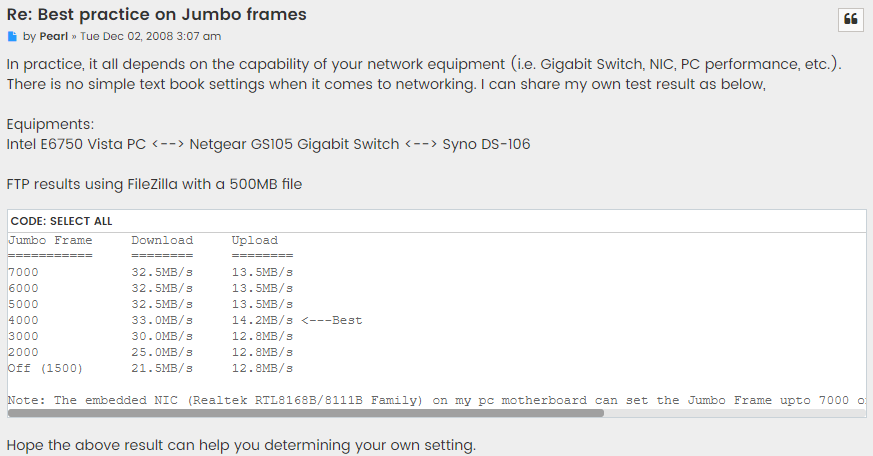
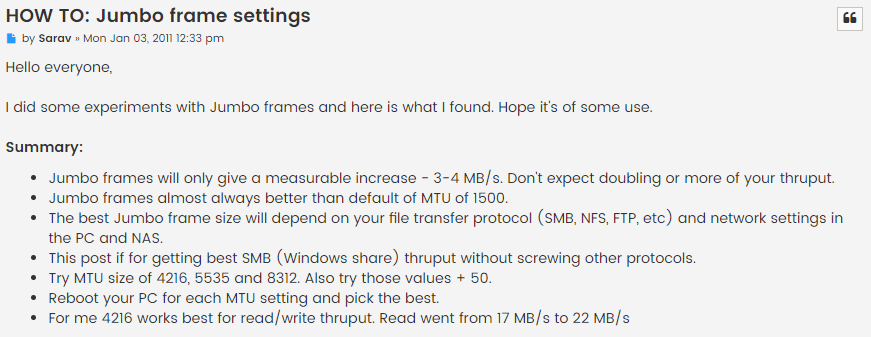
How to set it all up?
How to set the MTU
Mac: Open “System Preferences” → go to “Network” → Select the QNA Thunderbolt Ethernet → click “Advanced…” → go to the “Hardware” tab → change “Configure” to “Manually” → set “MTU” to “9000”.
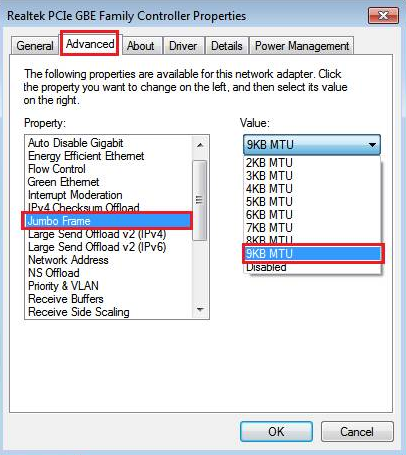
Windows: Open “Settings” → go to “Network & Internet” → click “Change your adapter options” → right click on the Thunderbolt 3 Ethernet adapter and click “Properties” → click “Configure…” → go to the “Advanced” tab → select “Jumbo Frame” and set the value to “9KB MTU”.
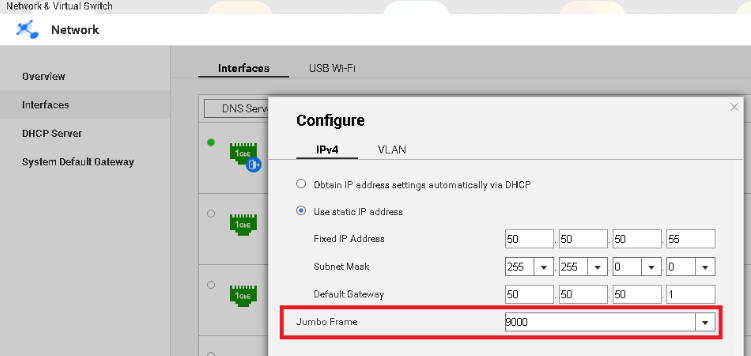
NAS: Open “Network & Virtual Switch” → go to “Network” > “Interfaces” → find the applicable Ethernet adapter, click and select “Configure” → go to the “IPv4” tab → set “Jumbo Frame” to 9000
And Synology
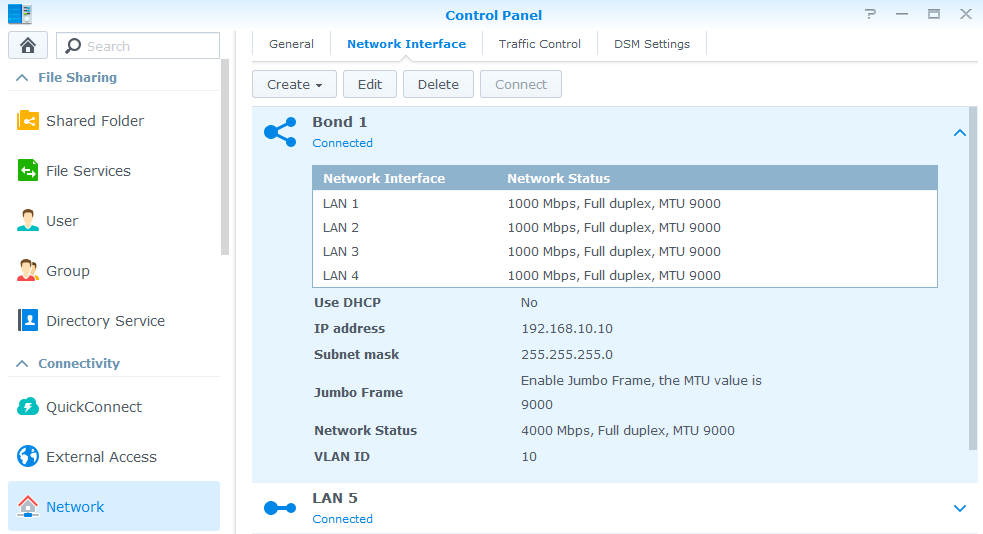
Products Supporting Jumbo Frames
Cisco 6500 switches
Cisco Nexus 7K/5K switches
| Where to Buy a Product | |||
 |
    
|
  
|
VISIT RETAILER ➤ |
 |
|
|
VISIT RETAILER ➤ |
We use affiliate links on the blog allowing NAScompares information and advice service to be free of charge to you. Anything you purchase on the day you click on our links will generate a small commission which is used to run the website. Here is a link for Amazon and B&H. You can also get me a ☕ Ko-fi or old school Paypal. Thanks! To find out more about how to support this advice service check HERE





UGREEN DXP4800 PRO NAS Review
Minisforum G7 Pro Review
CAN YOU TRUST UNIFI REVIEWS? Let's Discuss Reviewing UniFi...
WHERE IS SYNOLOGY DSM 8? and DO YOU CARE? (RAID Room)
UniFi Routers vs OpenWRT DIY Routers - Which Should You Choose?
WHY IS PLEX A BIT S#!t NOW? IS 2026 JELLYFIN TIME? (RAID Room)
Access content via Patreon or KO-FI
Discover more from NAS Compares
Subscribe to get the latest posts sent to your email.

DISCUSS with others your opinion about this subject.
ASK questions to NAS community
SHARE more details what you have found on this subject
IMPROVE this niche ecosystem, let us know what to change/fix on this site