

New Gl.iNet Mudi 7 INSANE Travel Router Revealed
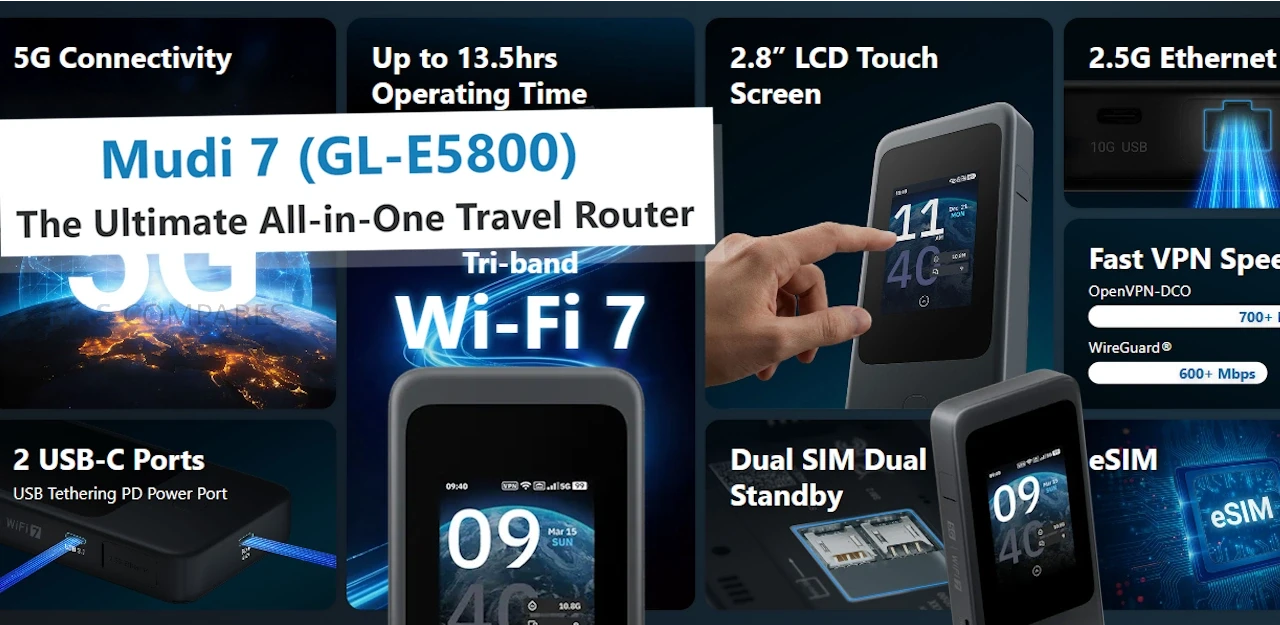
Gl.iNet is using day 1 of CES 2026 to spotlight the Mudi 7 travel router, with 2 listed variants: GL-E5800NA and GL-E5800EU. While the company is now formally presenting the device at the show and directing attention to its travel-focused positioning, it still has not published pricing or a confirmed retail release date in the materials available today. That leaves the Mudi 7’s market placement and availability timeline unresolved, even as the hardware is being discussed publicly at CES. Alongside the CES reveal, Gl.iNet has shared a full specification sheet that clarifies the Mudi 7’s core platform and feature set. It is based on a Qualcomm quad-core 2.2GHz design with 2GB LPDDR4X and 8GB eMMC, and it combines 5G NR with tri-band Wi-Fi 7-class networking, dual SIM dual standby plus eSIM, and a built-in touchscreen for on-device management. I previously saw an early prototype during a visit to Gl.iNet’s Shenzhen offices in October 2025, and the CES-era specification release fills in the internal details that were not available at the time, making it easier to assess what Gl.iNet intends to ship in the NA and EU variants.
| Item | Detail |
|---|---|
| Product name | Gl.iNet Mudi 7 (Link to Official Page) |
| Models | GL-E5800NA, GL-E5800EU |
| CPU | Qualcomm, quad-core @ 2.2GHz |
| Memory | 2GB LPDDR4X |
| Flash | 8GB eMMC |
| Wireless protocol | 802.11a/b/g/n/ac/ax/be |
| Bands | 2.4GHz, 5GHz, 6GHz |
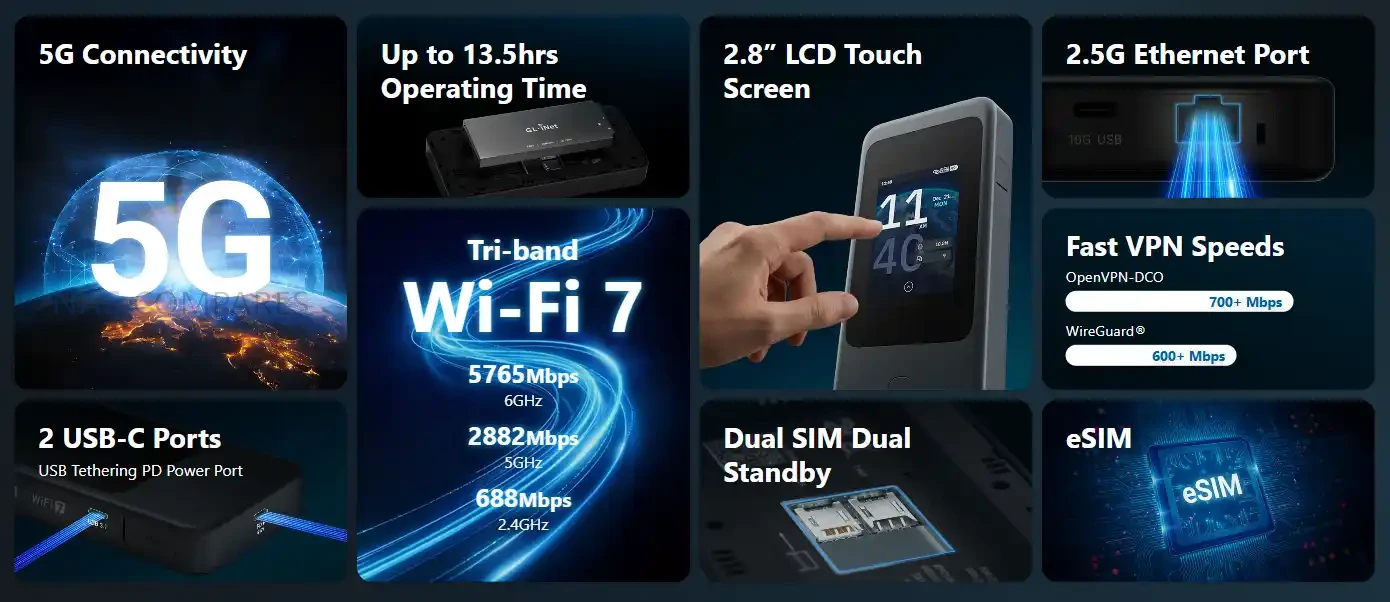
| Wi-Fi speeds | 688Mbps (2.4GHz), 2882Mbps (5GHz), 5764Mbps (6GHz) |
| Cellular | 5G NR NSA/SA; 4G LTE Cat 20 (DL) |
| SIM | Dual SIM dual standby + eSIM |
| Ethernet | 1x WAN/LAN, 100/1000/2500Mbps |
| USB | 1x USB 3.1 |
| External antenna | Supported; 2x TS-9 (cellular) |
| Screen | 2.8-inch touchscreen |
| Power input | USB PD/PPS 5-12V, 30W max |
| Power consumption | <30W |
| Battery | 3.85V, 5380mAh, 20.72Wh |
| Dimensions / weight | 157 x 75 x 22.8mm / 300g |
| Operating temperature | 0C to 40C |
Gl.iNet Mudi 7 Router – Design and Portability
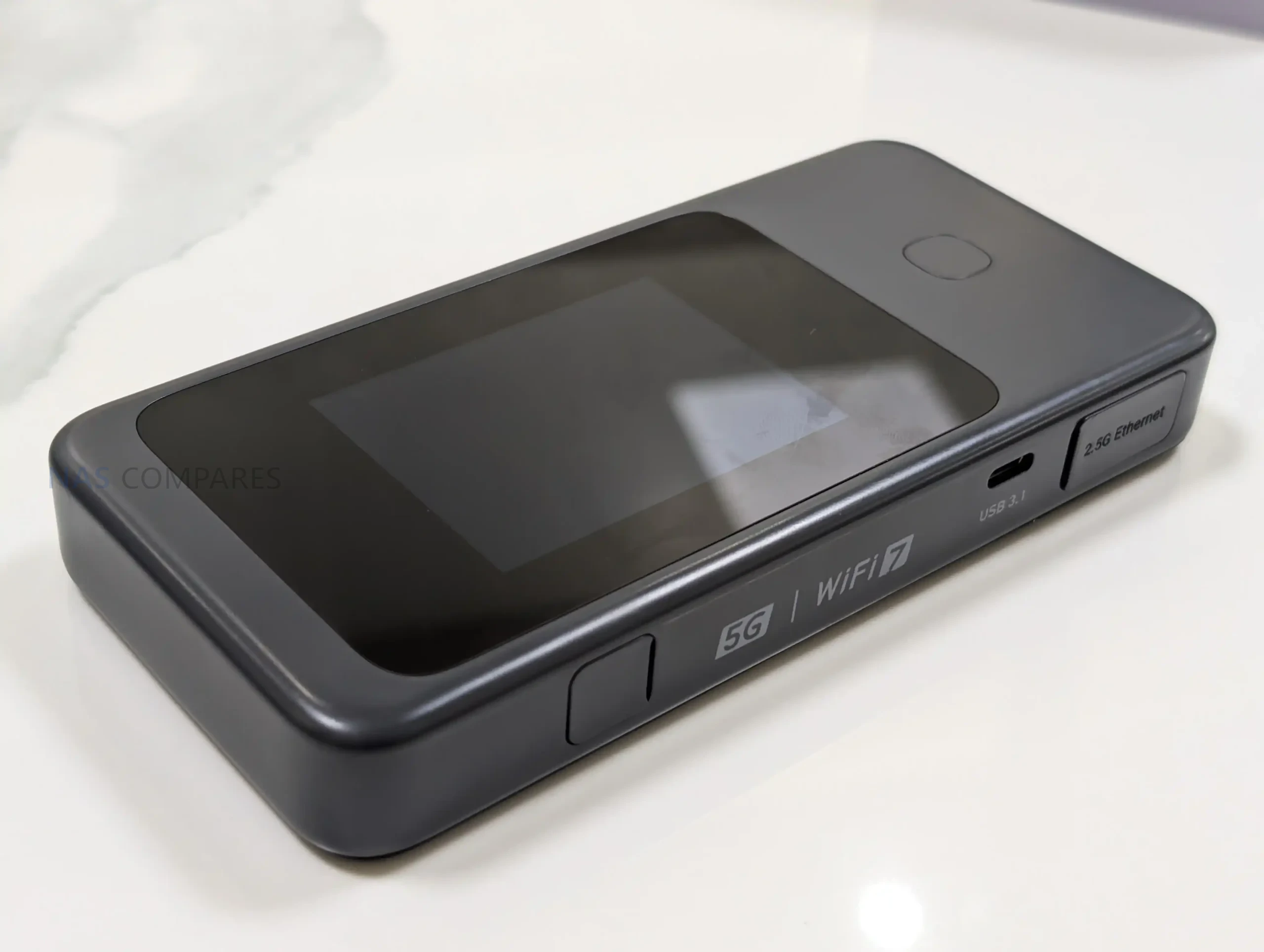
With the full specifications now available, the Mudi 7 is confirmed as a compact, battery-powered travel router measuring 157 x 75 x 22.8mm and weighing 300g. That footprint places it closer to a portable hotspot than a small desktop router, with enough thickness to accommodate a touchscreen, battery, and internal antennas.
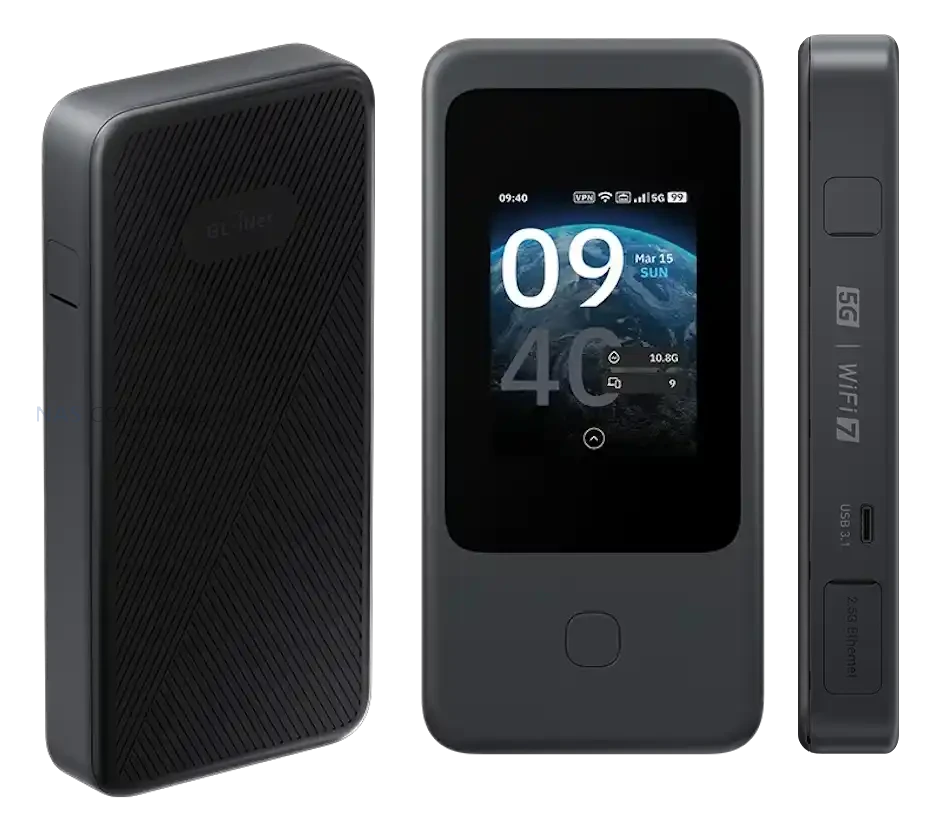
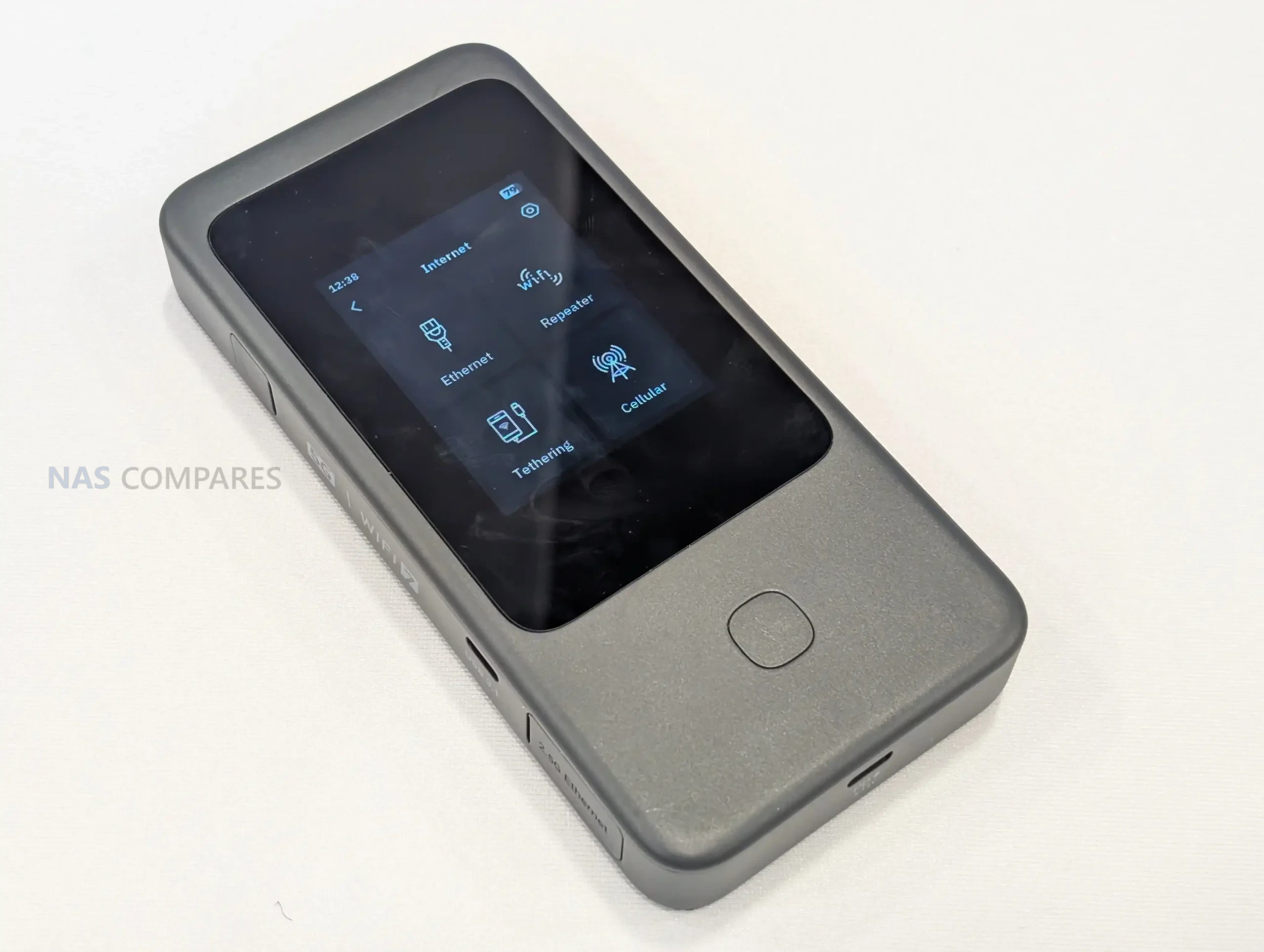
Gl.iNet lists a 2.8-inch touchscreen as the primary on-device interface. In practical terms, this design choice supports situations where you need to check status or adjust basic settings without relying on a separate phone or laptop, which can be useful when moving between locations or sharing access with other devices.
 |
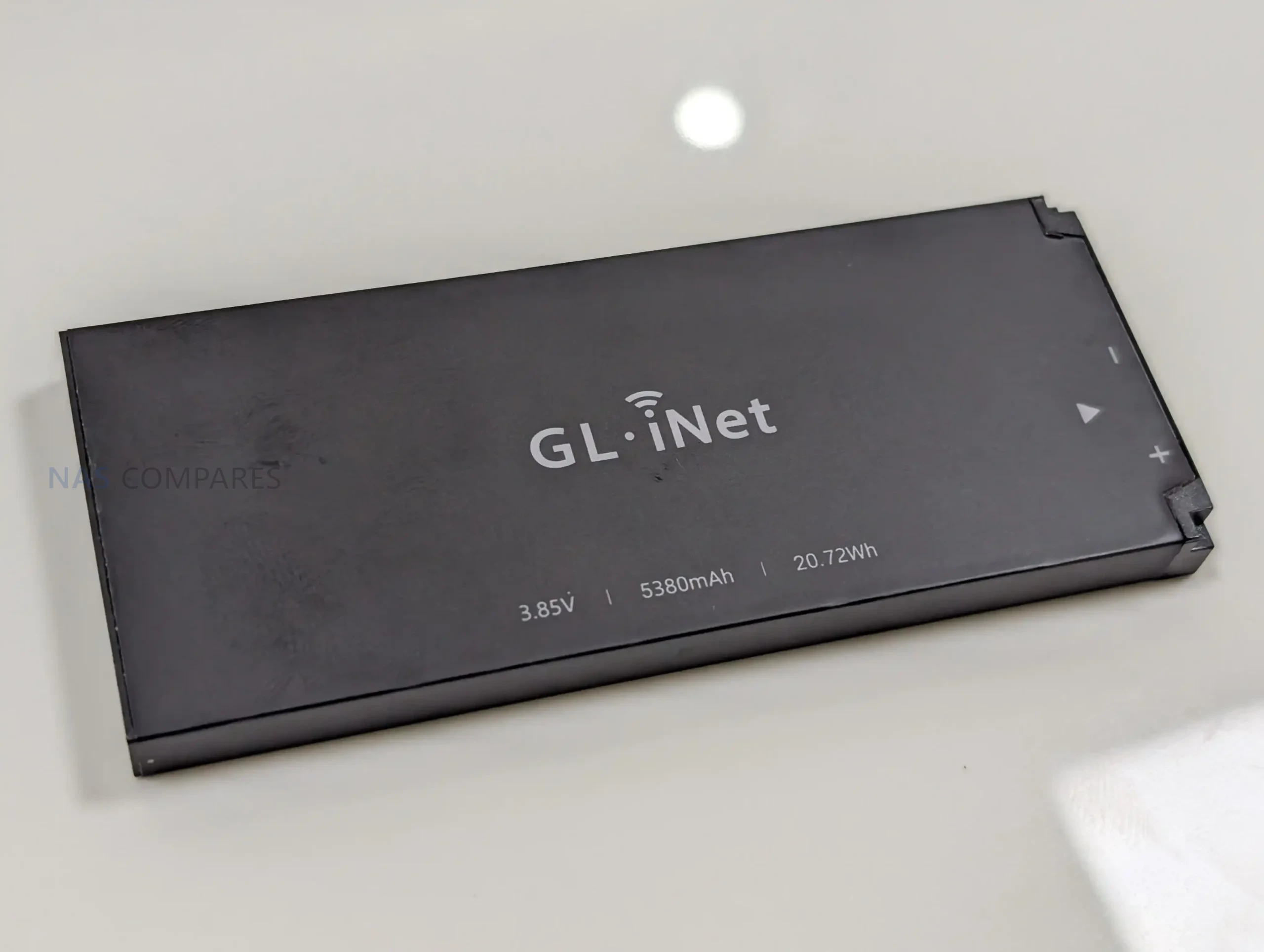 |
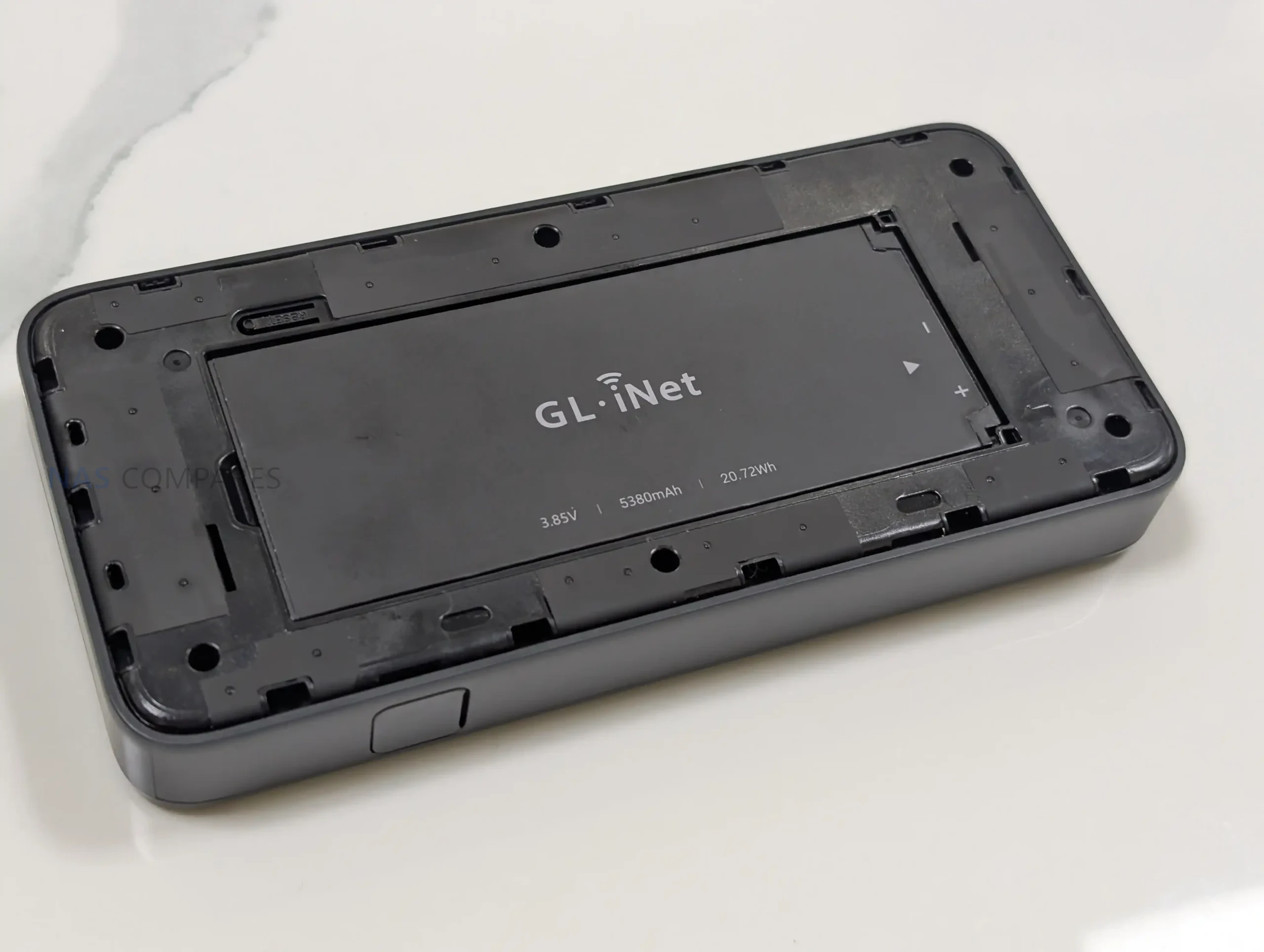
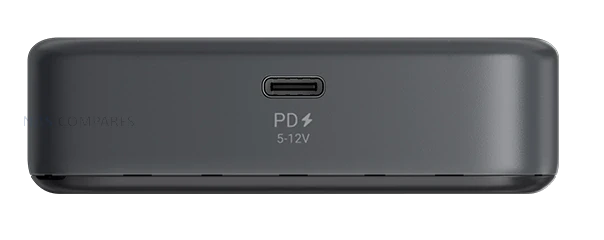
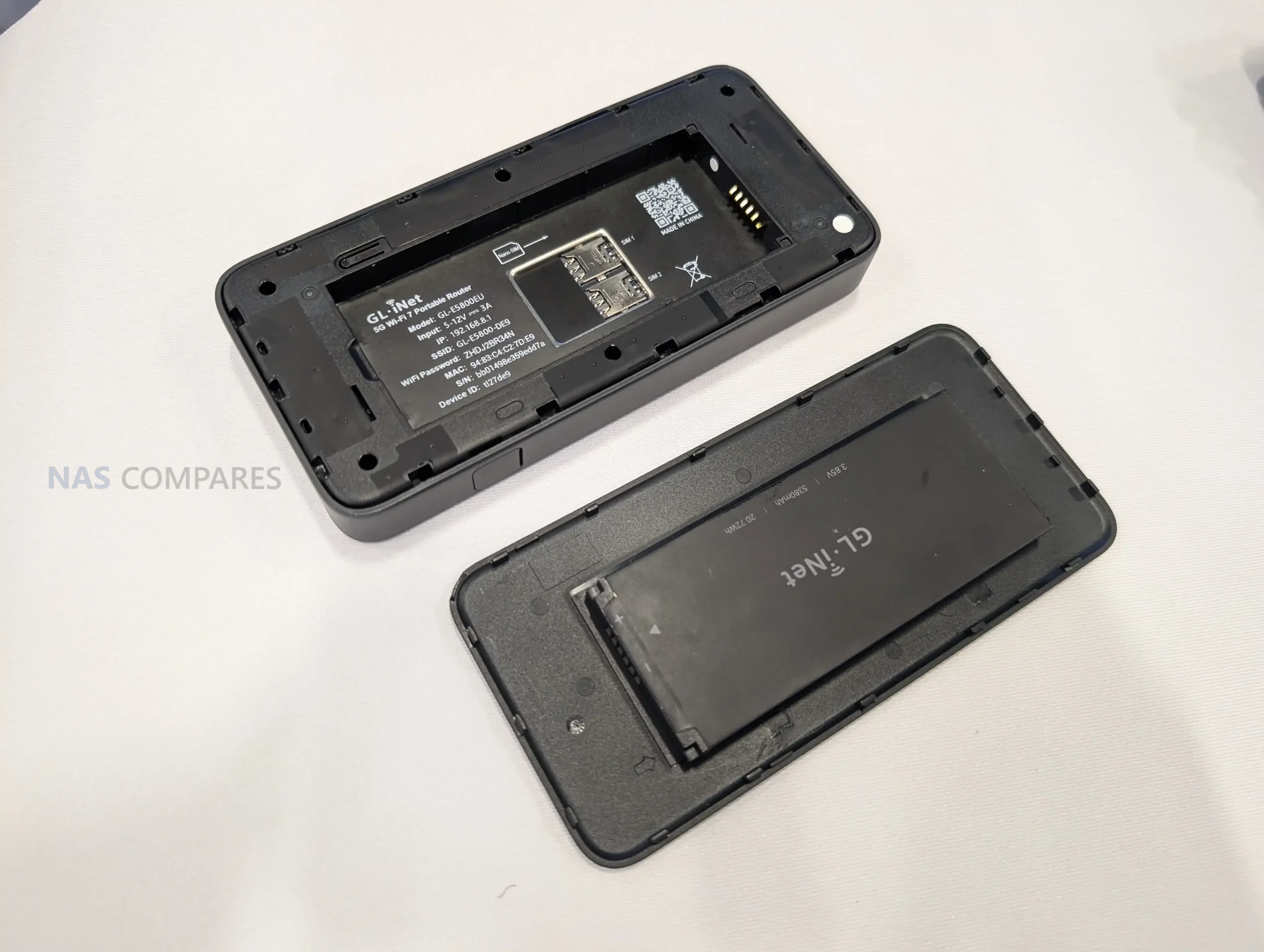
Power is handled through a built-in 3.85V, 5380mAh battery rated at 20.72Wh, and charging is specified as USB PD/PPS from 5V to 12V with up to 30W input. Gl.iNet also lists power consumption below 30W, which provides a ceiling for expected draw under load, though real battery life will still depend on cellular conditions, connected devices, and the mix of Wi-Fi and wired usage.
Gl.iNet Mudi 7 Router – Connectivity
Cellular is the main uplink option on the Mudi 7, with support listed for 5G NR in both NSA and SA modes. For fallback coverage, it also supports 4G LTE with Cat 20 download capability, which becomes relevant when 5G coverage is weak, when indoor signal conditions push the modem back to LTE, or when a roaming profile limits access to certain 5G services. Gl.iNet still has not published a band list in the specifications you shared, so region-by-region compatibility will depend on the exact supported bands of the NA and EU variants.
 |
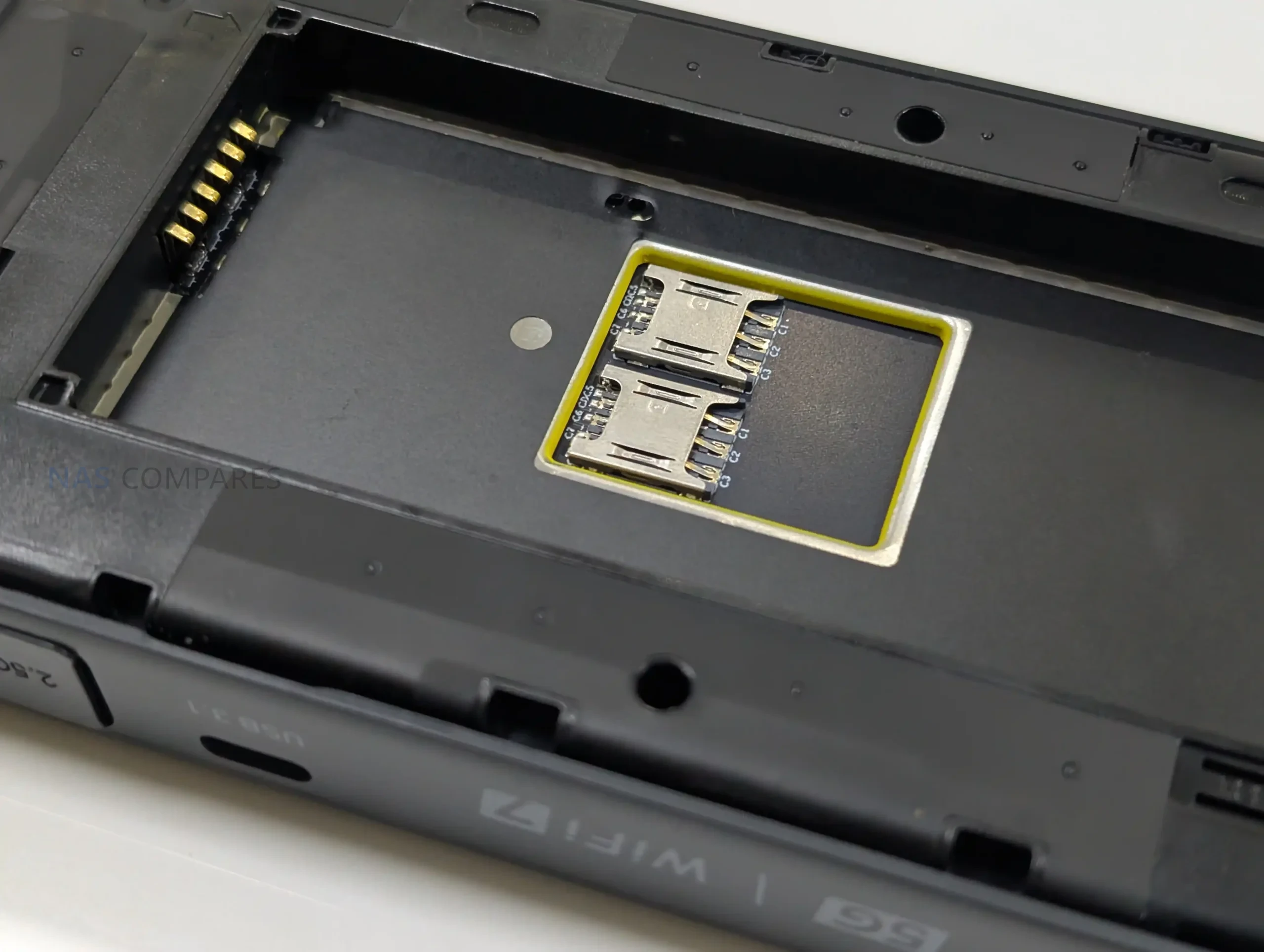 |
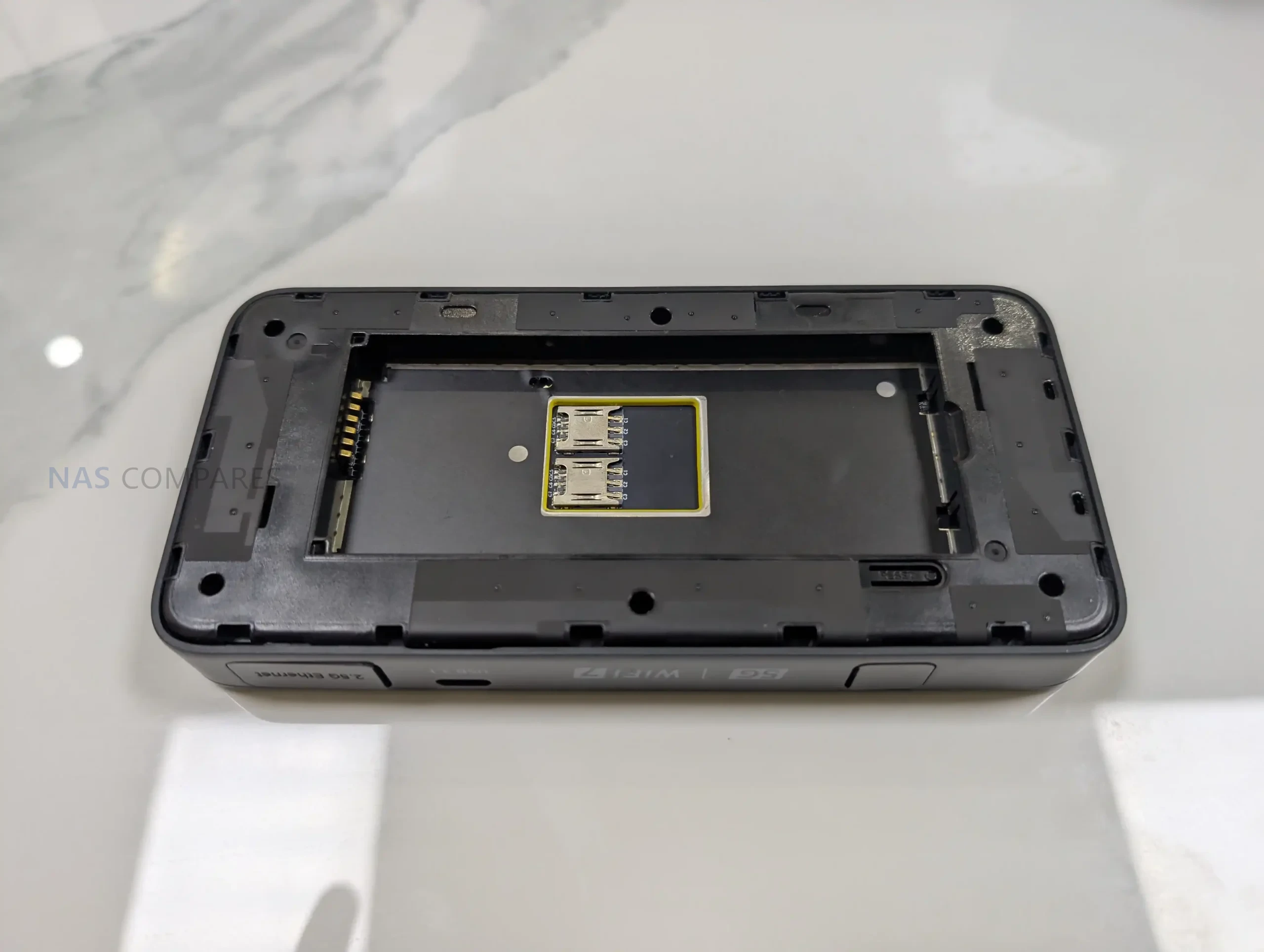
For SIM management, the router is specified with dual SIM dual standby and built-in eSIM support. In day-to-day use, that combination is intended to simplify switching between carriers, maintaining a backup line, or separating plans for different regions without having to physically swap cards as often. What remains unclear is how Gl.iNet handles priority rules, failover behavior, and eSIM provisioning in its interface, including whether switching can be automated based on signal or data limits.
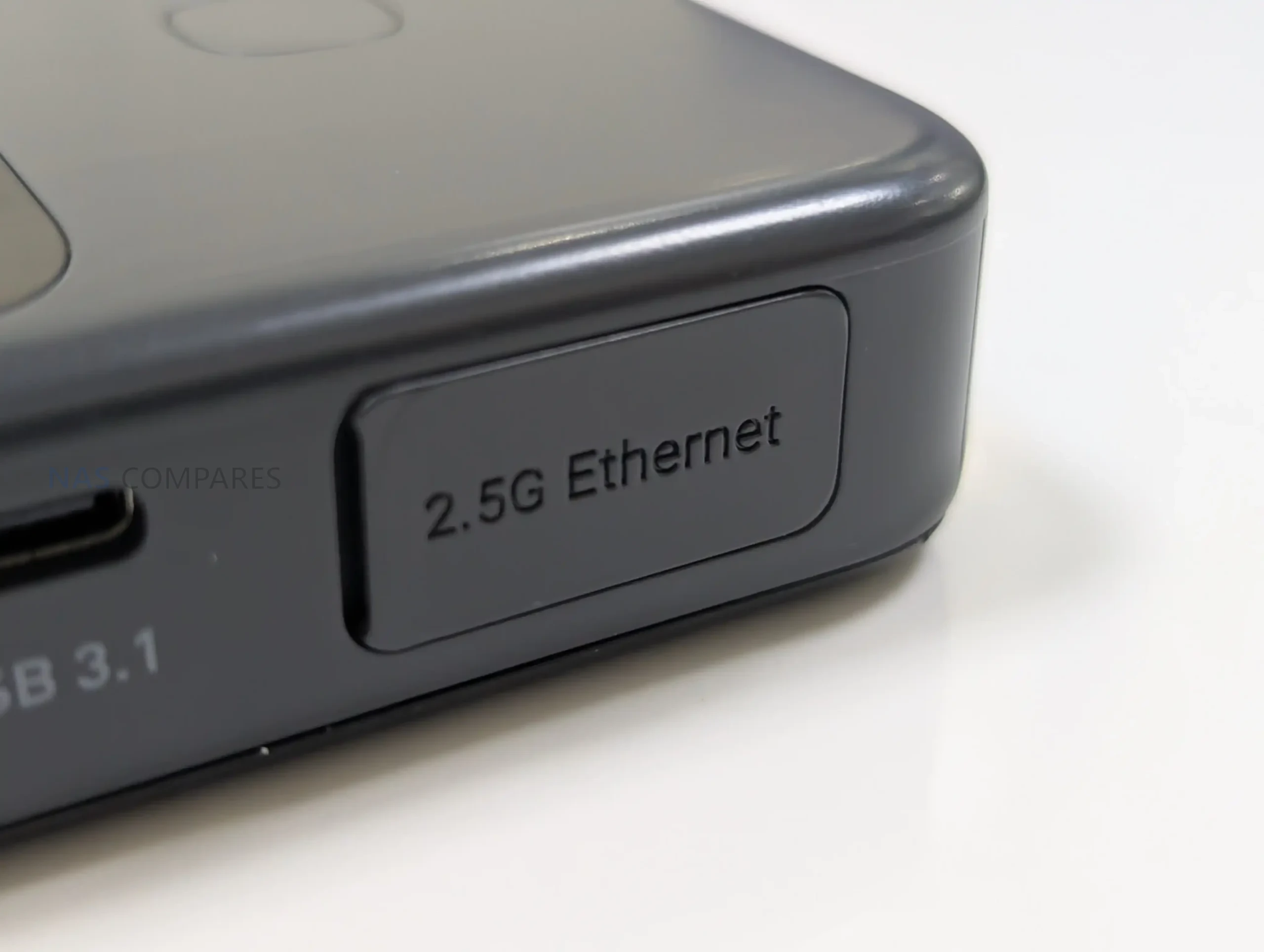
On the local network side, the Mudi 7 supports 802.11a/b/g/n/ac/ax/be across 2.4GHz, 5GHz, and 6GHz. The published maximum Wi-Fi rates are 688Mbps on 2.4GHz, 2882Mbps on 5GHz, and 5764Mbps on 6GHz, which sets expectations for its theoretical peak throughput rather than typical sustained performance. Antenna information is also listed, including 2 internal Wi-Fi antennas covering 2.4GHz, 5GHz, and 6GHz, plus 6 internal cellular antennas for LTE and 5G NR, indicating an emphasis on maintaining link quality in variable travel environments.
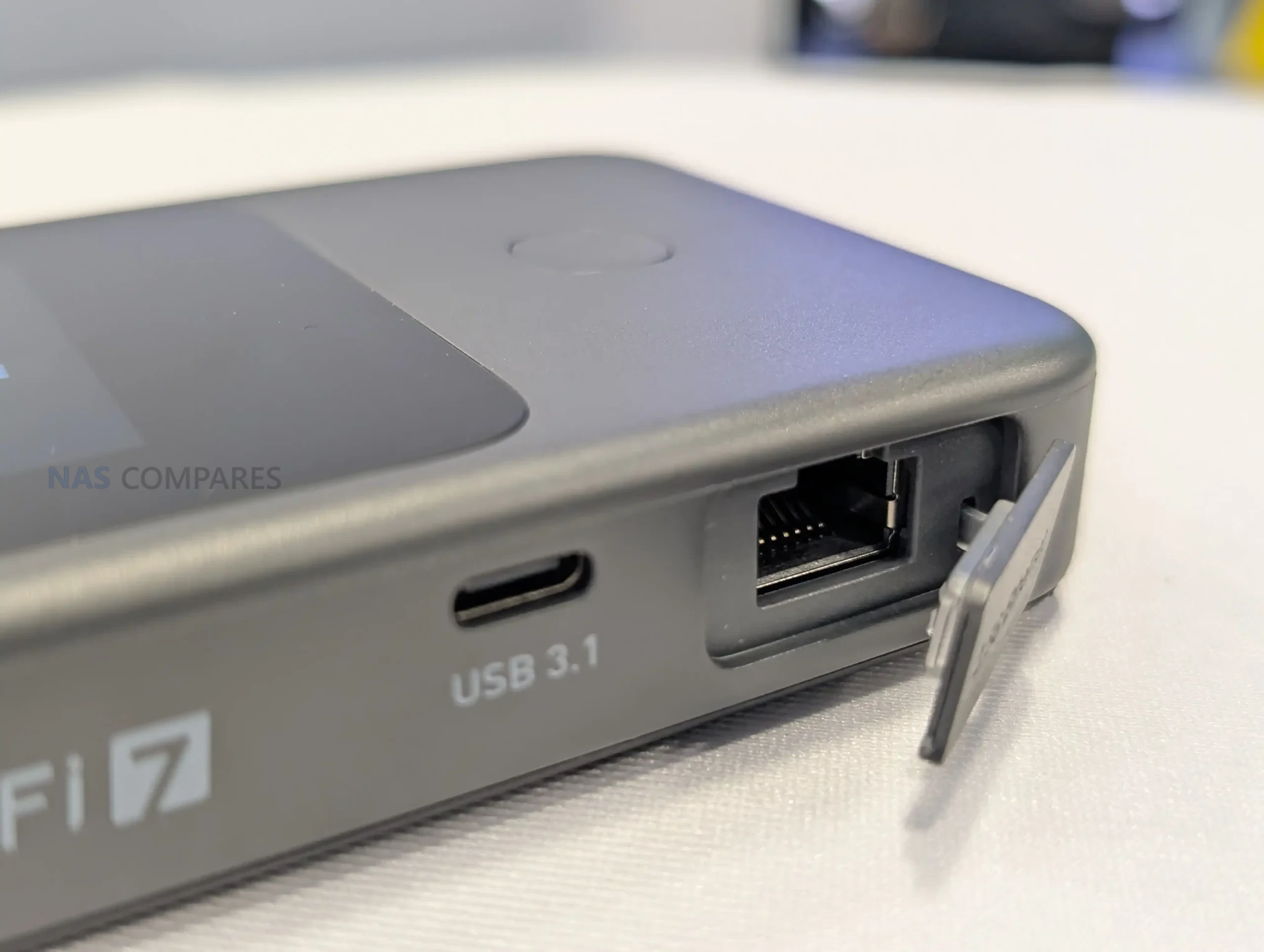
For wired and tethered connectivity, the router includes a single WAN/LAN Ethernet port rated at 100/1000/2500Mbps, allowing it to slot into networks that offer faster-than-gigabit service while keeping the option for a basic wired LAN connection. It also lists 1 USB 3.1 port, which can be relevant for tethering or attaching compatible peripherals depending on firmware support, but Gl.iNet has not detailed the exact supported use cases yet. External antennas are supported for cellular via 2 TS-9 ports, while external Wi-Fi antenna support is not specified in the sheet, suggesting any range extension is primarily aimed at improving cellular reception.
Gl.iNet Mudi 7 Router – Internal Hardware
The Mudi 7 is based on a Qualcomm platform, listed with a quad-core CPU clocked at 2.2GHz. Gl.iNet does not specify the exact chipset model in the specification sheet, so it is not yet possible to compare its CPU class directly against other travel routers using named Snapdragon or IPQ-series parts. Even so, the stated clock speed and multi-core layout indicate it is designed to handle routing, Wi-Fi management, and cellular tasks concurrently rather than relying on a lower-power single-core design.
Memory is specified as 2GB of LPDDR4X. That capacity is typically relevant for sustaining multiple client connections, running VPN tunnels, and keeping the management interface responsive while traffic is flowing. In practice, how far 2GB goes will depend on the software stack, the number of enabled services, and whether features like traffic monitoring or advanced firewall rules are running continuously.
For onboard storage, the Mudi 7 includes 8GB of eMMC flash. This is generally used for the operating system image, configuration data, and any built-in packages or logs, though Gl.iNet has not detailed how much of that space is reserved versus user-accessible. The specification also does not clarify whether there is any storage expansion path, or how storage is managed over time for items like VPN profiles, connection history, and accumulated logs.
Gl.iNet Mudi 7 Router – Conclusion
On January 6, 2026, the opening day of CES 2026, Gl.iNet is drawing attention to the Mudi 7 as its next travel router, listed in 2 variants: GL-E5800NA and GL-E5800EU. The published specification sheet outlines a Qualcomm quad-core 2.2GHz platform with 2GB LPDDR4X and 8GB eMMC, paired with 5G NR (NSA and SA) and tri-band Wi-Fi across 2.4GHz, 5GHz, and 6GHz. The physical and power details are also clear at this stage. Gl.iNet lists the Mudi 7 at 157 x 75 x 22.8mm and 300g, with a 3.85V 5380mAh battery rated at 20.72Wh and USB PD/PPS input up to 30W. Interfaces include a single WAN/LAN Ethernet port rated up to 2500Mbps, 1 USB 3.1 port, and 2 TS-9 ports for external cellular antennas, while a 2.8-inch touchscreen is positioned as a central part of on-device control.
Even with those specifications confirmed, several practical release details remain open on day 1. Gl.iNet has not published pricing, a retail availability date, or a cellular band list for each regional variant, which will determine how well the NA and EU models align with specific carriers and travel use cases. The company has also not provided a complete, Mudi 7-specific breakdown of firmware features and long-term software support, leaving the final day-to-day picture dependent on what is shown during CES and what ships in the retail firmware.
📧 SUBSCRIBE TO OUR NEWSLETTER 🔔
🔒 Join Inner Circle
Get an alert every time something gets added to this specific article!
This description contains links to Amazon. These links will take you to some of the products mentioned in today's content. As an Amazon Associate, I earn from qualifying purchases. Visit the NASCompares Deal Finder to find the best place to buy this device in your region, based on Service, Support and Reputation - Just Search for your NAS Drive in the Box Below
Need Advice on Data Storage from an Expert?
Finally, for free advice about your setup, just leave a message in the comments below here at NASCompares.com and we will get back to you. Need Help?
Where possible (and where appropriate) please provide as much information about your requirements, as then I can arrange the best answer and solution to your needs. Do not worry about your e-mail address being required, it will NOT be used in a mailing list and will NOT be used in any way other than to respond to your enquiry.
Need Help?
Where possible (and where appropriate) please provide as much information about your requirements, as then I can arrange the best answer and solution to your needs. Do not worry about your e-mail address being required, it will NOT be used in a mailing list and will NOT be used in any way other than to respond to your enquiry.
 TRY CHAT
Terms and Conditions
TRY CHAT
Terms and Conditions





|
 |
| Where to Buy a Product | |||
 |
    
|
  
|
VISIT RETAILER ➤ |
 |
|
|
VISIT RETAILER ➤ |
We use affiliate links on the blog allowing NAScompares information and advice service to be free of charge to you. Anything you purchase on the day you click on our links will generate a small commission which is used to run the website. Here is a link for Amazon and B&H. You can also get me a ☕ Ko-fi or old school Paypal. Thanks! To find out more about how to support this advice service check HERE


WHERE IS SYNOLOGY DSM 8? and DO YOU CARE? (RAID Room)
UniFi Routers vs OpenWRT DIY Routers - Which Should You Choose?
WHY IS PLEX A BIT S#!t NOW? IS 2026 JELLYFIN TIME? (RAID Room)
Synology FS200T NAS is STILL COMING... But... WHY?
Gl.iNet vs UniFi Travel Routers - Which Should You Buy?
UnifyDrive UP6 Mobile NAS Review
Access content via Patreon or KO-FI
Discover more from NAS Compares
Subscribe to get the latest posts sent to your email.
superb. learned new stuff ????
REPLY ON YOUTUBE
I will buy my first ever router soon, likely a travel router. I want Beryl AX but I find it expensive ???? I am considering alternative TP Link.
REPLY ON YOUTUBE
I will buy my first ever router soon, likely a travel router. I want Beryl AX but I find it expensive ???? I am considering alternative TP Link.
REPLY ON YOUTUBE
if only the UniFi one had a battery in it.
REPLY ON YOUTUBE
How can I tell if a British person is pronouncing the word “rooter” or “router”? ????
REPLY ON YOUTUBE
Just buy a Falcon Evo 5G.
REPLY ON YOUTUBE
No wonder these routers are sooo reliable. They can easily charge 3x for the feature set and reliability. I’m impressed!
REPLY ON YOUTUBE
Bro these videos are so good ????
REPLY ON YOUTUBE
7:30 Is that a hipster hand-cranked coffee grinder? Nice!
REPLY ON YOUTUBE
Regardless of what you think of the PRC, this is where the development and manufacturing are occurring for a ton of these products. I’m interested to see these places in person. Fascinating — thanks for doing this.
REPLY ON YOUTUBE
Got a Puli XE3000 about 2 years ago and works perfectly as a home and travel router.
With some perseverance I now have a near to enterprise grade router which I am very happy with.
I do a lot of travelling so this has both the convenience and security rolled into one.
Downside – the built-in battery degrades after a few months if the router is plugged in the mains for an extended period of time.
REPLY ON YOUTUBE
Routers ❌
Rooters ✅
REPLY ON YOUTUBE
My UniFi travel router has turned out to be garbage. It constantly fails to connect or takes upwards of 10 minutes when it finally will. Also, it disappears from being able to see it in the app CONSTANTLY.
REPLY ON YOUTUBE
Ubiquiti Geräte sind toll, aber leider bauen und bewerben die immer Geräte die man nicht kaufen kann. Ubiquiti sollte weniger Werbung machen und dafür mehr Geräte produzieren. Dann könnte man auch mehr Geld verdienen
REPLY ON YOUTUBE
As a very casual user, I just want to be able to connect locally to my destination’s WiFi. Maybe 3 or 4 companion devices only for basic e-mail, internet browsing, and nothing complicated. Not interested in connecting to my home network. Don’t own any Ubiquity products. Is the Unifi UTR a good option for my use case or should I drop another $50 for the ASUS RT-BE58 Go? I tried the GL.iNet GL-MT3000 on a 10 day multi-location trip and kept experiencing configuration issues and devices not re-connecting when it was turned on at a new place (even after capturing local WiFi). I like UniFi’s smaller form factor and I hope this induces more vendors to release something to compete with it.
REPLY ON YOUTUBE
Nice, thank you
REPLY ON YOUTUBE
Missing an LTE Sim slot….
REPLY ON YOUTUBE
It doesn’t “lack a battery/SIM card slot”.
Those are unnecessary features. The fact that you think it needs them, makes me think that you don’t know what you’re talking about at all, and your opinions on this product category are probably not worth my time.
REPLY ON YOUTUBE
For the technically inclined Netbird will allow access to your own LAN when you are on the go and doubles as a VPN with the possibility of using different exit nodes at will.
For the rest, unless you need to plug into a hotel room with an ethernet cable, tethering different devices to a mobile phone is cheaper and more convenient.
REPLY ON YOUTUBE
Unify has awful customer service – always avoid
REPLY ON YOUTUBE
Hands down – GL.iNet GL-X3000. I used it all the time in my vehicle with two sims (Rogers + Telus) and Starlink as my primary. All connection is set up in Failover configuration. I bought a USB-C to Barrel jack on Amazon. It’s been the most bulletproof solution to ensure I always have connection where ever I go.
REPLY ON YOUTUBE
Thanks for the video and the effort to clear things up! 10/10
REPLY ON YOUTUBE
They need more antennas on that all in one router
REPLY ON YOUTUBE
how much of a difference do the antennas make when it comes to wifi?
REPLY ON YOUTUBE
That explains a few things. I like UniFi, even have their stack in the office, but I don’t use a VPN for access, therefore the product made little to no sense to me. Now, thanks to you, I see the use case, it just isn’t mine.
Bought a Puli, and never looked back. My only gripe is my 5G connection in a rural area. An external antenna cleared that right up. Yes, it is pricy, but when you need access, security, and other capabilities, nothing beats it currently.
REPLY ON YOUTUBE
Why would you want a battery built in? It ticks all of my boxes and will work great with all of the devices I will be traveling with. Bought one on the US store before they sold out.
REPLY ON YOUTUBE
Travel routers are … like condoms.
REPLY ON YOUTUBE
The troubles with a trafel router are that they allow at most 3 a 5 device’s intern on the router network, where a home router 250+ devices allow. All not usable as a family travel router.
REPLY ON YOUTUBE
How is the WiFi strength of the UniFi router? Can you use it in a holiday house with two floors? Any comparision to a gliNet Beryl AX router?
REPLY ON YOUTUBE
That white monster is about as “travel” as an 80s laptop.
REPLY ON YOUTUBE
Its going to get interesting with Gl.iNet’s Mudi 7 coming out
REPLY ON YOUTUBE
I tried to buy UniFi one, it was gone within seconds of appearing in store.
REPLY ON YOUTUBE
Sold out
REPLY ON YOUTUBE
Bird nerd checking in. There is no species called the seagull. There is a gull family, some live at sea, some don’t.
Your picture looks more like a herring gull to me. Good to be technically correct on a technical channel.
Looking to pickup the unifi myself as I’m already so deep into their ecosystem.
REPLY ON YOUTUBE
Travel Rooter ; sort of like Rota–Rooter ?
REPLY ON YOUTUBE
Curious if the UniFi Travel Router allows you to clone and/or randomize a MAC address when setting up the WAN connection.
REPLY ON YOUTUBE
Will wait for gen2
REPLY ON YOUTUBE
Managed to bag myself a Unifi Travel Router today. Looking forward to playing with it when it arrives. Looks like it’s sold out in Europe and the UK. Seems like they have a hit on their hands.
REPLY ON YOUTUBE
I’m really starting to hate these companies that send their stuff to YouTubers for free, yet can’t manage to have a reasonable stock for paying customers. ????
REPLY ON YOUTUBE
That all in one thingy, doesn’t it suck for the rest of your colleagues when you take their router away? ????
REPLY ON YOUTUBE
Bought the UniFi one. Thanks! ????
REPLY ON YOUTUBE
Others have commented that OpenVPN is not working yet. Like the AI Key UniFi has taken a year and still has not gotten the basic firmware working on that. This may also be the case here. You have been warned!
REPLY ON YOUTUBE
For your upcoming Unifi review please provide a detailed example of how you would remotely access a NAS and transfer a file on a home Unifi network to your remote laptop. I’d also like to know if you could SSH into a host, access a self-hosted web service, or otherwise be able to have a remote machine act like it is directly on the home network. Thanks so much for great content.
REPLY ON YOUTUBE
Can you use the UTR as a backup for when your ISP is down, by tethering a cell phone off of it and making it a WAN 2 device on your Ubiquiti network?
REPLY ON YOUTUBE
Commenting so someone can tag me when this Unifi Travel Router is available for purchase. It says today but I don’t see it avaiabe to buy in the US. I guess it’s this afternoon?
REPLY ON YOUTUBE
Very cool products.
Warning about Amnezia VPN was created by Russian activists. If the Free/Premium service operates under Russian jurisdiction, the Yarovaya Law requires storing user data and granting government access without warrants.
REPLY ON YOUTUBE
Awesome!! They make my favorite routers!! I dropped Asus for GliNet and haven’t looked back!
REPLY ON YOUTUBE
I am happy with my Beryl AX. I use it to extend my network about 30 meters from my house to the garage so the cars and sprinkler control system have reliable connectivity. It allows me to tell the cars to warm up when it is freezing out. I had to put the transmit power on the lowest setting because my phone would connect to it all the way from inside the house. I took it with me in a trip, but I couldn’t get it working with my hotel’s captive portal.
On Black Friday, I got the Comet POE and Finger Bot. I haven’t done enough testing to form an opinion on those yet.
REPLY ON YOUTUBE
main missing element for them is mesh wifi add that in and they become a top player then
REPLY ON YOUTUBE
Great video. KVM backer and owner of several other GL-iNet products.
REPLY ON YOUTUBE
That looks like it would have been a very much enjoyable trip and tour.
Really great wireless routers, I have 3 of their wireless routers, Flint 2 and two Beryl AX units, I definitely recommend this brand.
REPLY ON YOUTUBE
9:10 is Mudi 7????
REPLY ON YOUTUBE
I have one router from them as base hardware for OpenWRT. Not expect so large company, nice to see.
REPLY ON YOUTUBE
I love Gl.Inet. Our company runs a small fleet of about 23 of them, mostly the x3000 series.
REPLY ON YOUTUBE
I hope they add 10G ethernet port to their home routers soon, otherwise I will have to switch to other brands. My ISP is offering 8Gbps fibre connection for a very reasonable price, but my Flint 2 can’t handle it.
REPLY ON YOUTUBE
I still have the original slate. It has aged gracefully and still maintained and working as a backup vpn gateway along a couple of more recent models and a comet kvm.
REPLY ON YOUTUBE
I’ve owned several GL.inet routers. Love them.
REPLY ON YOUTUBE
Any information about Brume 3? Is it gonna be MTK based hardware? Looking forward to it
REPLY ON YOUTUBE
Great video, any info on the Mudi 7 GL-E5800?
REPLY ON YOUTUBE
I enjoy your videos very much.
I think we all know that the world is a very unethical place. It’s good that you look for signs of exploitation. But let’s be honest i know full well that my clothes my food everything we take for granted in the west is produced in an exploit stiff way whether it be nature or humans. But i don’t think many of us would pay an extra £50 if it was guaranteed that people were being paid fairly. I admire that you at least recognise there is a problem.
Some tech YouTubers are so disingenuous when it comes to China.
It’s a funny old world ????!
REPLY ON YOUTUBE
Great timing, I’ve been researching router options to replace my ISP gateway and GL.iNet is a top contender so I’m interested to learn more about them!
If anyone’s got any good info to know I’d love to hear! I’ve currently got my eyes on either GL.iNet or Ubiquiti but GL.iNet is definitely killing it in price and feature set
REPLY ON YOUTUBE
CCP controls EVERYTHING. You are not good at trying to change the world’s view of China.
REPLY ON YOUTUBE
Love my gli router. ❤
REPLY ON YOUTUBE
Mobile NAS coming soon?
REPLY ON YOUTUBE
Funny how they produce devices for working remotely but they are all crammed working in the office
REPLY ON YOUTUBE
This is pretty neat to see, thanks for doing these videos.
I was a backer in the new KVM device they’re releasing, so I enjoyed seeing a little glimpse into the world behind it. I wasn’t familiar with their products before that but I think the KVM switch will be very popular for them. At least in some of our niche tech circles.
REPLY ON YOUTUBE
Will there ever be a content about products from countries that don’t commit genocide (Uyghurs) and don’t supply weapons to those committing genocide (drones and other weapons to Russia)? Your focus on China went a bit too far.
REPLY ON YOUTUBE
*IMPORTANT* – Regarding the TERRIBLE focus issues during the face-to-camera recording sections, that was 100% on me recording in low light and ‘trusting’ the camera to do it”s job. The pains the having a mobile recording setup and trying to do too much in Shenzhen over 4 days – I have learnt ALOT from these mistakes (after shouting at myself approx 100x) and will be better next time! Hope it does not ruin the watching experience!
REPLY ON YOUTUBE
If you google Mudi 7 it’s already on their website, just show it!
REPLY ON YOUTUBE
*IMPORTANT* I made an error on the Beryl 7 specifications. The Memory/RAM is 512MB, not 1GB. Apologies for the error. The hardware specifications were subject to change when I was handling a pre released product. This does scale the Beryl 7 a little more neatly underneath the Slate 7 in their portfolio.
REPLY ON YOUTUBE
We want a tri-band Slate-7, period.
REPLY ON YOUTUBE
To GL Inet staff that may be reading, please make a MTK based WiFi 7 router w/ 6Ghz, so that it may have mainline OpenWRT support.
REPLY ON YOUTUBE
Is the secret device the OpenWRT Two?
REPLY ON YOUTUBE
if I can smoke weed with the Beryl 7 with a VPN I buy it!
REPLY ON YOUTUBE
A couple of ideas for improvements for GL inet:
1. mesh routers: it’s a gap in their product offering
2. bake in the normal GUI an easier way to create VLANs, instead of having to use LUCI
Otherwise their current product lineup and the ‘everything is included / no subscription / do with our products anything you want’ approach are extremely refreshing
REPLY ON YOUTUBE
4:06 No uSD card slot. I’d wish they’d make the Type-C port fully functional USB3.2 (10Gbps) and convert the other USB port to the same.
Maybe even allow for redundant power via the two ports.
REPLY ON YOUTUBE
jetkvm crying even more now lol snooze you loose. gl are kicking the KVM devices out fast. thats what its all about
REPLY ON YOUTUBE
No 6Ghz band 🙁
REPLY ON YOUTUBE
Unfortunately I dont think its a mango/shadow refresh you’ve got hidden back there ☹️
REPLY ON YOUTUBE
i bought a berylAX to connect to a wpa2 enterprice network. yeah, nope was not supported. WILL the Beryl7 support WPA2/3 enterprice networks ??
REPLY ON YOUTUBE
Oh man. I just bought the slate 7, now I feel like maybe I should have held off for a bit for an updated model.
REPLY ON YOUTUBE
So uhh, what’s behind the book Robbie?
REPLY ON YOUTUBE
They are still better than firewalla who still insist that wifi 7 on a portal router will make it bad … so those saying gl inet isn’t doing much should go check out firewalla orange ????
REPLY ON YOUTUBE
Currently watching this video while connected to a Beryl AX in an ibis hotel and can I hell as like get the VPN on that thing running. Tailscale not a problem but both Openvpn and wireguard are not having it.
REPLY ON YOUTUBE
Not touching anything from that company. They used a qualcomm in the flint 3. No vanilla openWRT support….And for what. For what?
REPLY ON YOUTUBE
Why would I buy the new Beryl if it doesn’t have 6ghz? The one I have works perfectly fine. And it’s not a horrendous color. It’s a travel router so it’s not like I need bleeding edge performance.
REPLY ON YOUTUBE
Thanks for the heads-up. Waiting for CES 2026 then ????
REPLY ON YOUTUBE
2.4GHz in a travel router is stupid. Give it 5 and 6GHz, it’s not meant to cover a stadium.
REPLY ON YOUTUBE
While you have their ear(s) Robbie, ask them to please give us a GD PDF manual instead of that awful HTML thing. I want something that I can download and markup and possibly put a few notes on for my setup. Cheers. PS, just wink 3 times if that hidden gem has my NVMe in it…
REPLY ON YOUTUBE
If it is a triband slate 7, and not crazy expensive, I would be in line.
REPLY ON YOUTUBE
Great video, I too am liking the colours!
Any idea if they are working on a Comet IP kvm switch . i.e. multiple PCs one IP KVM and abiltity to switch between them?
REPLY ON YOUTUBE
I’m using tge Flint 3 which I pre-ordered before moving from my studio to a real house.
The coverage is amazing. Modem on bridge mode and everything works like breeze!
REPLY ON YOUTUBE
Good ????
REPLY ON YOUTUBE
What about the MUDI 7 (GL-E5800 – 5G NR Tri-band Wi-Fi 7 Portable Router)?
REPLY ON YOUTUBE
I hope you learn that throwing trash on the ground is not acceptable — you’re not at home, and you really look like a jerk…I was disappointed.
REPLY ON YOUTUBE
WOAH!! more nice new goodies !! AWESOME !!
REPLY ON YOUTUBE