

How to connect to my Synology or Qnap NAS directly via LAN/Ethernet cable?
If you are planning to connect directly- this is probably because you want to have a:
- private connection to a NAS
- do not have a switch
- want to maximize the potential data transfer speed
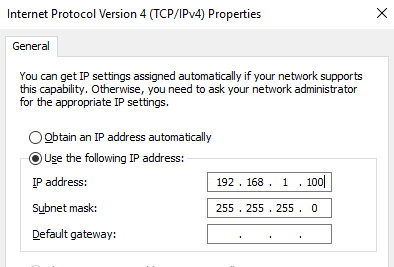
- First of all, you will need to make sure you have a fixed IP set on your computer. Disconecting from router will wipe it if its set to be automatic.
- open network setting
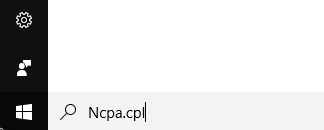
- Right click the connection you will use
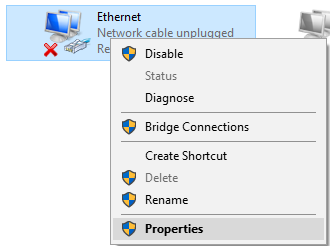
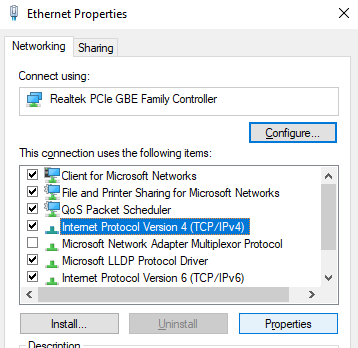
- Choose IP4 and click properties
- Choose manual IP
- open network setting
- Set a manual IP address on your NAS in same IP range
- Open control panel and search Network
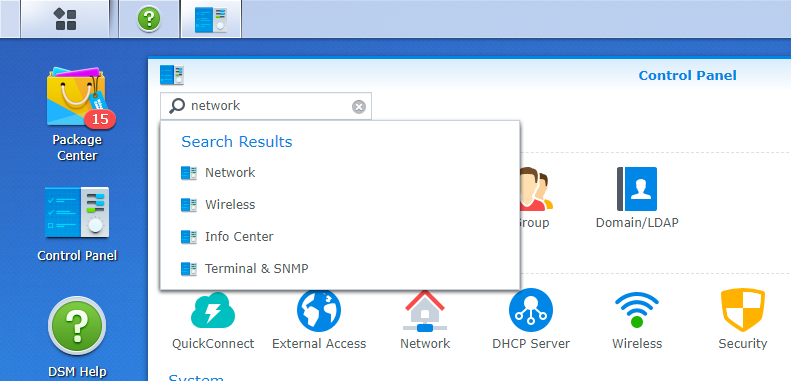
- Select Network Interface
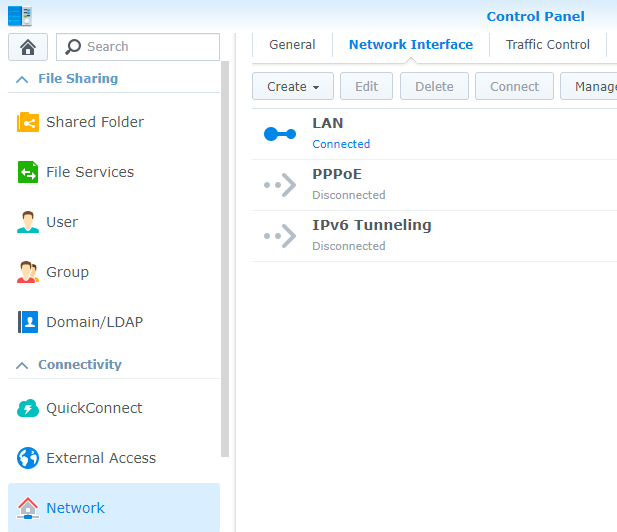
- Choose A LAN port you will use and click edit
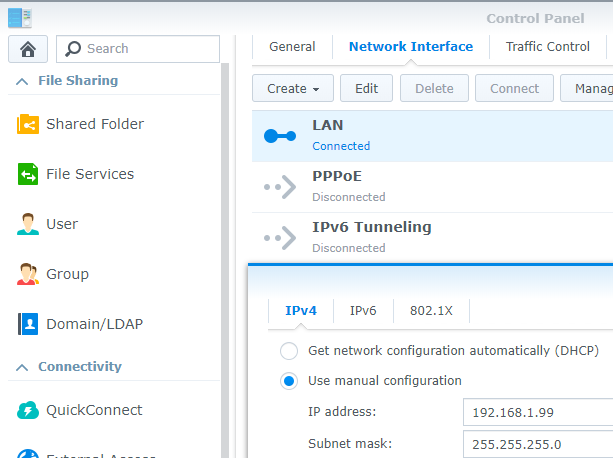
- Choose an IP within a similar IP range and you are ready to go.
- Open control panel and search Network
Find regulary updated NAS offers here
Of course I would prefer you choose AMAZON UK AMAZON USA to buy your perfect solution, however, if you would rather buy locally, please use the links used above to take you to your local Amazon store and help support this free advice service with ad revenue. More ways of supporting the blog are described HERE
Home: https://www.backblaze.com/cloud-backup.html#af9rgr Business: https://www.backblaze.com/business-backup.html#af9rgr Comparison with other service providers: https://www.backblaze.com/best-online-backup-service.html#af9rgr
| Where to Buy a Product | |||
 |
    
|
  
|
VISIT RETAILER ➤ |
 |
|
|
VISIT RETAILER ➤ |
If you like this service, please consider supporting us.
We use affiliate links on the blog allowing NAScompares information and advice service to be free of charge to you. Anything you purchase on the day you click on our links will generate a small commission which is used to run the website. Here is a link for Amazon and B&H. You can also get me a ☕ Ko-fi or old school Paypal. Thanks! To find out more about how to support this advice service check HERE
We use affiliate links on the blog allowing NAScompares information and advice service to be free of charge to you. Anything you purchase on the day you click on our links will generate a small commission which is used to run the website. Here is a link for Amazon and B&H. You can also get me a ☕ Ko-fi or old school Paypal. Thanks! To find out more about how to support this advice service check HERE





Private 🔒 Inner Circle content in last few days :
Is It OK to Buy a Used NAS? (RAID Room)
Do You NEED 5GbE NAS? (Or Should You Skip Ahead to 10GbE)
UGREEN DXP4800 PRO NAS Review
Minisforum G7 Pro Review
CAN YOU TRUST UNIFI REVIEWS? Let's Discuss Reviewing UniFi...
WHERE IS SYNOLOGY DSM 8? and DO YOU CARE? (RAID Room)
Access content via Patreon or KO-FI
Is It OK to Buy a Used NAS? (RAID Room)
Do You NEED 5GbE NAS? (Or Should You Skip Ahead to 10GbE)
UGREEN DXP4800 PRO NAS Review
Minisforum G7 Pro Review
CAN YOU TRUST UNIFI REVIEWS? Let's Discuss Reviewing UniFi...
WHERE IS SYNOLOGY DSM 8? and DO YOU CARE? (RAID Room)
Access content via Patreon or KO-FI
Discover more from NAS Compares
Subscribe to get the latest posts sent to your email.

DISCUSS with others your opinion about this subject.
ASK questions to NAS community
SHARE more details what you have found on this subject
IMPROVE this niche ecosystem, let us know what to change/fix on this site