

The Beelink ME Pro NAS – Should You Buy
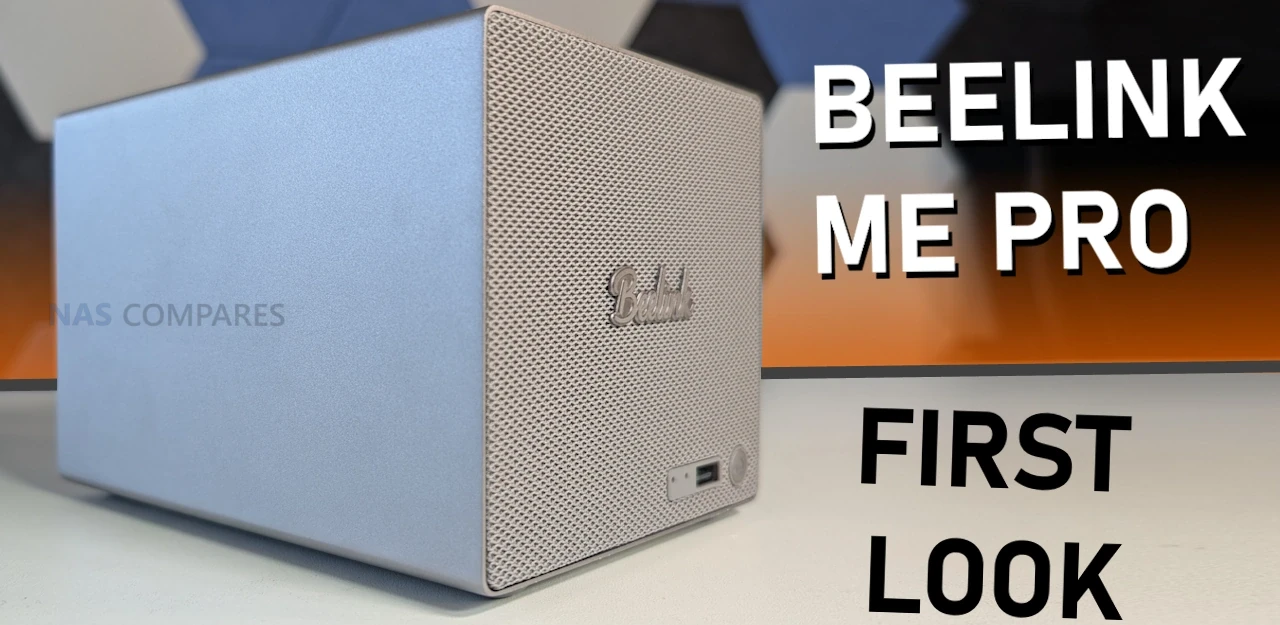
After the surprising hit that was the Beelink ME Mini NAS in 2025, a lot of users were looking forward to seeing what the brand would do next in the NAS space. In January 2026, the brand responded with the launch of the Beelink ME Pro: an Intel N95/N150 powered system with DDR5 memory, 5GbE plus 2.5GbE connectivity, 2 SATA HDD bays, 3 M.2 NVMe bays, and one of the smallest physical footprints in this device class that I have seen. I have a full detailed review in progress on the ME Pro, but even after several days of use, several pros and cons have already emerged that may influence whether this is the right purchase for a homelab. While the review comes together, this article will outline the good, the bad, and the weird aspects of the Beelink ME Pro NAS.
| Where to Buy the Beelink ME Pro NAS: |
Bonus Point: Really Nice Logistics Design
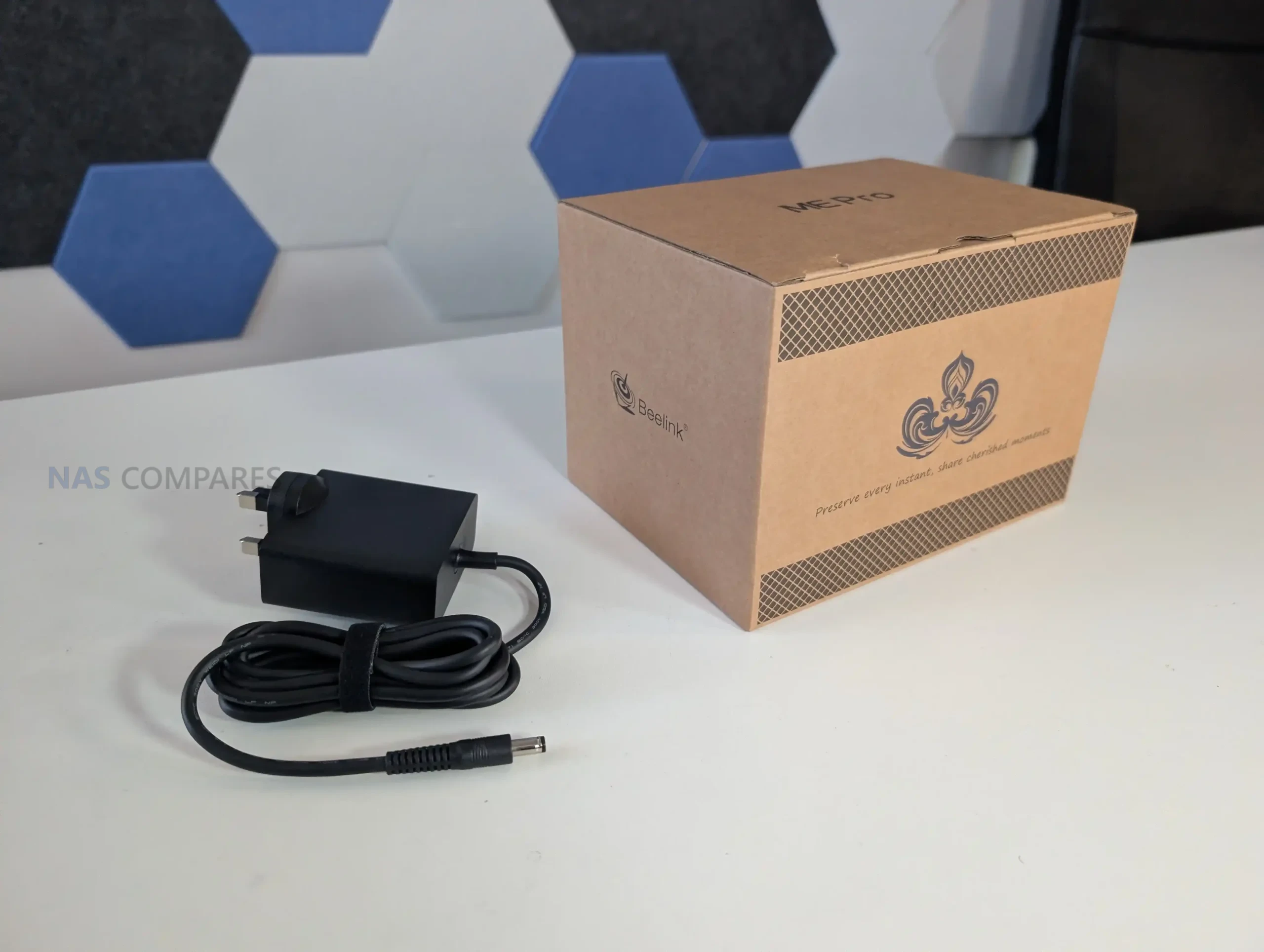
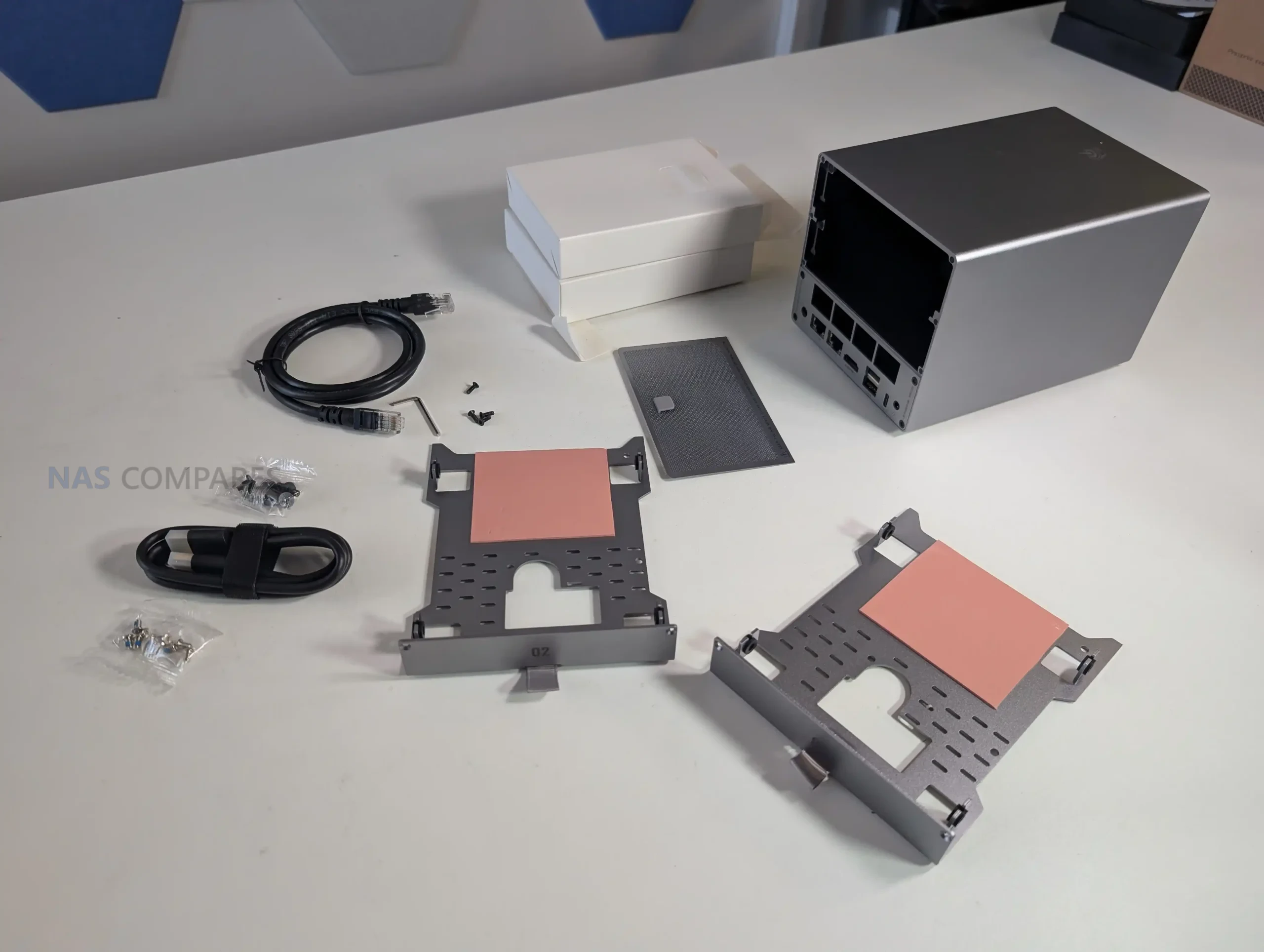
This is a minor point, but it is worth noting how the ME Pro arrives. The chassis box is unusually small for a 2-bay NAS, and at first glance it can look like the packaging contains little more than the unit itself. In practice, the accessory items are stored inside the drive bracket area in small internal boxes, which helps avoid loose parts moving around in transit and reduces wasted packaging volume.
The device also arrives with the M.2 thermal pads already positioned in place, so the initial storage installation process is more direct. It is not a major buying factor, but it is a practical packaging decision that avoids the excessive empty space and material waste that is common in this product category.
Reasons you Should Buy the Beelink ME Pro NAS
The ME Pro is positioned as a compact, high-connectivity 2-bay NAS that also provides NVMe expansion and local display capability, with hardware aimed at users who want more than basic file serving in a small footprint. It combines dual-port networking, integrated wireless connectivity, and multiple internal storage options in a chassis designed for straightforward access and cleaning, while also introducing a motherboard drawer concept that Beelink claims will support future platform upgrades. If those priorities match your setup goals, the ME Pro has several practical advantages that can justify its price and design choices.
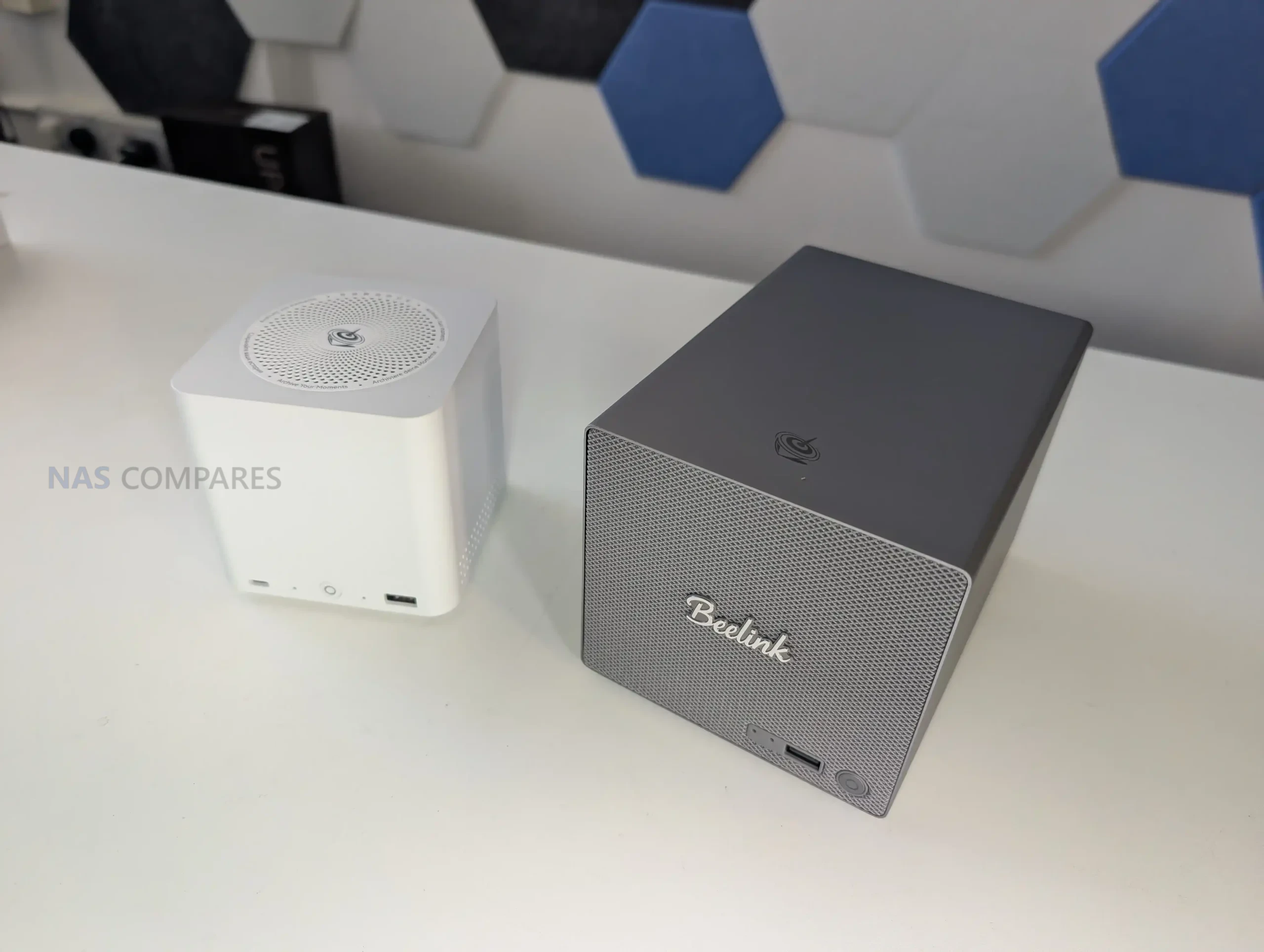
#1 Man alive – this 2 Bay NAS is TINY!
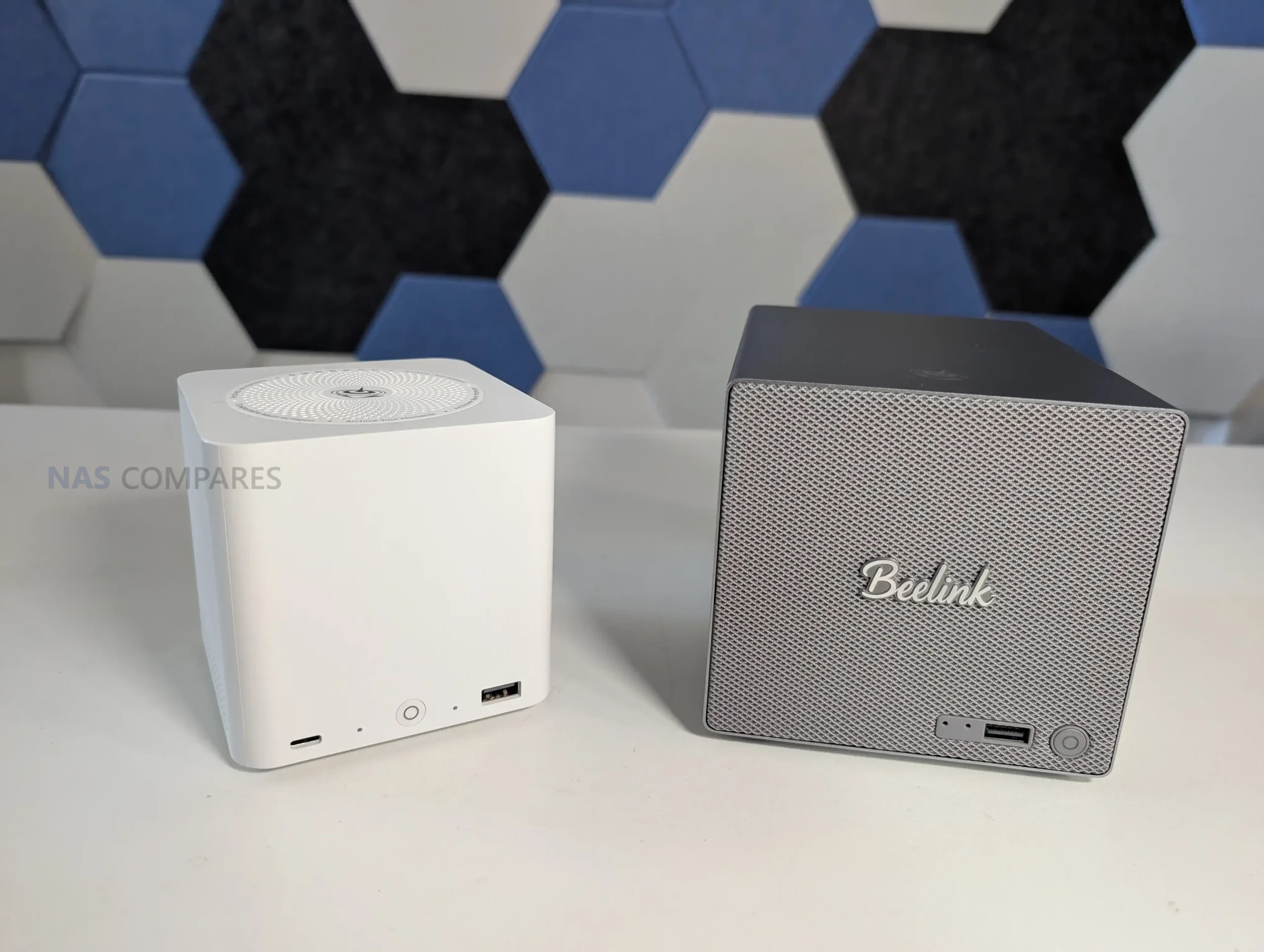
The ME Pro’s most immediate differentiator is its physical footprint. The chassis measures 166 x 121 x 112mm and uses an all metal unibody design, which is notably smaller than most 2-bay NAS boxes that also include NVMe storage and dual network ports. In person it reads closer to a compact mini PC enclosure than a traditional NAS, and that difference matters if you are placing it on a crowded desk, a media shelf, or anywhere you are trying to keep cabling and hardware out of the way.
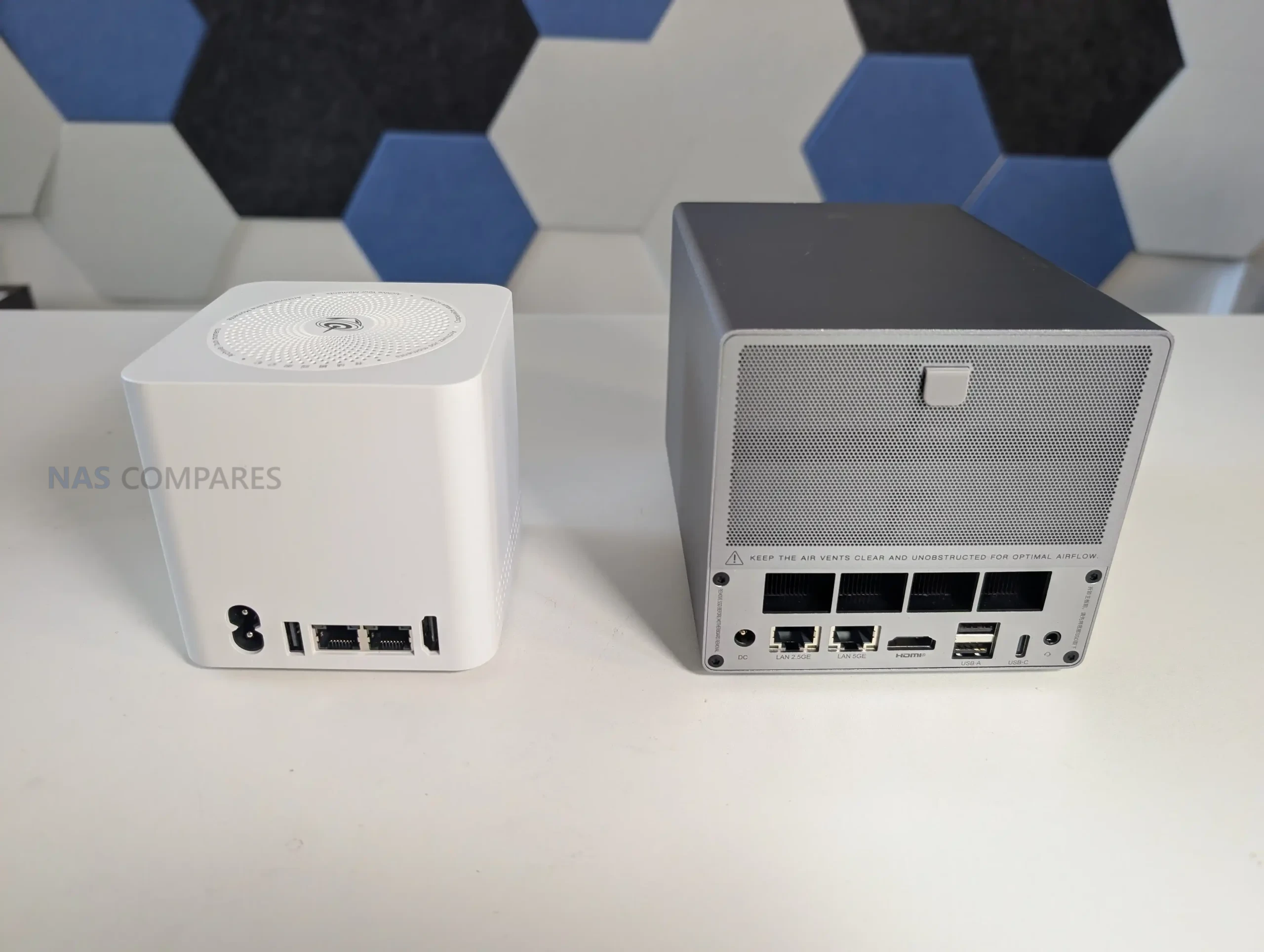
That compactness is not just cosmetic, it directly shapes how the hardware is arranged and how it feels to work with. Storage bays, the NVMe area, networking, and the cooling hardware are densely packed, so clearances are tight and the device is designed around precision fit rather than roomy access. The upside is that it is easy to place in small spaces without needing the usual NAS sized footprint. The tradeoff is that installations and maintenance are likely to feel more constrained than they would on a larger, more conventional 2-bay enclosure.
#2 Arrives with 5GbE and WiFi6, when everyone else is still on 2.5GbE
On networking, the ME Pro ships with 2 wired Ethernet ports and integrated wireless. The wired setup is a 5GbE Realtek RTL8126 port alongside a 2.5GbE Intel i226-V port, and the unit also includes WiFi 6 plus Bluetooth 5.4. For a compact 2-bay NAS, that is a broader mix of connectivity than the many systems that still top out at dual 2.5GbE, and it gives you more options for how the device fits into an existing home or small office network.
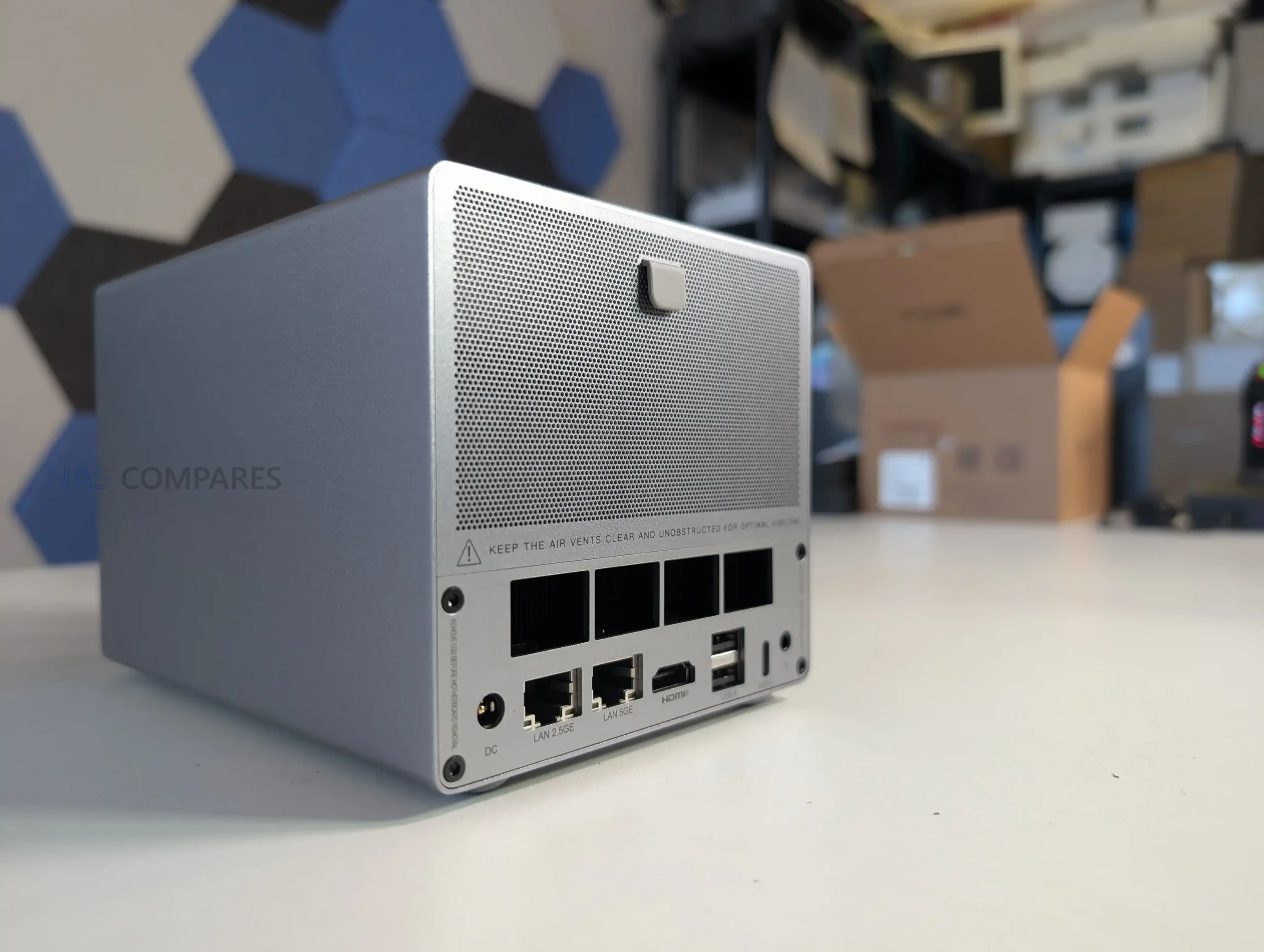
In practical terms, this provides flexibility rather than guaranteeing a specific performance outcome. A 5GbE port can be useful for faster transfers if you already have compatible switching or direct attach options, while the 2.5GbE port can serve as a secondary link for a different subnet, failover, or a separate device path depending on the OS and network configuration you choose. WiFi 6 is not a replacement for wired networking in a NAS role, but it can be relevant for temporary placement, initial setup, or use cases where running a cable is not straightforward, and the manual indicates the antenna is integrated into the front panel design rather than using an external antenna.
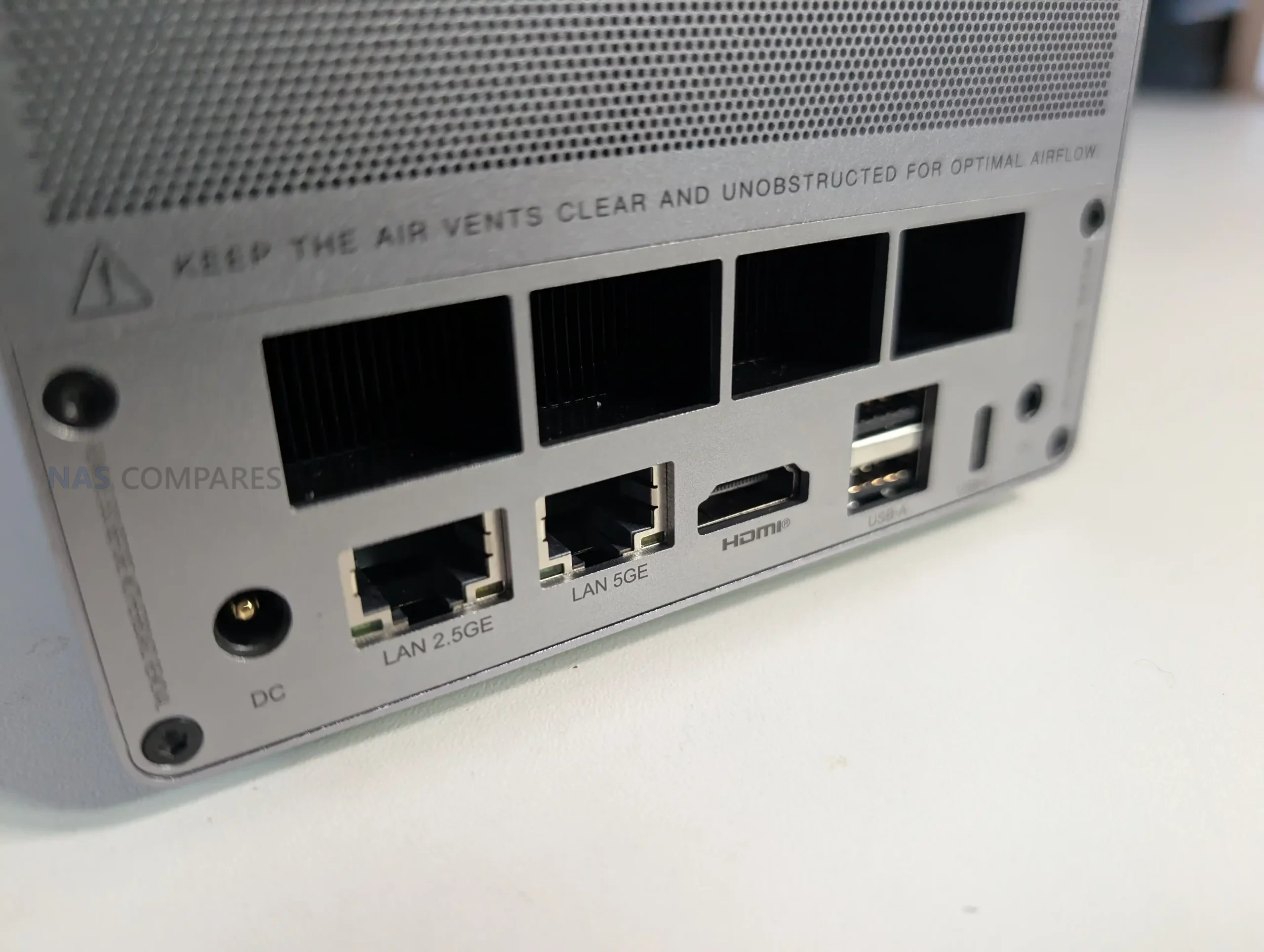
#3 Maintenance and Internal Access is a work of art!
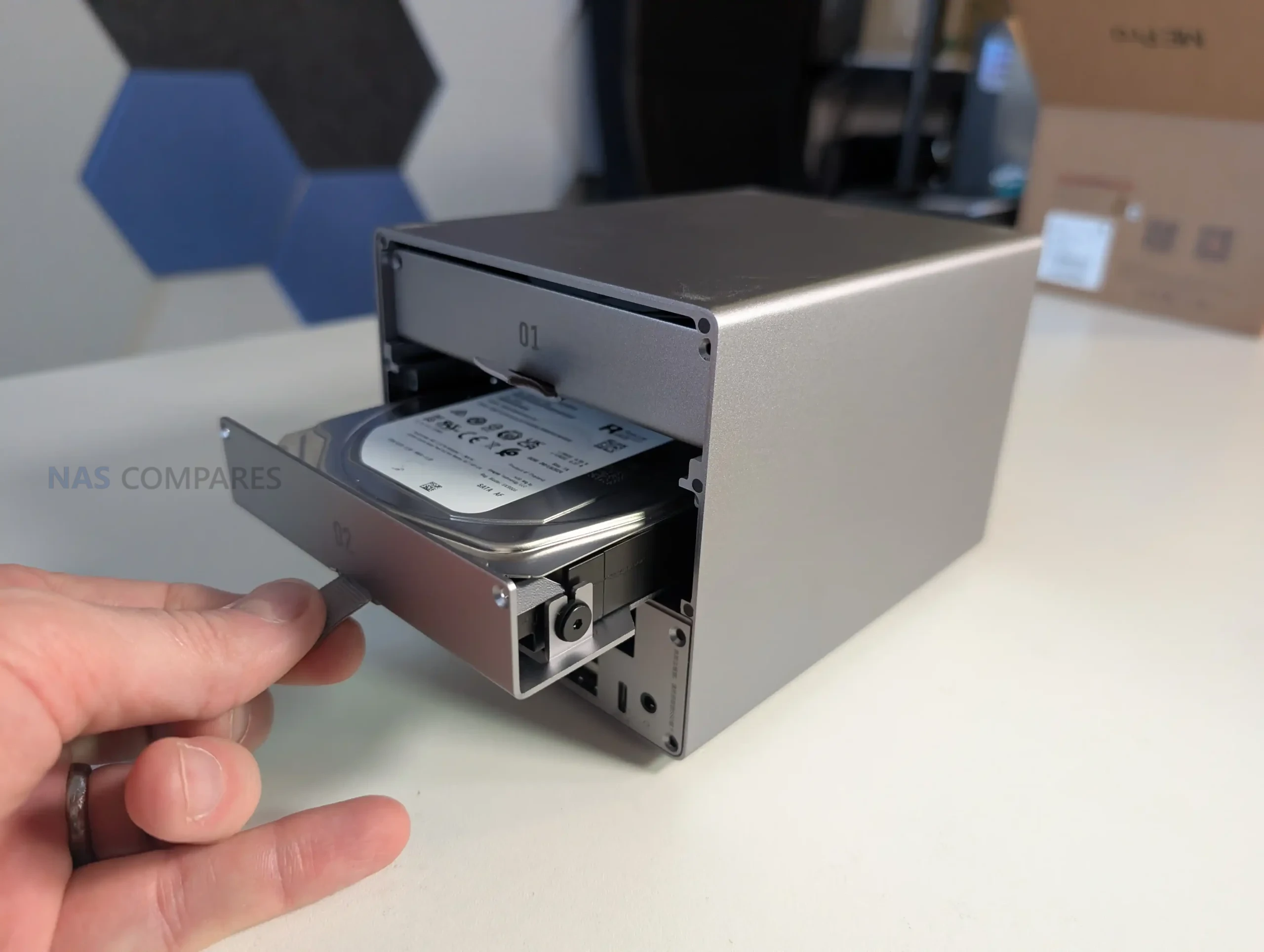
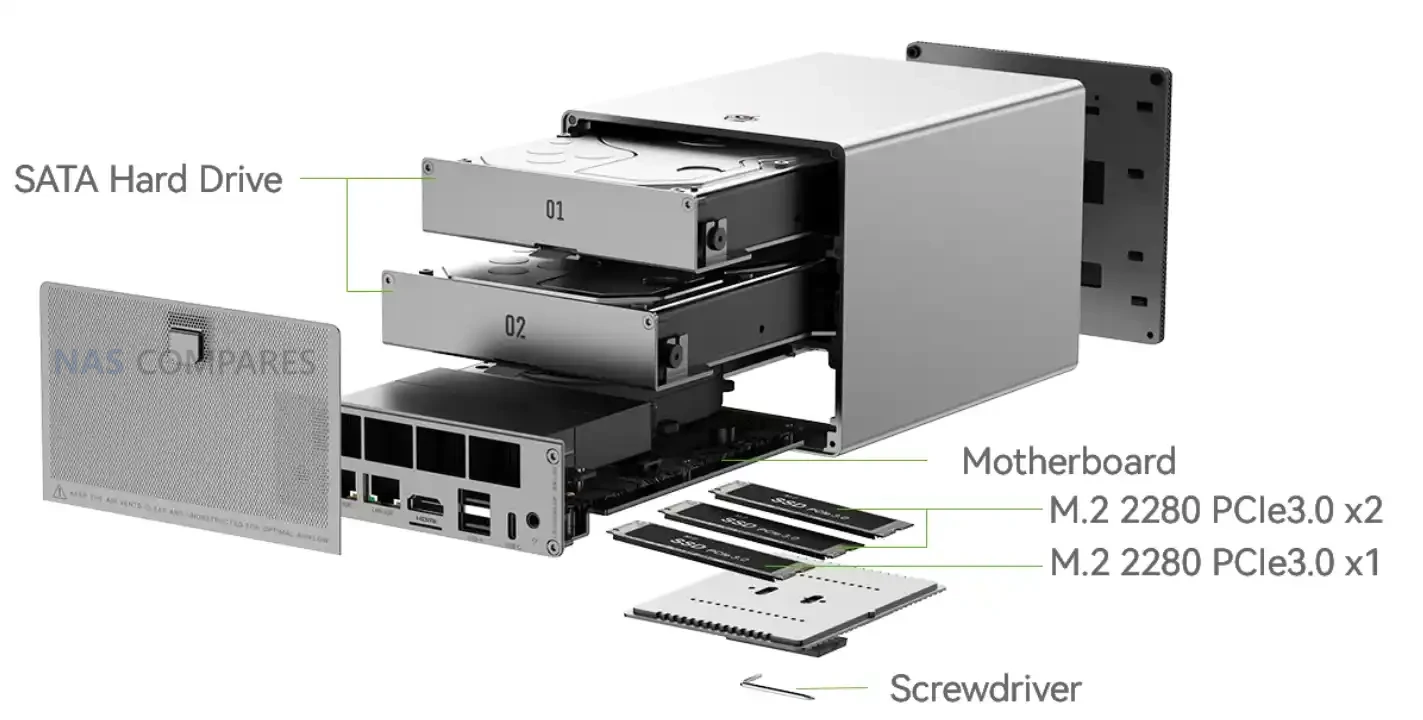
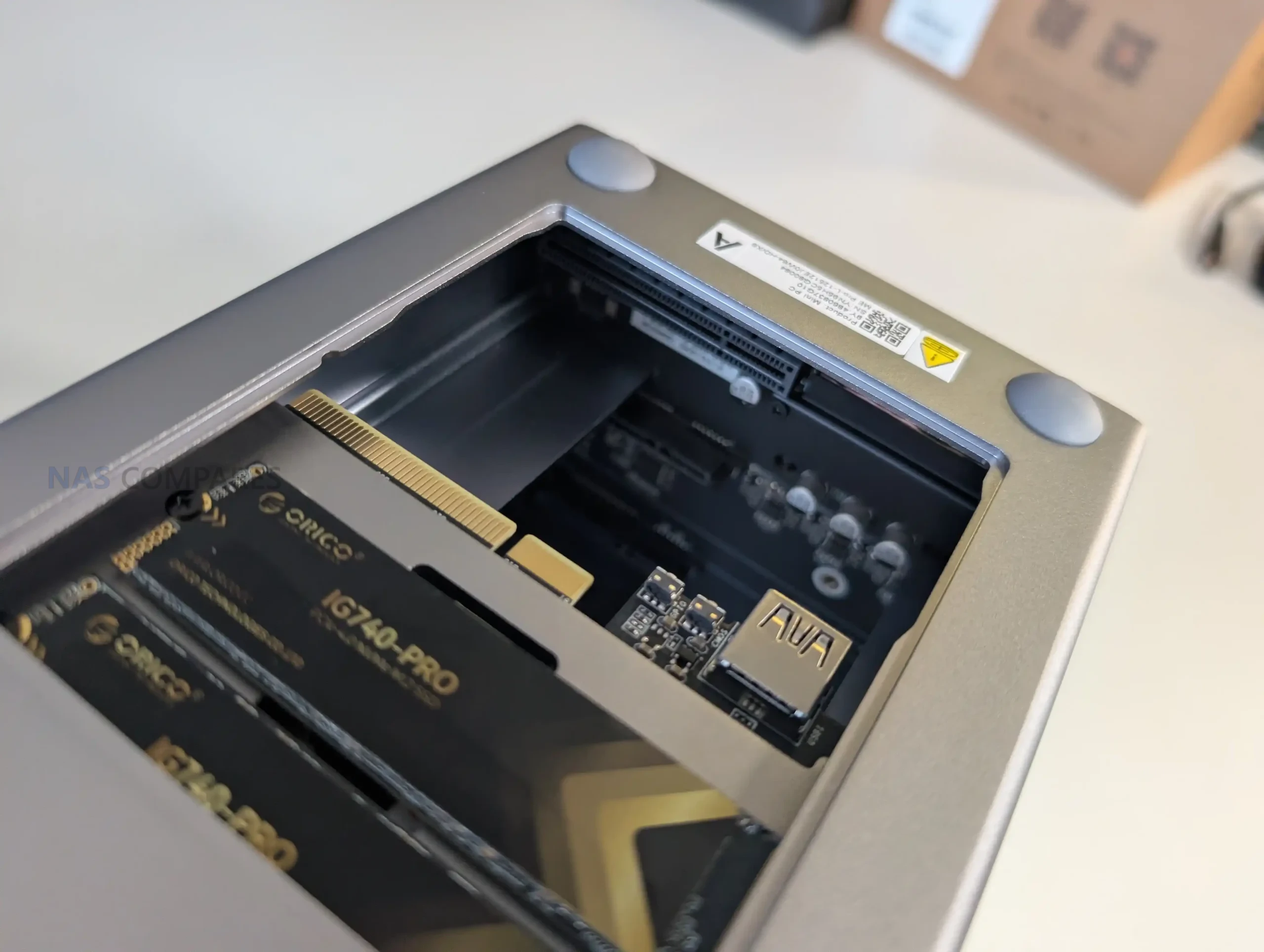
The ME Pro is built around user access rather than treating the internals as a sealed appliance. The manual’s process is simple: remove the magnetic cooling mesh cover, unscrew and pull out the hard drive bracket, and use the bottom access panel to reach the M.2 slots. A screwdriver is stored in the base under a silicone pad, so the tool required for basic access is physically included with the device. The ports and recovery related features also acknowledge user servicing, with items like a reset hole and a CLR CMOS function shown in the manual.
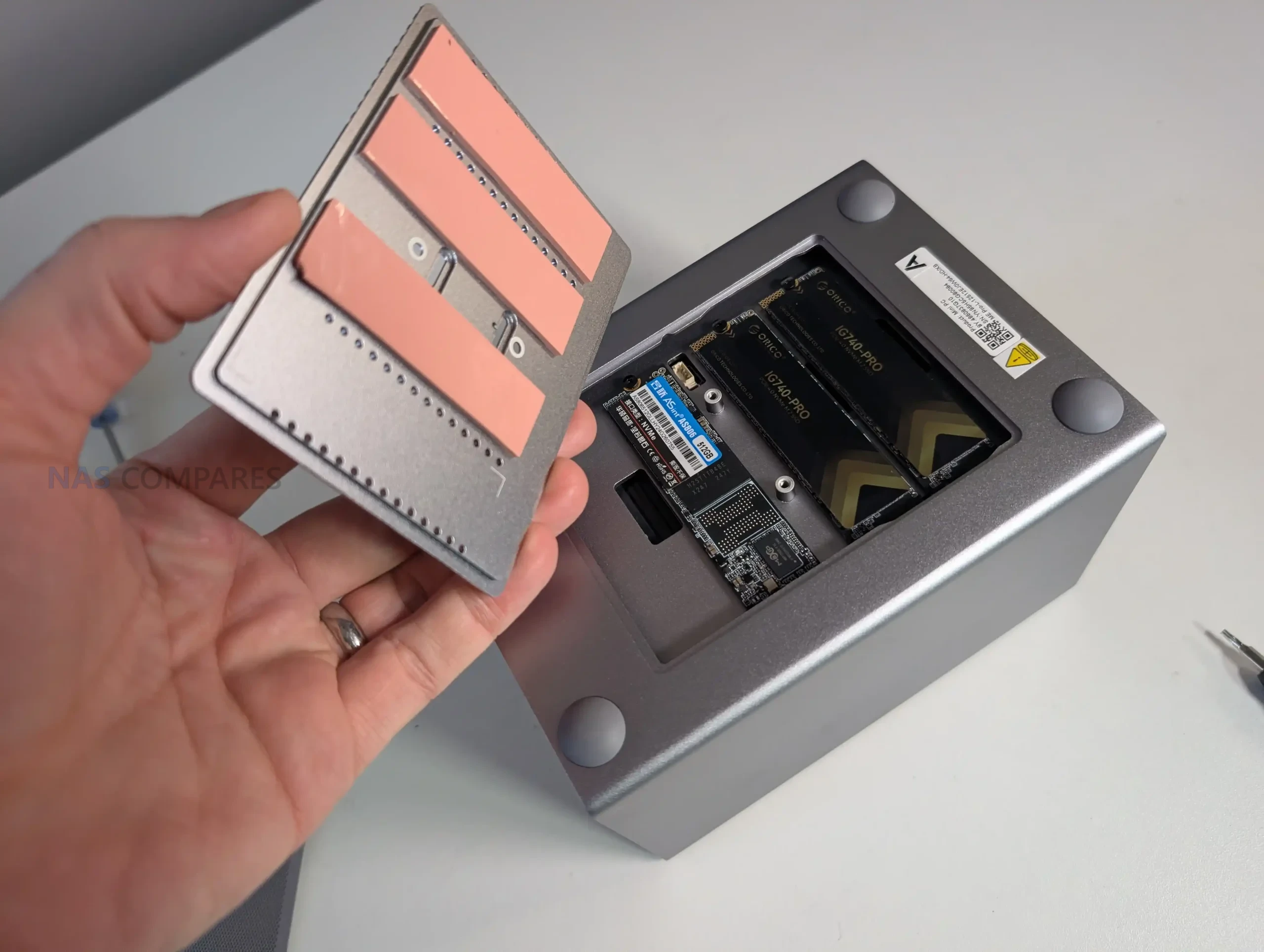
In day to day handling, the layout is designed to slide out and reassemble in a specific order, and it generally supports the idea of quick cleaning and drive installation without full disassembly. At the same time, access relies on small screws and tight tolerances, so it is not a tool-less experience. In your first impressions, the mechanism for sliding the internal assembly out felt solid and precisely aligned, but you also noted that the included tool is very small and can be fiddly to use. The result is a design that prioritizes compact service access, but still expects careful handling during installation and maintenance.
#4 Great Base Memory Quantity at a time when RAM costs are BONKERS
From the start, the ME Pro is configured with either 12GB LPDDR5 4800MHz on the N95 models or 16GB LPDDR5 4800MHz on the N150 models, rather than shipping with a minimal memory pool that immediately pushes users toward an upgrade. In practical NAS use, that baseline capacity is relevant because it can influence how comfortably the system handles common add-ons such as containers, light virtualization, background indexing, and multiple concurrent services, depending on the operating system and workload. It also reduces the likelihood that memory becomes the first immediate bottleneck for typical home and small office setups.
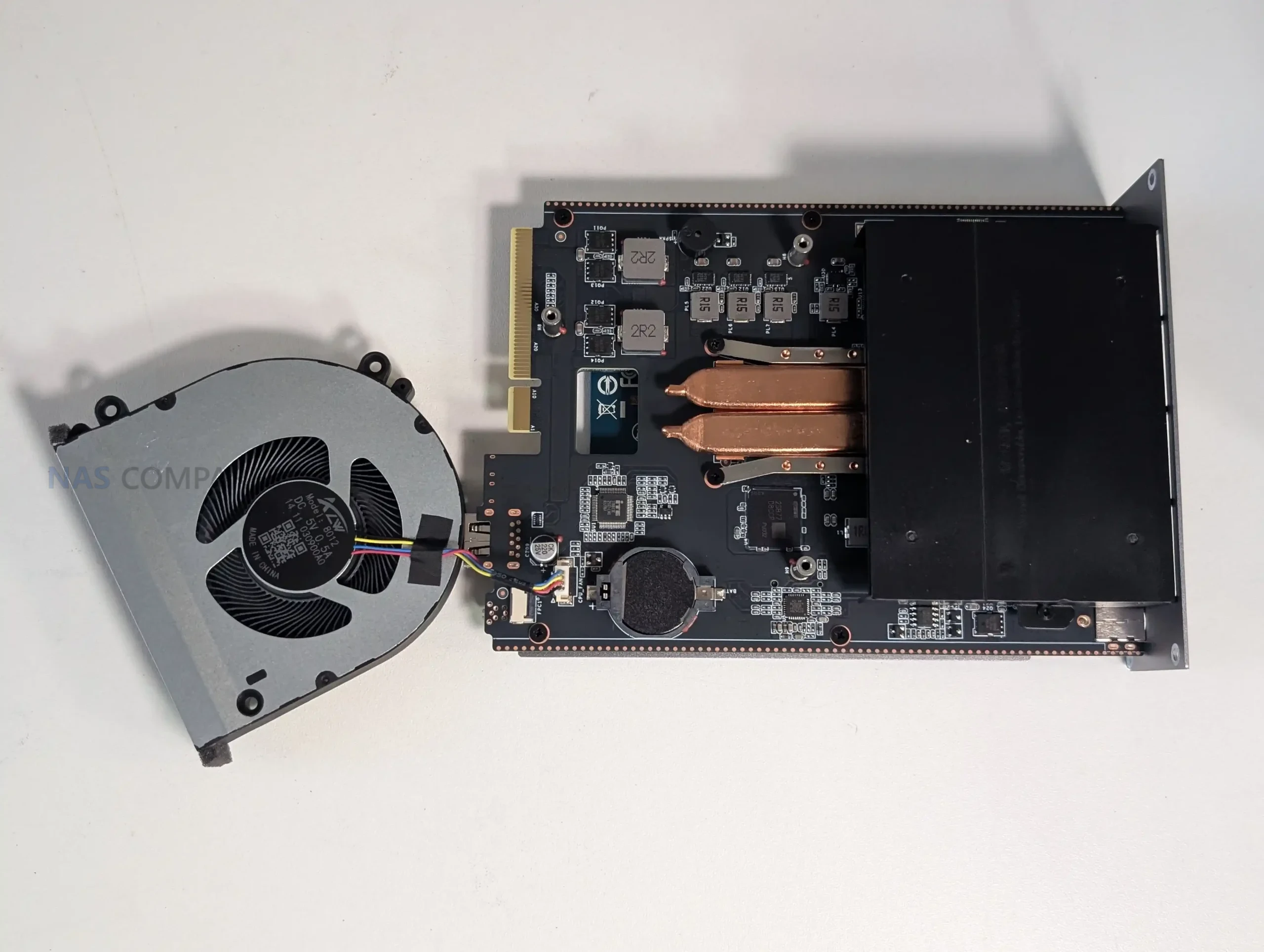
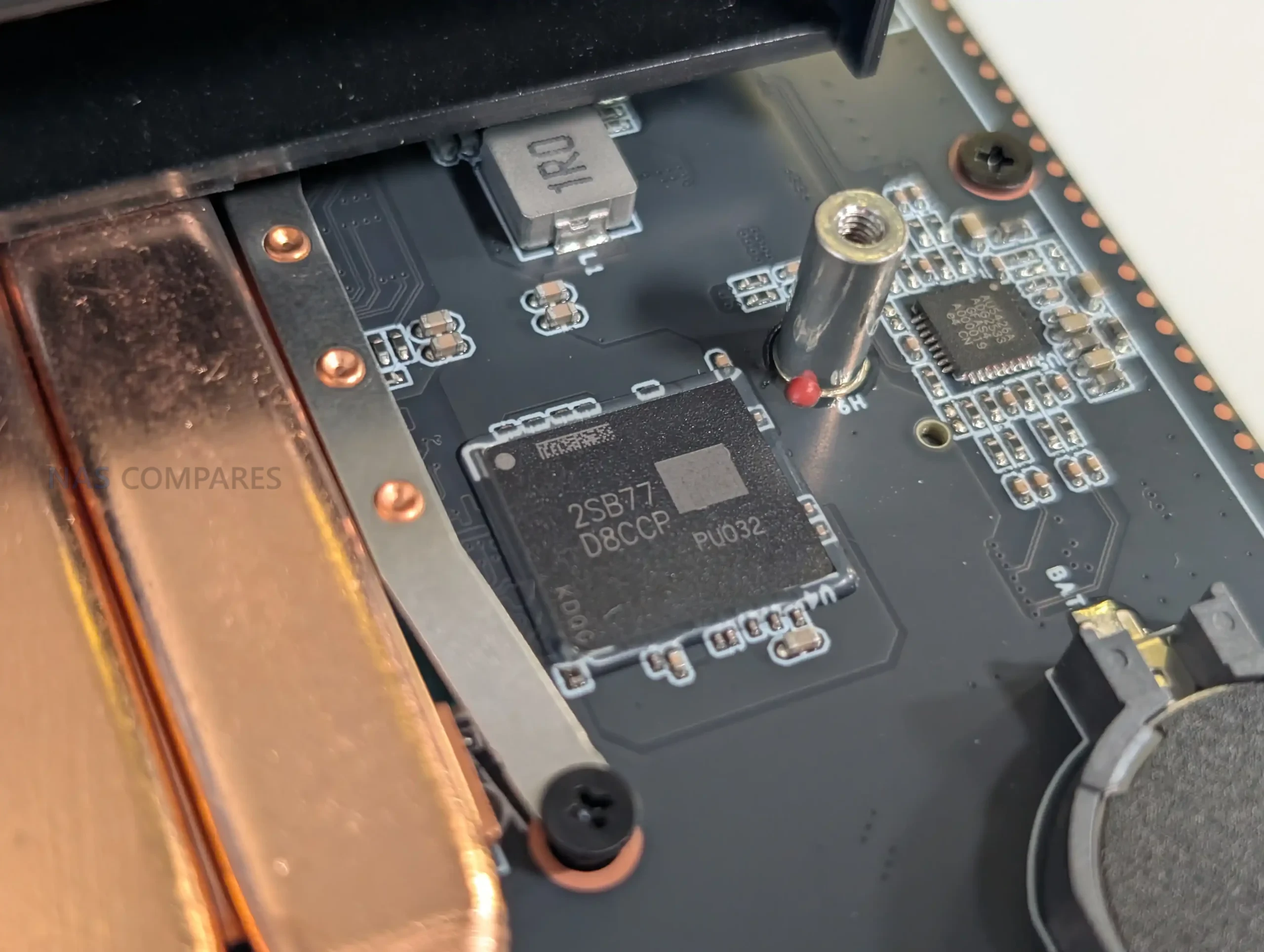
The tradeoff is that this approach is linked to the way the memory is implemented. In your inspection of the unit, you noted there is no SO-DIMM slot and the RAM appears soldered to the board, which means users are effectively choosing their memory tier at purchase rather than treating it as a later upgrade (more on that in a bit). This makes the initial configuration choice more important, especially for buyers who already know they will run heavier applications or multiple VMs over time.
#5 Genuinely unique modularisation and upgradability in a pre-built solution, which I have ever seen
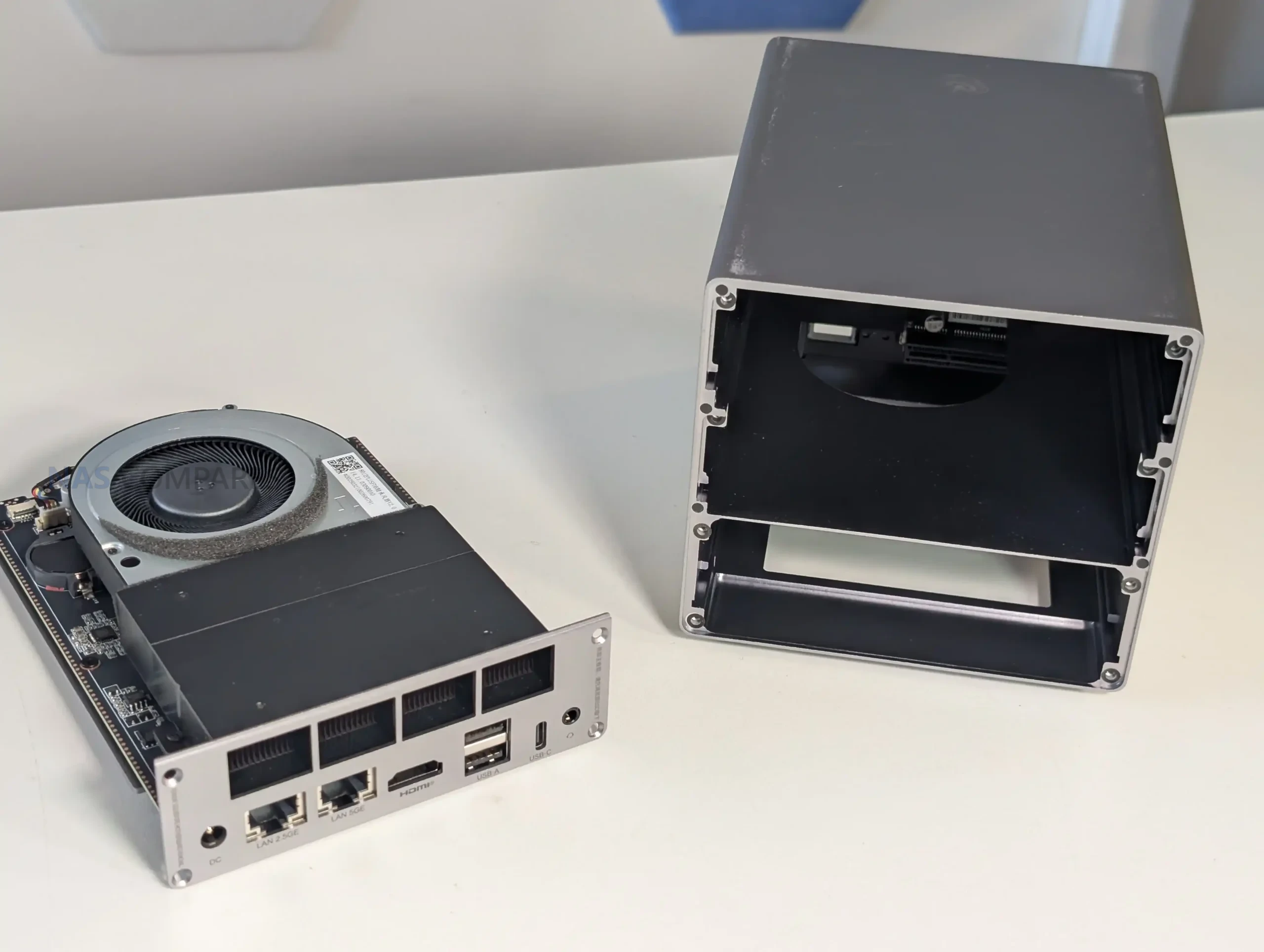
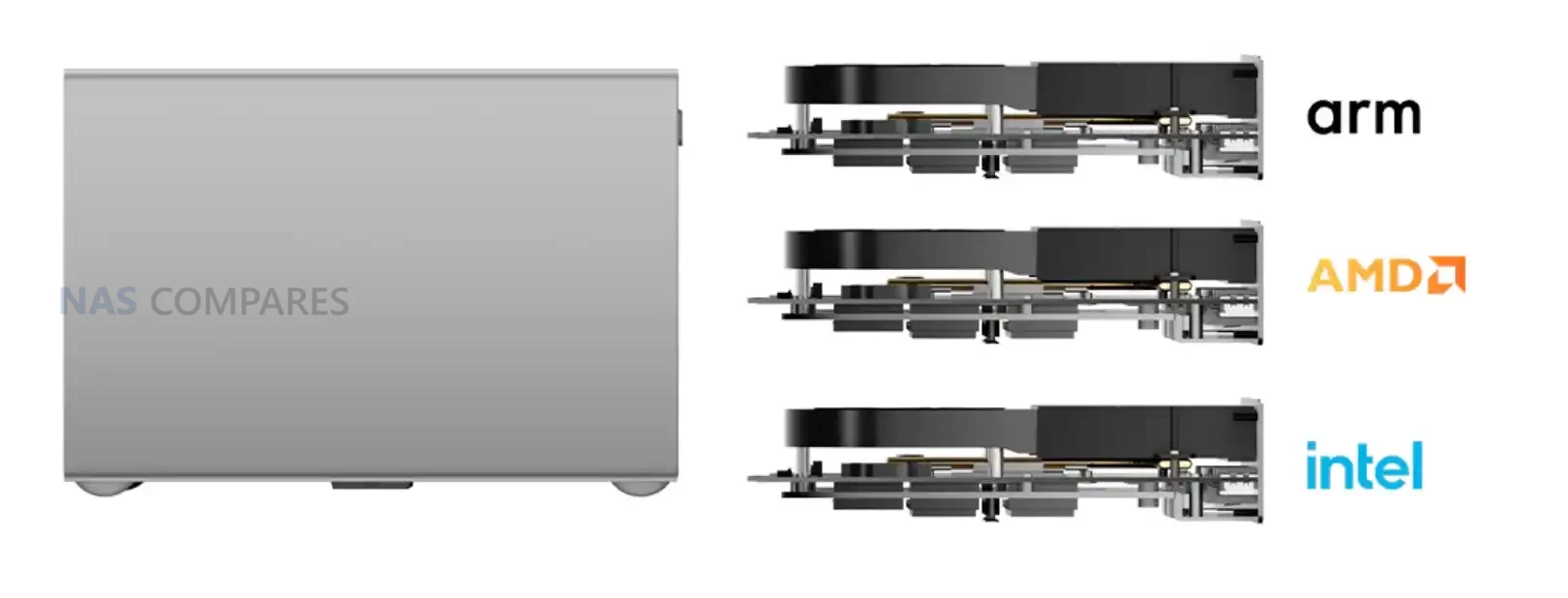
The ME Pro’s most unusual design claim is the swappable modular motherboard. Beelink markets the system as supporting interchangeable boards across Intel, AMD, and ARM options, using a drawer style layout intended to let the main compute board slide out rather than being permanently fixed inside the chassis. The product page frames this as a way to avoid replacing the entire enclosure when you want a different CPU platform, and instead treat the chassis, drive housing, and general structure as the long-term part of the purchase.
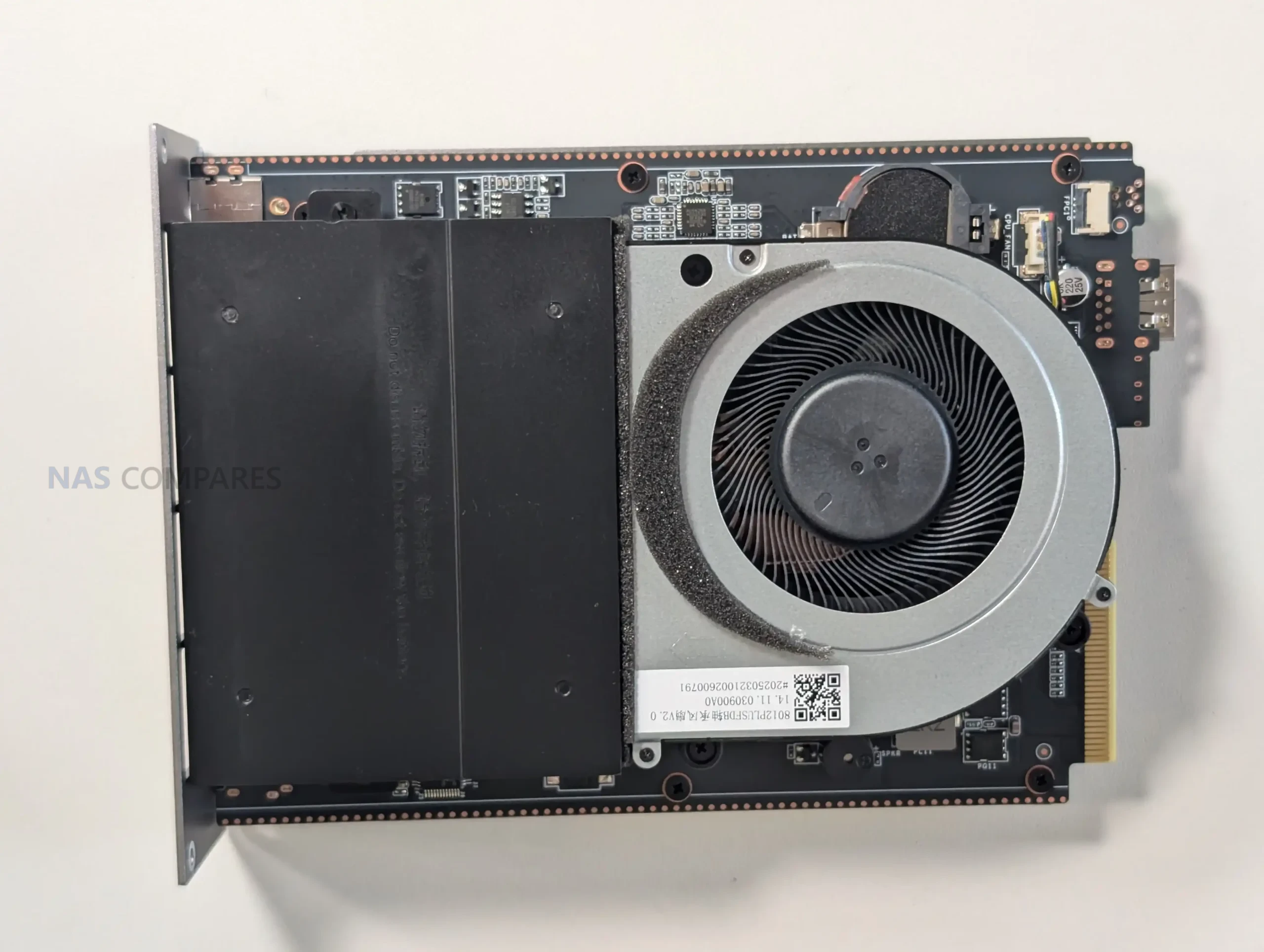
In practical terms, this concept will only matter if Beelink actually sells the alternative boards at sensible pricing and maintains availability over time, but the physical architecture appears to be built around the idea. Your first look showed a clear internal separation between the board assembly and the rest of the enclosure, and you also observed hints of planned scale-up hardware, such as layout markings that suggest different future storage or platform variants. For buyers who like the idea of extending a system’s usable life without a full rebuild, the ME Pro is one of the few pre-built NAS style devices currently trying to formalize that upgrade path rather than leaving it to a full case swap.
Reasons You Might Want to Skip the Beelink ME Pro NAS
The ME Pro’s compact design and connectivity focused feature set come with tradeoffs that will matter to some buyers more than others. Several of the core choices are linked together, meaning you get the small chassis, the storage density, and the modular drawer approach, but you also accept limits around upgrades, physical handling, and how the platform is configured from the factory. This is not a device where every part is meant to be user replaceable or easily swapped in the way a DIY small form factor build would be.
It is also worth treating the launch configuration and roadmap as part of the buying decision. The product is being introduced with very similar Intel CPU options and fixed memory tiers, while the company is already pointing toward future AMD and ARM variants and possible expanded layouts. For some buyers, that is a reason to wait until the wider range exists and the upgrade parts are actually available. For others, the current design constraints are enough to prefer a more conventional 2-bay NAS that is larger, simpler to work on, and has clearer long-term upgrade paths.
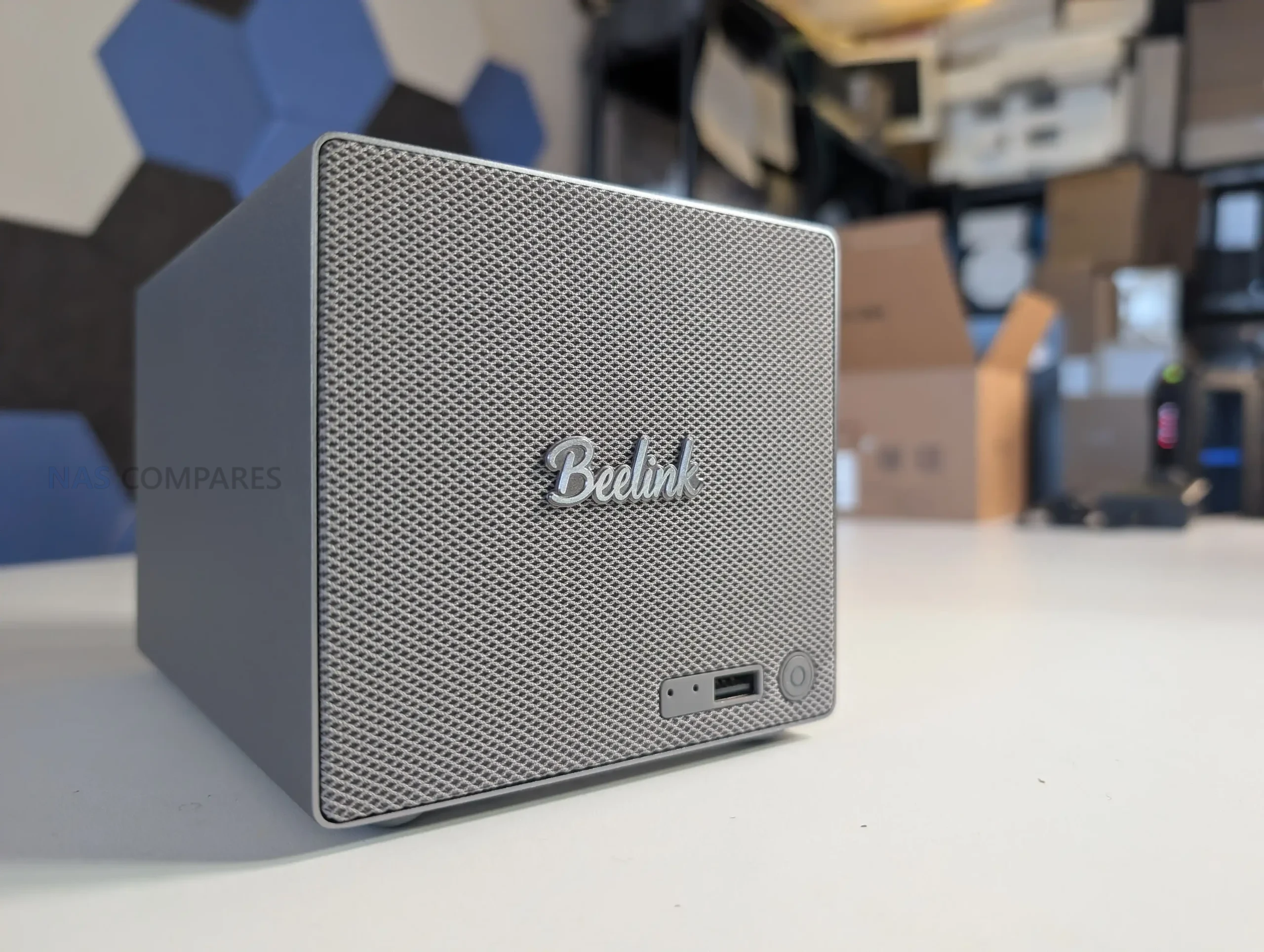
The RAM is FIXED (i.e cannot be upgraded or changed)!!!
The ME Pro uses LPDDR5 memory (12GB on the N95 models, 16GB on the N150 models), and based on the internal layout you inspected, there is no SO-DIMM slot for user upgrades. In other words, the memory appears to be soldered to the motherboard rather than installed as a replaceable module. That makes the initial purchase configuration more important than on many small NAS builds where memory can be upgraded later as needs change.
The practical impact shows up when your usage grows beyond basic file storage. If you plan to run multiple containers, heavier indexing tasks, or virtual machines, memory headroom can become a limiting factor long before CPU or network does, depending on the OS and services you deploy. With this platform, there is no simple path to increase RAM after purchase, so anyone unsure about future requirements may prefer a system with upgradeable memory, or may want to treat the 16GB model as the safer long-term option by default.
The design is so, so very tight!
The ME Pro’s small enclosure is achieved through very tight internal tolerances. That is visible in how the drive bracket, motherboard drawer area, and storage zones are packed together, and it influences the overall experience during installation and servicing. The system relies on screw mounting for drives rather than a click-in tray approach, and while the manual provides clear steps, the process assumes careful alignment rather than quick, tool-less handling. This level of precision fit is likely part of how Beelink is trying to control airflow and improve thermal transfer in a compact space, and it also aligns with their noise and vibration messaging around tightened mounting and silicone dampening.
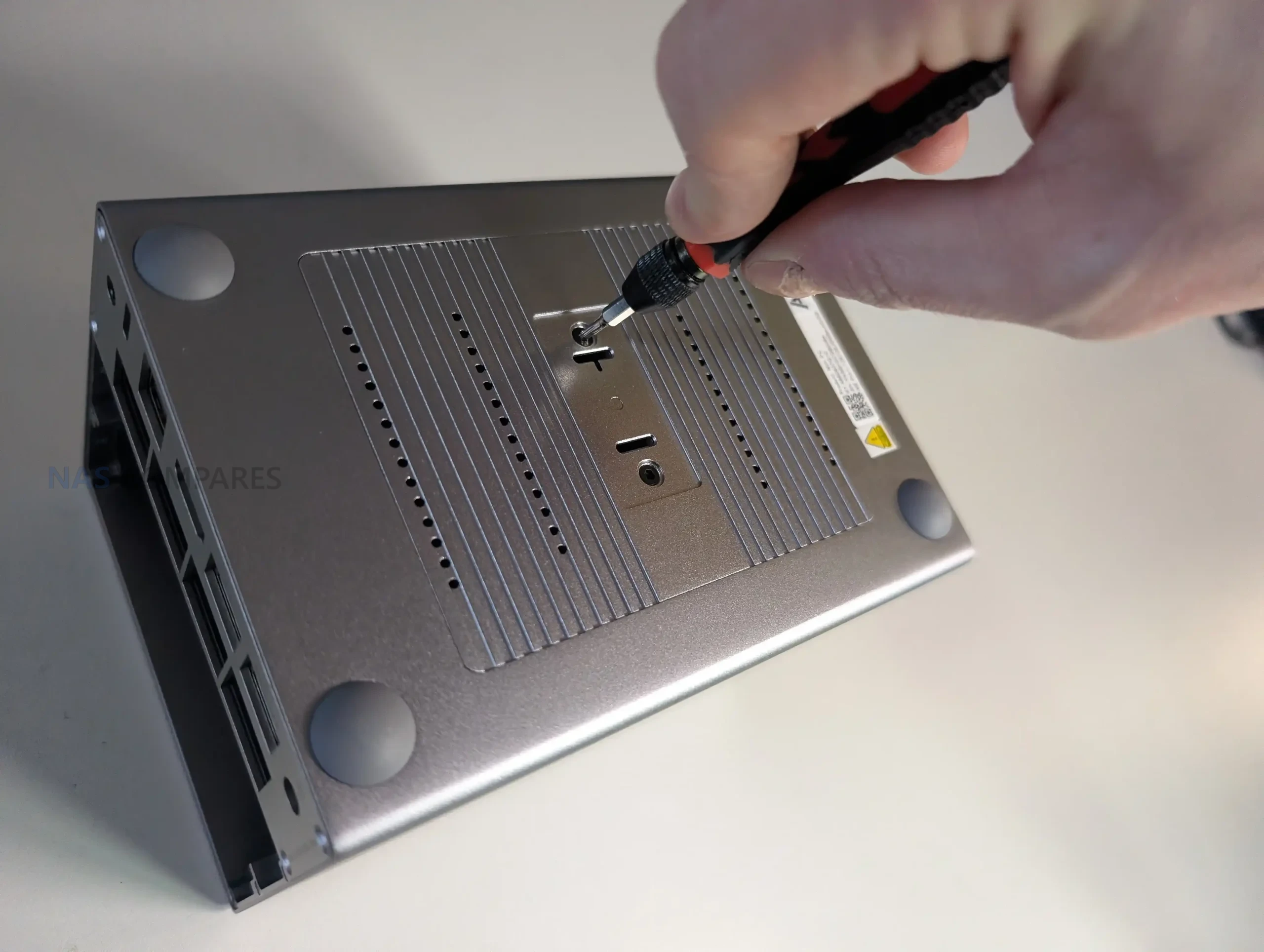
In the first impressions, that tightness showed up most clearly when inserting and removing components. Slotting the hard drive bracket and drives could feel rough at times, with very little clearance to work with, and the internal assembly can require a firmer push to seat correctly. Even if the compact fit is helping with heat dissipation and vibration control, it remains a very tight build, and it is less forgiving if you are frequently swapping drives, testing different storage combinations, or repeatedly opening the chassis. The end result is a device that looks clean and flush when assembled, but can feel constrained during hands-on work compared with a larger enclosure with more physical margin.
Launching the N95 version and N150 version was an odd choice (i.e very similar processors)
At launch, the ME Pro is offered in N95 and N150 variants, and on paper these CPUs sit very close to each other. Both are 4-core, 4-thread Intel N-series parts with 6MB cache, and the headline frequency difference is modest: up to 3.4GHz on the N95 and up to 3.6GHz on the N150. For many NAS workloads that are constrained by storage or network throughput rather than CPU, this kind of gap may not translate into a clearly different experience, especially once real world thermal and power limits are applied.
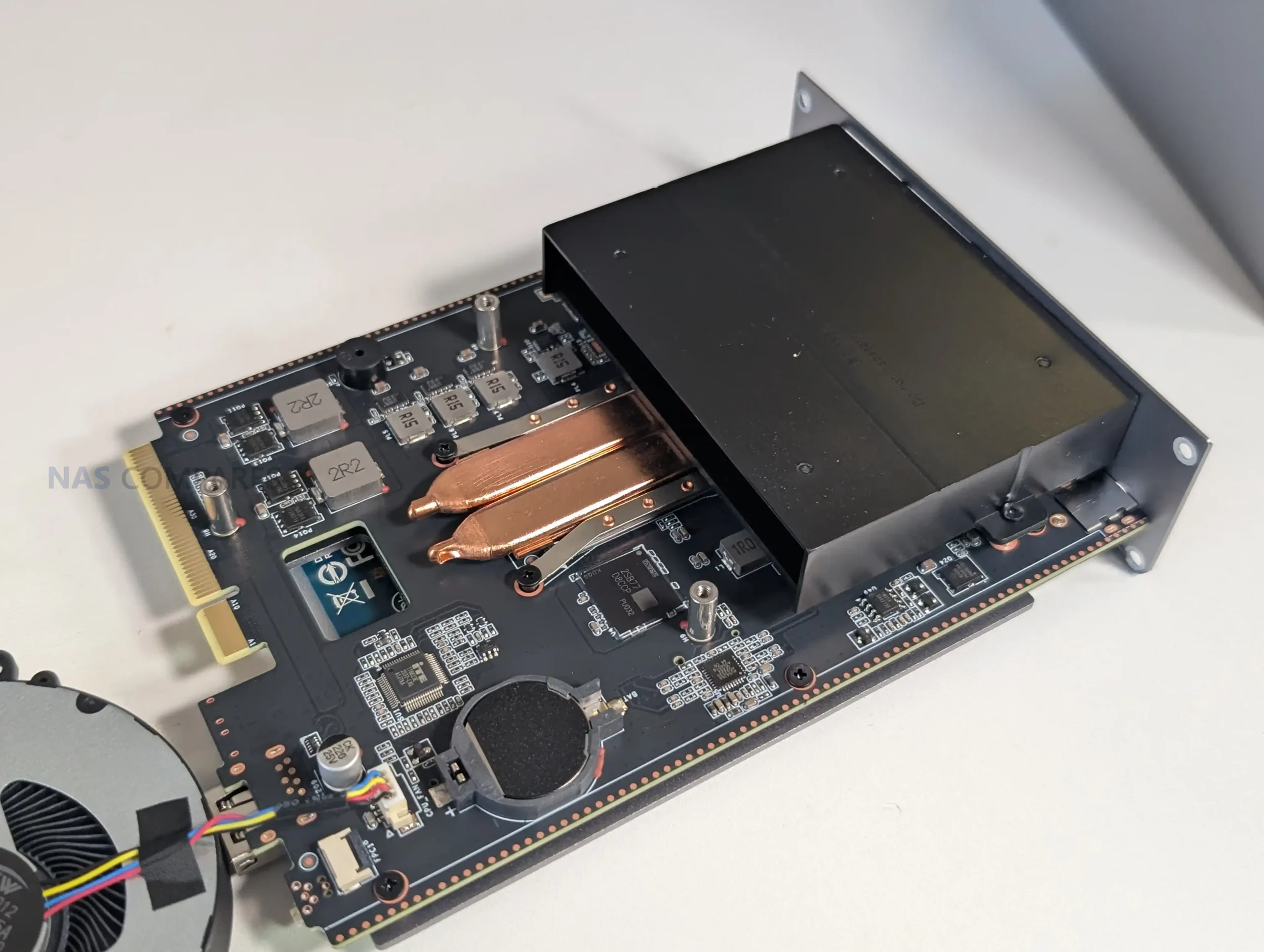
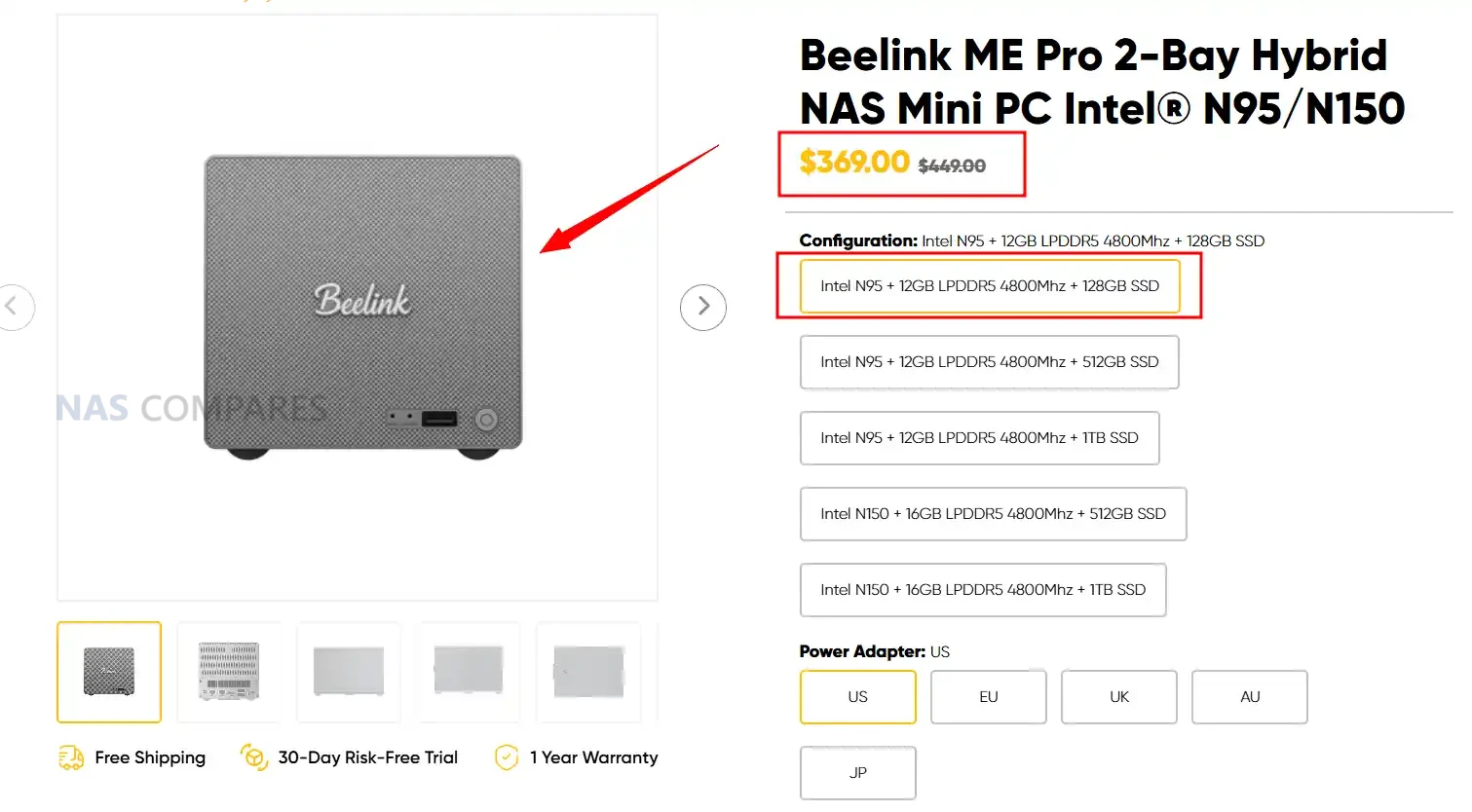
This tight spacing makes the product stack less clear than it could be, because the pricing difference between the entry and higher tier configurations is not simply paying for a meaningfully different platform. In practice, buyers are also paying for the memory and SSD tier attached to each CPU option, and in your case the non-upgradeable memory makes that choice more permanent. If the goal is to segment the lineup, the N95 and N150 pairing may feel like a small step that leaves some users waiting for a more distinct higher performance option rather than choosing between two closely related CPUs. Given the noise that Beelink has made about this expanding range, that only further encourages some users who think these CPUs a little timid, to remain on the fence a bit longer….
There are other CPU/Architecture versions coming
As mentioned, Beelink is already signalling that the ME Pro chassis is intended to outlive the initial Intel configurations. The official product messaging highlights a swappable modular motherboard concept and explicitly references future boards beyond the current Intel N-series options, including AMD and ARM. In your first look, you also noted visible hints inside the unit that suggest the internal layout has been planned with other variants in mind, rather than being a one-off design limited to the launch hardware.
For buyers, this creates a timing question. If those alternative boards and models arrive soon, they may offer clearer performance separation, different feature priorities, or a better match for specific workloads. At the same time, the current purchase decision depends on what is available today, not what is promised, and the value of the modular approach only becomes real once the upgrade boards can actually be bought at reasonable pricing. Until the roadmap becomes a shipping product line, some users may prefer to wait, while others will simply evaluate the current N95 and N150 models on their own merits.
Mixed M.2 Speeds at PCIe 3.0 x2 and PCIe 3.0 x1? Was 10GbE and uniform lanes discussed instead?
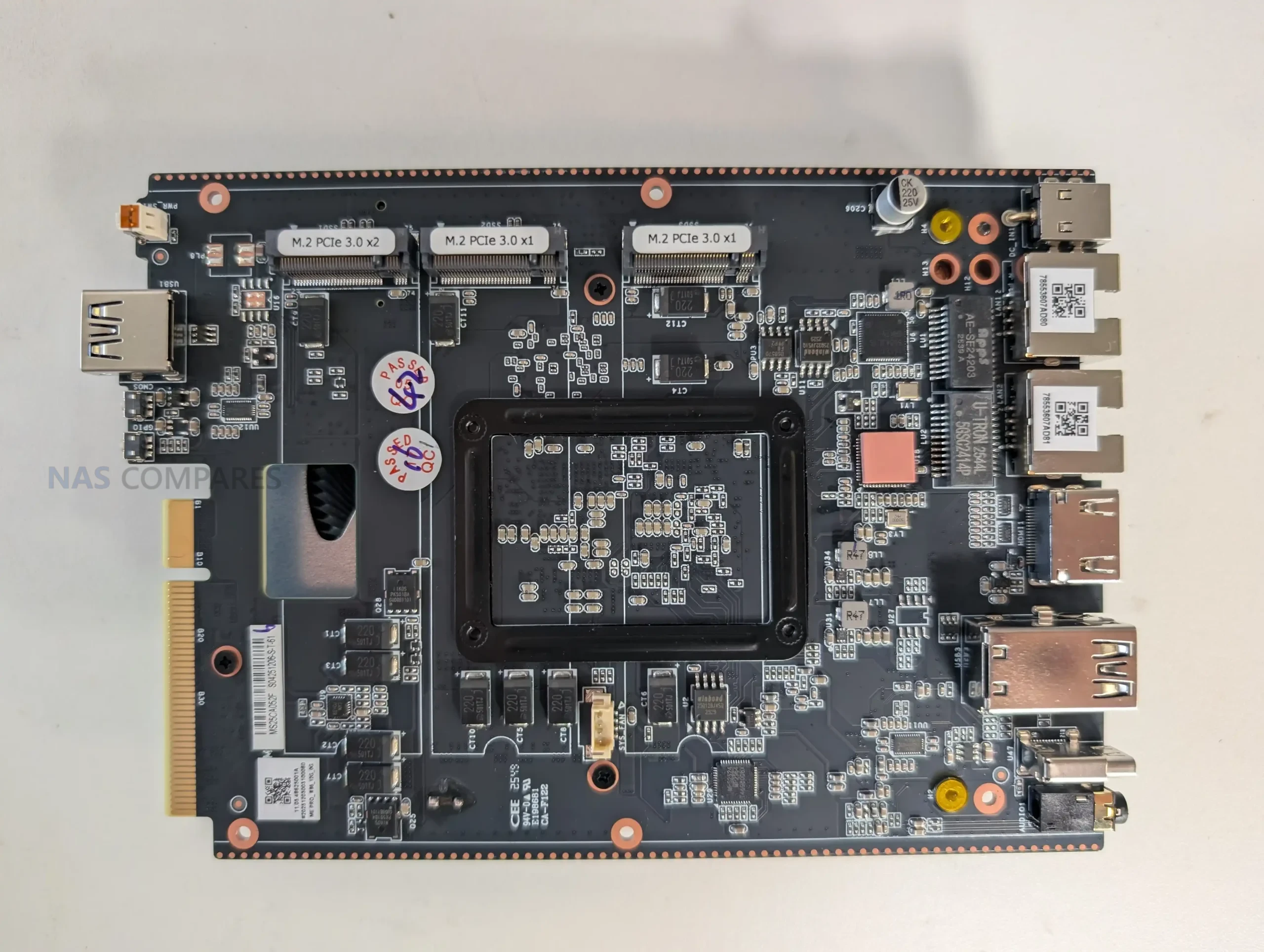
The ME Pro’s 3 M.2 NVMe slots are not equal. Slot 1 is PCIe 3.0 x2, while slots 2 and 3 are PCIe 3.0 x1, and the manual specifically recommends using slot 1 for the system drive because it is the fastest slot. In practical terms, this creates a tiered NVMe layout where one drive has higher potential bandwidth than the other 2, which can influence how you plan cache, containers, VM storage, or scratch workloads. It also means peak NVMe performance depends heavily on which slot you choose, not just the SSD you buy.
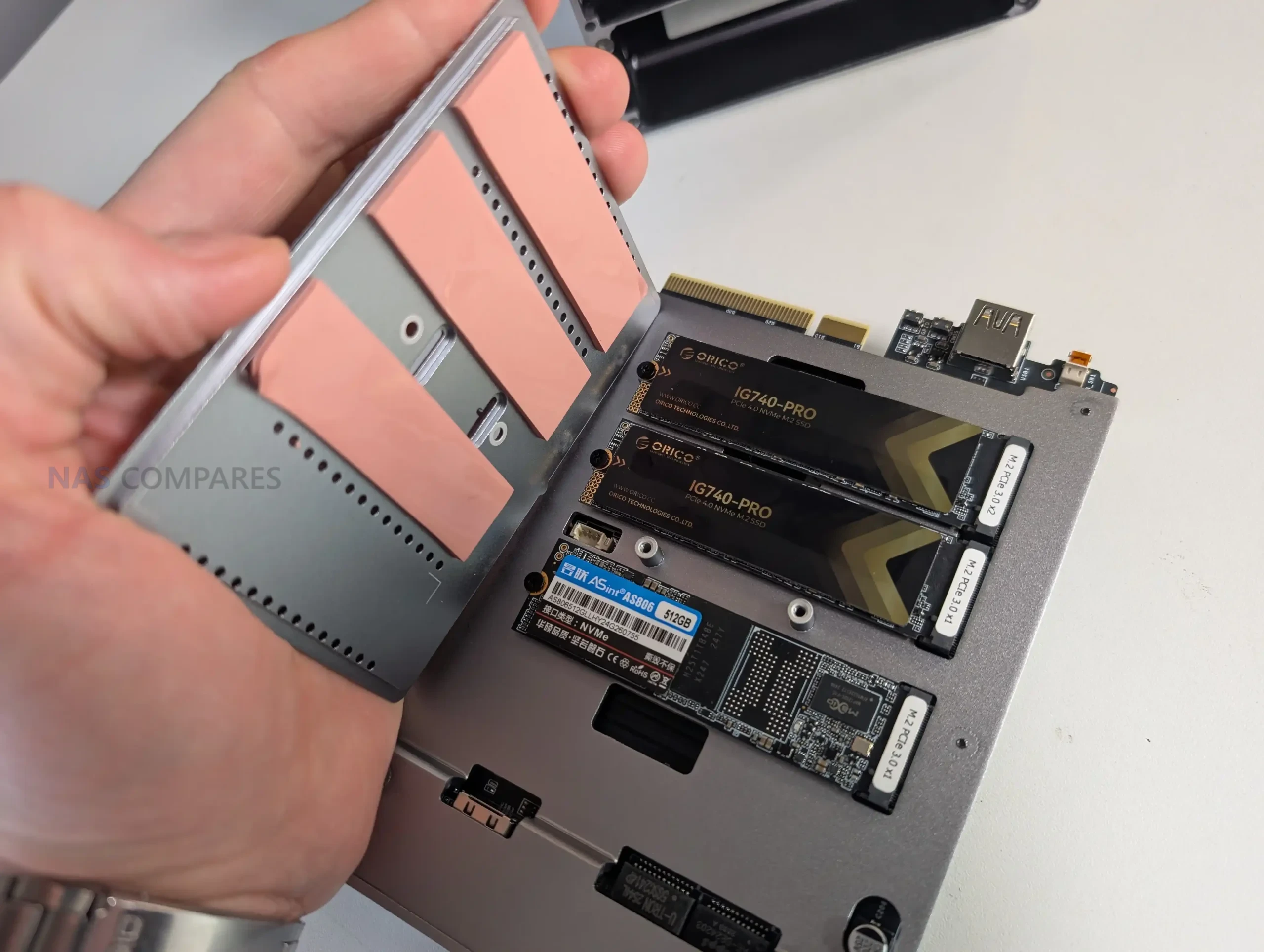
That design choice raises an obvious tradeoff question: whether the platform would have been better served by a different allocation, such as keeping all 3 M.2 slots at PCIe 3.0 x1 in exchange for other connectivity, or prioritizing a different network tier such as 10GbE (though arguably, it might well have to sit at 3×1 and potentially be bottlenecked to 800-900MB/s, unless that lowered the m.2 to x2 bays). The ME Pro already includes 5GbE plus 2.5GbE, so the networking is not low end, but the mixed NVMe lane widths still make the storage side feel uneven by design. For a NAS focused build, the practical impact will depend on real testing: whether the internal topology causes contention under mixed loads, and whether the faster slot meaningfully benefits common tasks once network and SATA throughput are considered.
Conclusion & Verdict – Should You Buy the Beelink ME Pro NAS?
The Beelink ME Pro is a compact 2-bay NAS platform that combines SATA storage with 3 M.2 NVMe slots, dual wired networking, and integrated wireless in an enclosure that prioritizes density and internal access. It also introduces a modular motherboard drawer concept that, if supported with real upgrade boards over time, could change how long the chassis remains useful compared with typical pre-built NAS systems. As a hardware package, it is aimed at users who want high connectivity and mixed storage options without moving to a larger box.
At the same time, several of its main limitations are set at purchase and cannot be easily changed later. The memory appears fixed, the internal fit is very tight during drive and bracket handling, and the launch CPU options are closely spaced rather than clearly separated performance tiers. The NVMe layout is also mixed speed by design, which affects how you should plan drive placement and workloads. Whether these tradeoffs are acceptable depends largely on how much you value the enclosure size, the network ports, and the promised modular roadmap versus the more conventional upgrade flexibility of larger or more established NAS designs.
| Where to Buy the Beelink ME Pro NAS: |
📧 SUBSCRIBE TO OUR NEWSLETTER 🔔
🔒 Join Inner Circle
Get an alert every time something gets added to this specific article!
This description contains links to Amazon. These links will take you to some of the products mentioned in today's content. As an Amazon Associate, I earn from qualifying purchases. Visit the NASCompares Deal Finder to find the best place to buy this device in your region, based on Service, Support and Reputation - Just Search for your NAS Drive in the Box Below
Need Advice on Data Storage from an Expert?
Finally, for free advice about your setup, just leave a message in the comments below here at NASCompares.com and we will get back to you. Need Help?
Where possible (and where appropriate) please provide as much information about your requirements, as then I can arrange the best answer and solution to your needs. Do not worry about your e-mail address being required, it will NOT be used in a mailing list and will NOT be used in any way other than to respond to your enquiry.
Need Help?
Where possible (and where appropriate) please provide as much information about your requirements, as then I can arrange the best answer and solution to your needs. Do not worry about your e-mail address being required, it will NOT be used in a mailing list and will NOT be used in any way other than to respond to your enquiry.
 TRY CHAT
Terms and Conditions
TRY CHAT
Terms and Conditions





|
 |


UniFi Routers vs OpenWRT DIY Routers - Which Should You Choose?
WHY IS PLEX A BIT S#!t NOW? IS 2026 JELLYFIN TIME? (RAID Room)
Synology FS200T NAS is STILL COMING... But... WHY?
Gl.iNet vs UniFi Travel Routers - Which Should You Buy?
UnifyDrive UP6 Mobile NAS Review
UniFi Travel Router Tests - Aeroplane Sharing, WiFi Portals, Power Draw, Heat and More
Access content via Patreon or KO-FI
Discover more from NAS Compares
Subscribe to get the latest posts sent to your email.
need better processors for proxmox. using me mini for months now, n150 is limiting and also need better power handling for power hungry nvmes
REPLY ON YOUTUBE
9 M.2 NVMe on a 9 PCI-E lane N150, where some of the lanes are already reserved by NICs etc… Not so good choice. That would mean that PCI-E switch chip would be used, so bye bye ASPM support.
I hope they will redesign it with higher PCI-E lanes count CPU, even if that would meant a higher price for the base unit. If you have money for 9 NVMe drives in this economy, then additional $50-$100 for the base unit is nothing ????
REPLY ON YOUTUBE
I have a self build Unraid box with the OS on a mini flash drive. Has this a usb port some where that I can plug the drive into and have a working system ? I note the usb a on the back and wonder if that is it ?
REPLY ON YOUTUBE
Amazing! This means modular upgrades are possible. One NAS can support multiple systems, AMD/Intel/ARM…
REPLY ON YOUTUBE
I need a little help!
I had hoped the Pro version that was still M.2vme based like the mini. So my mini is finally coming possibly tomorrow. And to be cautious and because I heard there are issues #1. power issues with running all 6 SSD slots so I decided on using just 5 and #2 installing TruNas on the EMMC drive has quirks?.. but does it still? I would have thought Belink would have addressed this? What if I use HexOS? Do I still need to do anything special to install on the EMMC before installing Hex? Is Hex on EMMC even an option with the Mini?
REPLY ON YOUTUBE
Incredible i just purchased an 8GB module for my synology and this video came out 🙂
REPLY ON YOUTUBE
Will 32 GB of RAM be enough for the new AI NAS from UGREEN ? iDX 6011
REPLY ON YOUTUBE
yes.
its a marshall :))
REPLY ON YOUTUBE
Most important, it’s power consumption please
REPLY ON YOUTUBE
its design with advanced cooling and structure makes it perfect for users who need continuous 24/7 operation.
REPLY ON YOUTUBE
0:19 it’s the warning for the BIOS battery usually in the CR forms (2032/2025 or smaller)
they could cook your throat and basically kills you if you swallowed them
REPLY ON YOUTUBE
You need to get a better microphone
REPLY ON YOUTUBE
Hi good video but I wonder from where does the fan takes fresh air, it seems that pulls air from the HDD trays which would be hot if the drives are running.
REPLY ON YOUTUBE
What type of raid benefits from different types and sizes of media? I can’t imagine a use case where you’d want to mix nvme with spinning rust. It’d be one or the other?
REPLY ON YOUTUBE
What battery are they talking about? a CMOS battery? or does it have a built-in battery for safe shutdown in power outages?
REPLY ON YOUTUBE
Honestly this is such a disappointment. I was hoping for at least an N300 option or even something with a Core I5. I don’t need another 4 core box of which there are alrdy enough on the market.. There is definitely no “pro” with this weak CPU options.
REPLY ON YOUTUBE
For what it is though, it’s quite pricey as a two-bay solution.
REPLY ON YOUTUBE
ugreen dh4300 plus can use any 2.5 ssd
REPLY ON YOUTUBE
Personally I wouldn’t go below 16 or even 32GB of ram but it all depends on number and size of disks and additional services running on your NAS.
I use 128GB in my NAS, actually it’s Proxmox with multiple VMs/containers, with 12x14TB hdds (ZFS), Plex/Jellyfin, Windows VM with RTX for remote gaming and some more.
Should have maxed out 256GB when the prices were low 🙁
REPLY ON YOUTUBE
Prediction: Overheating HDD.
The thermal pads look like a hack to keep the sensors showing lower temperature as that might be where HDD temp sensors are located. The heat from the top HDD has nowhere to go and I would not be surprised if it reaches 50C.
REPLY ON YOUTUBE
This video provides a first look at the Beelink ME Pro NAS, highlighting its compact design, two SATA HDD bays, and three M.2 NVMe bays (0:40). The reviewer discusses the device’s ventilation, design aesthetics (3:18), and accessibility for maintenance (4:45). Key components like the Intel N95 CPU (8:00) and Wi-Fi 6 support (8:50) are mentioned, along with initial pricing and configuration options starting at $369 for the base model (9:40). The video also touches on the potential for swappable CPU/motherboard boards in future versions (11:00).
REPLY ON YOUTUBE
I don’t really like these “upgradable ecosystem” units, you sort of get locked into what they make period. Fully DIY is independence.
REPLY ON YOUTUBE
Linux test mandatory ! Beelink Mini is fine so I see no issues but this is not negotiable. I try to avoid spyware.
REPLY ON YOUTUBE
‘Don’t swallow batteries’ not an uncommon disclaimer for lots of devices that uses button cells becaseu small children can swallow them (something like CR2032 which is very commonly used for motherboard CMOS battery). It’s a legal ‘slopey shoulder’ for manufacturer to shift the legal responsibility to the end user, same as the ‘asphyxiation warning’ on a lot of plastic bags.
REPLY ON YOUTUBE
Great intro Robbie, your creativity and innovation is top notch…. I’d like to see you open your jacket and have seagull come out… And then have you yell at them ????
REPLY ON YOUTUBE
Simpler to just max the RAM out and forget about it
REPLY ON YOUTUBE
Interesting product. Though, I wonder about thermal profile and whether there is enough air flow to cool HDDs, SSDs, and CPU. I’m afraid HDDs will be frying there.
REPLY ON YOUTUBE
expensive..
REPLY ON YOUTUBE
I bought 5 years ago a Qnap NAS, and thanks to this channel i was able to equipe the device with a 16Gb crucial memory stick.
Thanks!
REPLY ON YOUTUBE
The drawer-style motherboard of ME Pro makes upgrading feel much less painful. Great job, Beelink!
REPLY ON YOUTUBE
32gb in both nas devices, qnap and synology. I use both exclusively for a movie server
REPLY ON YOUTUBE
Can NAS makers please stop having just two HDD bays. If you want any type of redundancy you will loose 50% of the capacity in a RAID1. If you have at least three drives there are so many more options and you only loose 33% of the capacity.
REPLY ON YOUTUBE
I really want an AMD version with support for ECC ram.
REPLY ON YOUTUBE
0:07 is this a music channel? Lol
REPLY ON YOUTUBE
Styling wise, its pretty snazzy.
REPLY ON YOUTUBE
I need no RAM in my NAS, because RAM doesn’t exist anymore… I’m so mad that I didn’t pull the trigger on 64GB DDR5 on eBay just before price hikes and was like – naaaah, I don’t need that in a NAS, and if I do, I will just find another deal… >.>
REPLY ON YOUTUBE
idk, my requirement is that it’s gotta be a 4-bay minimum
REPLY ON YOUTUBE
Nice intro sketch! Also Gamer Nexus in last video make _memory desappear_ sketch!
REPLY ON YOUTUBE
Perfect, love it
REPLY ON YOUTUBE
Too expensive! Paying $300 for the aluminum box? Pass…
REPLY ON YOUTUBE
I guess they went with an aluminium case for heat dissipation. Shame it couldn’t be plastic for reduced noise if using 3.5” drives.
REPLY ON YOUTUBE
looks nice, I would still like one with 4 bays and 10gbe.. that will be instant buy
REPLY ON YOUTUBE
Great first look. Can’t wait to see more. I regret not getting the ME mini last summer when it was $199. Price is now $269.
REPLY ON YOUTUBE
Waiting for 4-Bay version, 2-Bay is too small for my needs. I will pre-order 4-Bay instantly. Very nice design indeed: Wifi 6 card is just so awesome. Good engineering on hardware making sure thermal design is better, remember HDDs cannot cool down without air flowing over them, heat pads in the bays will help dissipate heat to the chassis. For future, I want them to smooth out the aesthetic details next: make the sliding out motion of bays smoother with better tolerances on aluminum chassis, remove that ugly Beelink logo from front, remove the warning on the air vents at the back, that warning should go on a manual not on hardware, and don’t use hex screws but Philips PH0 screws. I want them to offer a premium 4-Bay version: i5 CPU, 1TB NVMe, WiFi7 and optional ECC RAM. WiFi7 will allow me to use it as a “wireless” NAS. The way Beelink is going, in future they are going to outdo Ugreen 8-bay NAS very easily and with better hardware. I love this competition and Beelink’s progress.
REPLY ON YOUTUBE
Love the look and features. Would be curious if the compute sled can run outside of the case. If it can, super cool! It’d be slick to have a mini-rack cluster of just the sleds ala RaspberryPis.
REPLY ON YOUTUBE
Is that what beelink calls PRO a device ? ????????
REPLY ON YOUTUBE
Are the SATA drives hot swap?
If I made an 8TB RAID 0 SSD setup (2× 4TB), could I back up to a single 8TB hard drive – and swap that out while the system is running?
(If a new board came out, with a 4th SSD slot, the RAID0 could be upgraded to RAID5.)
REPLY ON YOUTUBE
Ya I really like the look of this but the lack of ECC makes this a harder sell for me. At this point I don’t think I would buy or build a NAS with ECC being available.
REPLY ON YOUTUBE
I’m one of those that don’t like the big logo there
REPLY ON YOUTUBE
Could the wifi slot accommodate a 2230 nvme?
REPLY ON YOUTUBE
Terrible. Literally nothing new added to the market and so expensive. We need a version of the ME Mini with beefier Intel CPU (for plex transcoding etc) which will allow higher RAM amounts!
REPLY ON YOUTUBE
You had it all this time you son of a gun!
REPLY ON YOUTUBE
Feels like everyone is entering the NAS space now. I think the Gen 1 products that we saw in 2025 were a bit underwhelming, but the gen 2 products will hopefully knock it out of the park.
REPLY ON YOUTUBE
Word of advice – keep far away from masked men riding around in SUV’s while you’re in Vegas.
REPLY ON YOUTUBE
Looks like it’s trying to copy Marshall Speakers with that Retro look which I’m not a fan of.
REPLY ON YOUTUBE
The front panel and logo remind me of a 1950’s American car. ????
REPLY ON YOUTUBE
No Phillips screws, never worst things ever. Thank beelink for using a reasonable screw type and even including an Alan key. No oem includes a Phillips screw driver.
REPLY ON YOUTUBE
It’s good to see other manufacturers making NAS and not letting Synology monopolize the NAS market or encouraging customers to save everything on someone else hard drive under subscription model.
REPLY ON YOUTUBE
Robbie, do you know if there are any N150 based devices with 10GbE connectivity out there? I know they are naturally somewhat limited when it comes to I/O lanes.
REPLY ON YOUTUBE
Best of luck not getting even more sick in Vegas.
REPLY ON YOUTUBE
At first sight the top end N150 system isn’t as good value as a Ugreen DXP4800+
REPLY ON YOUTUBE
I’d love to see some testing with trueNas. From the forums the ME mini had some issues and keen to know if that has been ironed out in this version
REPLY ON YOUTUBE
The tight fit (tolerance) of those sleds when they mate with the chassis is necessary. Without a tight fit, vibrations will make the whole thing rattle. Nobody enjoys a rattling NAS. And also, the ME Pro looks twice the volume of the ME Mini.
REPLY ON YOUTUBE
That grill and logo MUST be inspired by a Marshall amp!
REPLY ON YOUTUBE
Best vod intro ever made !!!
REPLY ON YOUTUBE
Any word on when the 4bay will arrive?
REPLY ON YOUTUBE
They swallowed the battery to gain it’s POWER !
REPLY ON YOUTUBE
they could probably sell the board thingie alone in a little case to make for a really small computer . .
REPLY ON YOUTUBE
I’ve been really interested in making a small LLM-Powered Chatbot. A NAS that would be capable of this would be a good video.
REPLY ON YOUTUBE
For a moment I thought you said “I’m going to see YES” – surely that would be more fun than CES although they’re all getting on a bit to be fair
REPLY ON YOUTUBE
it is sad we got pcie 5.0 nvme drives and put them into a nas where there might get castrated to sata throughput, should not be that much of a challenge to create a coprocessor embedded in the motherboards chipset to add pcie lanes or get an arm/risc-v processor from scratch instead of juicing dry the Nxx/Nxx0 potato chips
REPLY ON YOUTUBE
Disappointed that the ME Mini isnt a full flash nas with a more powerful CPU with better pcie allocation for the m.2 nvmes and upgraded networking. Nothing really makes this pro in comparison with the original IMO
REPLY ON YOUTUBE
Weird intro. Don’t work so hard. Just start it off cold.
REPLY ON YOUTUBE
seems like a rip-off of a marshall speaker grill.
REPLY ON YOUTUBE
It does feel very rough going in there.. that’s what she said ????
REPLY ON YOUTUBE
I really like this.
REPLY ON YOUTUBE
Love the looks of this
REPLY ON YOUTUBE
The ‘don’t swallow battery’ warning is presumably for the CMOS battery, because thousands of children have swallowed button/coin cells. Problem is, any kid old enough to read isn’t at issue.
REPLY ON YOUTUBE
369$ to 559$ is way too much for that, don’t forget, it’s a NAS, so network and storage is the most important, only 2 bays and 5GBe is not enough.
REPLY ON YOUTUBE
Re: Do not swallow the battery… We have a saying here in the States: Every safety briefing and warning label has a story. 🙂
REPLY ON YOUTUBE
if there were widely available for regular public 1PB hdds then this ant’s “pro” “nas” would’ve had any sense, otherwise L O L
REPLY ON YOUTUBE
I love the design. I’d love to pick up the N150 version but that cost seems excessive.
REPLY ON YOUTUBE
Frankly, my 1821 with 64gb in it often runs slower than my 916+ with 2gb. Especially the UI, it’s laggy af, but file ops as well.
That frankly perplexes me
REPLY ON YOUTUBE
Save journey, hope you get through customs ????
REPLY ON YOUTUBE
Wrong CPU, wrong medium – spinning rust, wrong form factor, wrong ethernet. Good grief I am a grumpy so and so.
REPLY ON YOUTUBE
The sound of trying to assemble the metal parts into the enclosure reminds me of the sounds of the local goatherder moving his flock through the mountains.
REPLY ON YOUTUBE
Best opening to a video ever!
REPLY ON YOUTUBE
curious how this stacks up against ugreen’s offerings
REPLY ON YOUTUBE
Apropos of nothing, nice watch.
REPLY ON YOUTUBE
not gonna lie that battery looks tasty
REPLY ON YOUTUBE
I have mixed impressions of the ME Pro: external PSU is nice, so you can easy replace it or connect a mini-UPS. Trayless drives would be better and would take only a little more space. 5GbE is useless, because there are nearly no 5GbE managable, effordable switches out there – so you have to go with pricy 10GbE switches or cheaper 10G SFP+ switches and a SFP+ to 10GbE gbic (that gets very hot). Only 2 sata is just enough for raid1 – and you lose half the capacity. All in all not a “pro” – only if “pro” stands not for “professional”.
REPLY ON YOUTUBE
Cool design, But what worries me is the hard drive’s heat
REPLY ON YOUTUBE
A major reason I bought the ME Mini was the 64gb on board storage for the OS drive. Without that, this pro model is dead on arrival for me.
REPLY ON YOUTUBE
Ism der a N355 on the way? I would like to have more CPUs for a Proxmox based homelab with storage options.
REPLY ON YOUTUBE
The case is incredible!
REPLY ON YOUTUBE
**looks at RAM prices**
The amount of RAM I need in my NAS is the amount of RAM I already have in my NAS.
REPLY ON YOUTUBE
I would’ve liked to see 2.5 inch drives solution to this design for the option of having more than a raid 1 setup.
REPLY ON YOUTUBE
I am going to say this is a pointless ask…. but will it survive the travel test? Whether it be by road, plane or sea.
REPLY ON YOUTUBE
it doesn’t look like a speaker mate, it’s meant to look like a Marshall guitar amp
REPLY ON YOUTUBE
Bit of LPS 1 spray will probably help with the drive Slides sliding in and out
REPLY ON YOUTUBE
The americans swallowed the battery – right after they dried their pets in the microwave oven
REPLY ON YOUTUBE
Really like the case on this one
REPLY ON YOUTUBE
Ordered n95 and most minimum spec
Memory and flash A bit expensive now ( I got some unused memory and nvme on hands )
Hope they will have sodimm ram slot + barebone version for sales
REPLY ON YOUTUBE
The removable motherboard assembly reminds me a bit about the company Framework. This is exactly what a noob like me is looking for…
REPLY ON YOUTUBE
Expensive…for this money you have better alternatives….AOOSTAR with Ryzen 7 5825U for £253.59 (with no ram no ssd)
REPLY ON YOUTUBE
What a cool design. Love how the guts are modular so it can be upgraded easily.
REPLY ON YOUTUBE
Got a flash of a first look at the logo and “saw” Barbi!. Cool! Barbi has a NAS now! :^D
So far, a lot to like.
REPLY ON YOUTUBE
its well thought and well design i might say. because i cant think anything change
REPLY ON YOUTUBE
I like it. I think that it not being smooth is okay. It is a great little product that allows you to run both types of hard drives.
REPLY ON YOUTUBE
Well I have already finished my N6 build waiting for yours… Anyway if its not already in the can yet make sure to highlight that if you have an ATX PSU then you need a very low profile cooler. Also, many SFX PSUs come with cables too short to have the PSU anywhere but the bottom, AND you will need to buy extra sata and molex cables.
REPLY ON YOUTUBE
RAM? What’s that? It doesn’t exist anymore, or you need to sell your house to get some! My last 2 QNAPs, I’ve immediately upgraded the RAM,, I always saw it as a priority, my TS-451+ I added a second 4GB for 8GB and my TS-464 I got the earlier version and swapped the 8GB for 2x 16GB (32GB), the shipped RAM is never enough beyond file storage, run a few apps and containers and you quickly start hitting limits. When I built a DIY N305 NAS I put 48GB in it, but am running Proxmox, with TrueNAS on top, plus things like Frigate, Immich, Unifi Controller, Bitwarden, and Home Assistant. I’ve head people say we’re gonna see this AI induced nonsense for at least 4 years, my advice would be buy whatever electronics you need asap if they price is still good, I’ve just bought a new phone and a 18 month refurbed laptop, I didn’t need them immediately, but my OnePlus 6T is 7 years old, and my MacBook Pro is a 2011 model, if either die in the next 2 years or so, I’m screwed, coz both phones and laptops will be effected too, I don’t fancy paying £100+ extra.
REPLY ON YOUTUBE
i consider myself lucky i have 32GB of RAM for my DS1621+ with Plex and Container Manager on it. it feels like the right amount of RAM (Mailserver and Drive also Adds Up to the usage here)
REPLY ON YOUTUBE
????????????????????????????????????
REPLY ON YOUTUBE
How much ram do you think I need to run something like a (modded) Valheim or Satisfactory game server for 5-10 players?
REPLY ON YOUTUBE
Replaced original ddr4 4gb ram with kingston 2×16 gb from beginning 9 months ago for reasons, 2x$25 low cost compared to high cost 24 tb hhd, keeping as spares in case of bad ram and unavaibility of ddr4 after more than 5 years from now. Nas is using 32gb ram at 8% utilisation as a casual user. Happy.
REPLY ON YOUTUBE
Here’s something funny.
Try buying only 4GB of memory.
The smallest stick is 4GB. But you need more than one stick of memory.
So you can’t get as small as 4GB. If you have 4 slots like most PCs that’s a min of 16GB.
REPLY ON YOUTUBE
Why do I feel so dirty watching that intro?
REPLY ON YOUTUBE
Which UPS you can recommend for UGREEN NASync DXP8800 Plus ?
REPLY ON YOUTUBE
I have a gmktec G2 sitting on its arse under the TV doing nothing, that has 12 gig of memory so I’ll get a RAID enclosure for it. Cheap and cheerful.
REPLY ON YOUTUBE
This just popped up in my YT feed and my first time watching the channel.
While I agree that memory prices are bonkers and that you need to think about what you want….
If you are serious about building anything… please ignore most of what they are saying. (And here’s why:)
As someone who’s been in the IT industry for over 40yrs and has been building my own kit probably longer than these guys have been alive… how much memory you need and want will depend on a couple of factors…
1) What are you using as a CPU?
2) How many memory slots are available? (Motherboard)
3) Use Case? (What type of files do you want to serve and the frequency of use…)
4) Network speed?
5) How much storage in your NAS?
6) What are your expectations in terms of performance?
And of course there is probably a bit more.
But without knowing these factors… you are going to end up w a steaming pile of [censored].
The CPU is important because it will indicate the size and shape (power) of your NAS. You can build out a Raspberry Pi to be a ‘NAS’ but really what are you serving?
You start to see where this is going… And yes, I could probably do a very long video on this topic.
To blindly say at a minimum you need 4GB or really tossing out any number… you are giving poor advice.
There are several other channels like ‘Serve the Home’ which have covered this topic.
It is just plain wrong and misleading to toss out nonsense that had been said in the start of the video.
The other issue is that building a PC and picking out your memory is a price optimization problem.
If you look at 4GB per dimm and you have 4 slots… then you’re talking about 16GB in total.
Then there’s the issue of memory speeds. You don’t need gaming speed memory. Slower CPU and slower memory still work fine. Especially if you’re adding spinning rust to the mix or standardizing on SATA.
REPLY ON YOUTUBE
I would never run anything below 8GB, if only because SMB also uses RAM as a cache. And I also don’t want system memory swapped to the HDD.
REPLY ON YOUTUBE
ram prices are insane… mid december i watched out and i could have gotten me a nice kit of 2 sticks for 64gb crucial sodimm ddr4 memory for my future QNAP TS-873a, for just 300€… but i hasitated… and that was a mistake… currenlty 64gb run for over 700€,… and also harddrives are affected heavily -.- those 12gb wd red plus drives, usually at 250-260€ are sitting at 380€…
(for clarification, i wanted to run 3x 12TB drives and a future l2arc with ZFS on QuTS Hero, configured to a raid-z1, later to be upgraded to raid-z2)
REPLY ON YOUTUBE
I’d go at least 8gb in a nas as a minimum. If you go 16gb, you’ll have room to do extra things like running containers in the future.
REPLY ON YOUTUBE
Got 128gb for my current NAS, super overkill but at the time it was $120 and ZFS will use it all.
REPLY ON YOUTUBE
I do not have a NAS instead I have Intel NUC’s.
My 7th gen has an i3 and 32GB of RAM. I have had it for a number of years.
My other 2 NUC’s are 8th and 9th Gen and they both have 64GB of RAM.
In Feb of 2023 I paid £86 for a 32GB stock of 2666 DDR4.
I have 2 sticks of 16GB 2666 DDR4 on the shelf.
I use an external 2TB drive on the 7th gen and run Windows Server 2022 and Plex Server on it.
I have an old Dell Poweredge r210 II the has a 1TB SSD boot drive and a 4TB WD Green spinning drive for the backups.
I also have an external USB 3.0 enclosure with 8TB made up of 1, 2 & 4 TB drives the hold backups of VM’s and uncompressed mkv DVD rips.
REPLY ON YOUTUBE
Good intro… but sad at the same time.
A will try to skip buying tech in 2026…
REPLY ON YOUTUBE
I am so glad I got my 1522+ last year…. I maxed out the RAM in it with 32 gigs…at that time it was far less expensive than the 18TB drives I was populating it with
REPLY ON YOUTUBE
I have a DIY NAS with OMV, MergerFS and SnapRaid. I run Plex and a bunch of other docker containers on it and I usually have 2-4GB used out of my 32GB ram.
But 2 days ago I upgraded my Parity drive from 8TB to 18TB to allow bigger future storage expansions and during the Parity rebuild, the RAM slowly creeped up to 11GB used total.
So for things like big file operations or even some raid types, don’t go short on the ram or you might run into issues. With my current 4x8TB, 1x18TB setup and Snapraid, 16GB total is a must.
I just have 32GB in there to also run a Windows VM that has 16GB reserved when booted.
REPLY ON YOUTUBE
2x16GB ECC RAM is sufficient.
REPLY ON YOUTUBE
Just bought a Terramaster F2-425. Comes with 8Gb DDR5 so that will do for awhile. Only really intend to use it for basic storage/backups etc, and Plex or Jellyfin. Probably overkill but it was on sale for $60 more than its cut down sibling, so future proofed, I hope. All my Proxmox stuff is on various NUCs. Though I am considering shutting one down, raiding the ram and stuffing it the most powerful box to make the best use of ram while things are stupid. I don’t really need all boxes in the cluster anyway. Security cameras are Ubiquiti on their own Unifi NVR. I prefer separation of functions as much as possible. Costs more but less destructive when I blow something up by fiddling.
REPLY ON YOUTUBE
It’s almost like those big companies don’t want you to self host, storage and AI and instead hit into their monthly subscription services ????
REPLY ON YOUTUBE
dental work needed…..
REPLY ON YOUTUBE
In 2009, my QNAP TS-859Pro+ NAS came with 1GB RAM. I upgraded it to 2GB (the max possible) a year later. It’s still running just fine to this day with a 3TB mirror and a 60TB RAID5 array. The two 3TB drives are from when it was new but the 12TB drives were added about 6 years ago.
REPLY ON YOUTUBE
As much as you had 2 months ago, or if you HAVE to buy new…a third of what you could afford then ????
I bought 32gb before I ordered my aoostar. Just in time at 120€
REPLY ON YOUTUBE
The upgrade I did to 16 GB I did in july felt like overkill at the time. But right now it feels like it will have to last me quite a few years.
REPLY ON YOUTUBE
The good news is that if you DIY your nas with some old pc part you can use DDR3 memory which for a nas is (I think ?) perfectly fine and will make no difference with DDR4 or 5
Even DDR2 I guess but there you’ll be limited to really old CPU that could harm the performances, and it’s harder to get 16gb with ddr2
REPLY ON YOUTUBE
I added 32GB to my DS1825+, Not needed at the moment but it will be in near future as I plan on going above the 108TB single volume size limit.
REPLY ON YOUTUBE
Good intro, entertaining.
REPLY ON YOUTUBE
Thank you Robbie and Eddie for a year of incredibly helpful videos. Wishing you both a joyful 2026
REPLY ON YOUTUBE
GREAT channel. You’ve been consistently efficient in info/time. I always point out $ towards 1 objective is short sighted. Meaning, RAM, storage & cpu are ALL interdependent. If you upgrade, upgrade all of them. (and happy holidays to you). ????
REPLY ON YOUTUBE
I installed 64 GB ECC RAM in my NAS. Useful for ZFS.
REPLY ON YOUTUBE
64 and 128GiB in mine NAS someone said ZFS needs 1GB of RAM for every 1TB of storage ???? That rule is BS by the way. With ZFS, most of the system memory will become a read cache so if your live dataset fits in RAM you can get very nice speedups having that data already cached.
REPLY ON YOUTUBE
???? “Your first stick is free!”
REPLY ON YOUTUBE
From my experience with ZFS,
How much memory do you think you need.
That is cute. Now, lets double that number.
Did you double that number? That is good. Lets double it again.
Good job doubling the number. Lets do that again.
Do you need to get a drink? We are going to be here for quite a while.
I have a thought, lets double the amount of RAM again…
The main reason is, if you want good performance in a heavy environment, you need lots of L1 ARC. That lives in RAM. Don’t forget to back up your power and make sure your UPS can talk to your NAS. When power is running low, you want your NAS to know it is time to shut down. That gives it enough time to get all of the L1 data saved to flash.
REPLY ON YOUTUBE
Currently right now
REPLY ON YOUTUBE
RAM Shaming, My Synology is already maxed out at 6GB
REPLY ON YOUTUBE
Had my 920+ a while, came with 4GB and I bunged in another 16GB as soon as I got it, my understanding then was that was the most the processor could support.
REPLY ON YOUTUBE
I’m one to always max out ram so I don’t have to worry about upgrading later. I’m glad now that I’ve done that, but I’m scared for the unknowns in the future, when I find i need a new machine. I think I’ll be shuffling ram around where it’s needed to min max performance.
REPLY ON YOUTUBE
If we are talking ddr5 then the sweet spot right now, price to performance is 16mb, not gb, don’t get those mixed up or you will end up in debtors prison.????
REPLY ON YOUTUBE
I’m still rocking a MyCloudPR2100 from 2016 with 4 GB ram.. But I’m in the market to purchase something more capable.
REPLY ON YOUTUBE
I always come alone.
REPLY ON YOUTUBE
LOL! Loved the intro. Answer to your question though is the maximum the hardware will support. I run containers as well as file access for the backent of a RAG (AI). If I use a NAS for the hardware, I need at lease 8G, and prefer around 12 to 16.
REPLY ON YOUTUBE
LOL that intro was pretty great!
REPLY ON YOUTUBE
I went DEEP down the Docker rabbit hole after getting my first turnkey NAS… Now I got 16 containers (including those oh so thirsty Tdarr and Calibre containers) on an 8GB N100 system. Definitely not ideal, but careful task scheduling, a pagefile, and conditional logic in cron jobs (eg: start tdarr if total RAM usage < 40%, else wait 30 mins) is letting me do whatever I want it to do with minimum power consumption.
REPLY ON YOUTUBE
Intro awesome, my Ugreen DXP6800 Pro have 64GB of RAM, 2TB of Cache, and atm only 2 x 4TB drive (as i moved my 7x 16TB Exos to the Ubiquiti Unas Pro :D)… and for homelab, i have ZimaBoard2 with 16GB, ZimaBlade with 16GB and Mac Mini with 24GB 😀
Ugreen is at work, mostly running Factorio server but it kind of out of breath and minecraft servers ???? at home my zimaboard and blade running various of staff, like beszel, arcane… for plex i use mac mini, as it is silent and powerfull
REPLY ON YOUTUBE
I’m glad I maxed out my RAM to 64GB before Ramageddan hit. I bought mine for £136.96 back in August. It’s no longer available, but when I checked around two weeks ago, it was over £600.
REPLY ON YOUTUBE
I never thought this topic would be so important … I’d like to see this expanded based on operating system though … It’s probably because of ZFS, but with TrueNAS it’s typically recommended to have a GB of RAM per TB of storage. I know there’s some configuration changes you can do to reduce that, which could be it’s own video on optimizing an OS based on needs. I’m just using it for storage and Plex, but based on the regular recommendations I’m short of RAM at 64GB for my 80TB of usable capacity (100TB raw). This was put together last year, so I dodged a bullet as far as RAM pricing when I built it.
The RAM shortage has made me consider if I should look at other options like OMV, ZimaOS, Unraid, or an off-the-shelf like UGreen for the backup NAS I am making in 2026
REPLY ON YOUTUBE
I’d say 12GB is more common than you’d think, what with how many turnkey NAS devices have come with 4GB soldered and have only one upgrade socket where a 8GB DIMM gets installed.
REPLY ON YOUTUBE
Sound easy 1Gig by Tera.
REPLY ON YOUTUBE
My NAS/Plex server has 16GB of RAM, and rarely uses more than 6 at any time.
REPLY ON YOUTUBE
I need at least 128gb in my nas, though I got a 96gb of ddr 5 that for some odd reason decide to go on a strik and I can not even get north ridge fix to even reply to my email to see if they can look to fix them.
REPLY ON YOUTUBE
I’ve been eyeing future NAS upgrades since before the chaos pricing in the hard drive/RAM/general tech space started and I’m glad I’m not out of space in my 2-bay yet lmao.
Being a Synology fan (I know, scandalous lol) it’s especially sucky with how their base model RAM always starts so small. I’m looking at other brands but I really like DSM and SHR so it’s just a lot of trade offs.
We also gotta pour one out for Crucial being killed off by Micron, it’s always been some of the most compatible RAM for systems like Synology and it’s gonna suck with it gone.
REPLY ON YOUTUBE
Maybe it’s just me, but I think the bottleneck for NAS devices is primarily the CPU…..
REPLY ON YOUTUBE
Was glad I picked up 32gb of crucial DDR5 a month before they pulled out of the market. Added to the 8gb of DDR5 that came with my UGREEN DXP6800 Pro. I should be good for all future purposes. Happy New Year ????????????
REPLY ON YOUTUBE
Psssst,…….how much for that SODIMM DDR5 32GB kit?
REPLY ON YOUTUBE
I max my nas ram at the beginning of the year. I got lucky on the timing
REPLY ON YOUTUBE
RAM – Random Astronomical Memory…
REPLY ON YOUTUBE
my truenas 64tb with immich and Nextcloud and Jellyfin eaten 96gb, and they ask for more
REPLY ON YOUTUBE
It’s past midnight in my timezone. HAPPY NEW YEAR!!!! This is my first youtube watch of 2026!! ????????????
(and yeah, RAM prices suck. As do SSD and HDD prices. ????)
REPLY ON YOUTUBE
glad i went overkill on ram a few years ago
REPLY ON YOUTUBE
When I bought a Minisforum MS-01 for Proxmox, I put 96 GB of Crucial in it. You reckon I could retire if I sold that? lmao
For what it’s worth, I have an old Synology DS918+ that I was running 30 or more docker containers on before Proxmox and I was fine with 4 GB of RAM.
REPLY ON YOUTUBE
The merchant from RE4 had a glow up
REPLY ON YOUTUBE
Hi @nascompares, the me pro is on pre order on beelink website with delivery to europe in january, I wonder if you will review it as I am really interested in the 2 bay model with N150. It seems this is the perfect device that fills the gap with current minisforum lineup. Also do you think cost feature wise is better the zimaboard 2 or this. I know zimaboard is like 150eur cheaper with same n150 but has less expandability but also is silent, which is good for 24/7. Cheers for Germany
REPLY ON YOUTUBE
Hi, according to their website the RAM is soldered.
REPLY ON YOUTUBE
Seems like it could be a serious competitor to some big brands.
REPLY ON YOUTUBE
Imagine if this could cool an AMD Ryzen™ AI Max–class CPU — running full local LLMs while also acting as your NAS.
If Bee-Link makes this platform compatible with Ryzen AI chips, it would seriously change the game for compact AI + home server setups.
REPLY ON YOUTUBE
I am very interessted in the 9-SSD-Slot system. I have the ME Mini and I like the cube, even if installed Proxmox oni the eMMC was a bit of a pain 😉
REPLY ON YOUTUBE
Only 4 core cpu? Too bad
REPLY ON YOUTUBE
Hopefully a version that supports ECC.
REPLY ON YOUTUBE
I really hope some model will have ECC.
REPLY ON YOUTUBE
checked their new Facebook post. the modul with the cpu can be changed 🙂 intel or amd or even an arm cpu.
REPLY ON YOUTUBE
Bless you!
After watching this, I went to the Beelink page – and discovered I’d won a prize, in an old competition. I had no idea!
What’s more, the LAST day to submit a shipping address is tomorrow (15 December).
So again, thank you.????
REPLY ON YOUTUBE
I can’t wait for the pro and also the updated Me Mini
REPLY ON YOUTUBE
Not going to lie i like how they don’t give a ???? about being all secret. And all production looks impressive. Very interesting company
REPLY ON YOUTUBE
Please sir, I need this, I need discount code, release and delivery before Christmas in UK. Thank you please.
REPLY ON YOUTUBE
Nokia N95 king of phones before the iPhone arrived.
REPLY ON YOUTUBE
0:47 : CPU heatsingk RIGHT UNDER the HDD tray ????
Are dey ‘avin’ a laff m8 ? ????
REPLY ON YOUTUBE
1:45 , no the N95 is a type of mask.
REPLY ON YOUTUBE
Beelink’s timing is terrible, with the price explosion for RAM, flash, and HD storage. Not their fault, of course, but consumers may not be able to afford their NAS appliances.
REPLY ON YOUTUBE
I guess this company will be banned in 2030 ????
REPLY ON YOUTUBE
And the new Minisforum Intel based small computer comes with 2x25gig lan if you want to take a look at that
REPLY ON YOUTUBE
Have you heard about the youyeetoo nest disk nas?
REPLY ON YOUTUBE
Interesting, thank you . I bought a Beelink mini PC, it overheated, stopped working and I will not touch Beelink with a bargepole now! Buyer beware! ????
REPLY ON YOUTUBE
Thank you. Very informative.
REPLY ON YOUTUBE
I think your videos are brilliant, thank you. All I will say to your viewers is given that many Chinese products, example, buses bought by Norway, to learn just one, have kill switches in them, would you really trust a Chinese brand? Remember what the Israel is were able to do with Pages, to Hamas, think about it.
REPLY ON YOUTUBE
No mether if its a home server, if it has the label server, redundancy for the os its a must, so at least mirror
REPLY ON YOUTUBE
At this point in time, I think all consumer and/or ‘prosumer’ ( _and _*_definitely_*_ commercial_ ) NAS should have at least one 10GBE ( _or, if SFP+, then it _*_must_*_ have the widest possible compatibility – Why does no-one talk about the limited compatibility of SFP+ ports?_ ) these days.
The point being that unless it’s a single person household ( _who can afford that these days?_ ) it’s never going to just be one person accessing one thing.
REPLY ON YOUTUBE
I’ve got the me mini 6 bay, it’s great. Something like this could be an affordable way to back it up to HDDs. It’s tidier than the zima blade SATA nas build. If I can ever afford a pair of 14tb drives. Where are the affordable high capacity NVMe drives? We can’t afford to populate these things!
REPLY ON YOUTUBE
I had such high hopes for this, but seeing they kept the N150 I am very disappointed. I need an 8 core/16 threads (preferably) AMD cpu with at least 32GB of RAM for running proxmox with some VMs besides the usual selfhosted services.
REPLY ON YOUTUBE
Video editors want 25g or 40g.
REPLY ON YOUTUBE
I just want a 4 bay that has a shallow depth that is 19″ rack mountable
REPLY ON YOUTUBE
The 6 M2 NAS with one 10G,
REPLY ON YOUTUBE
Would love a 4 x NVMe and 4 x 2.5″ drive RAID with either an N150/N355 with 1 x 10Gbe port. I know, wishful thinking. Been very impressed with this brand recently (last 9 months).
REPLY ON YOUTUBE
By the release date, the price will be $200 nickers for the NAS, and $4 million for the DRAM
REPLY ON YOUTUBE
Looks like a forbiden router.
REPLY ON YOUTUBE
Quite a bunch of interesting things !
Depending on the price tag, this might become my first ready-made NAS… As long as I can choose what OS I want to run this compact (hence pretty !) hardware.
REPLY ON YOUTUBE
new camera
REPLY ON YOUTUBE
6 bay hard drive setup would be nice.
If 3.5 inch ones are too large, maybe a model that accepts 2.5 inch size drives?
REPLY ON YOUTUBE
That’s nice, but have they fixed their UEFI – the one that has AMI Test PK rolled out and MDM-managed EC?
If not – then Beelink still produces untrustworthy hardware.
REPLY ON YOUTUBE
Wish they would do a version with two 5gbit and no 3.5 disks;
REPLY ON YOUTUBE
Very interested in the final product and price. Almost went with the mini, but thought, Hmmm what will be the next thing they come up with, and seems we are almost there.
REPLY ON YOUTUBE
I’m waiting for Epyc 2005 based machines.
REPLY ON YOUTUBE
For your information the Me mini is not $209 at the moment it is $269. It might be good to update the video description with this information
REPLY ON YOUTUBE
What does soon mean? I just picked up a dxp2800 and would much rather have this if I can return it before I open it up lol
REPLY ON YOUTUBE
LOVE THAT SWEATER
REPLY ON YOUTUBE
Super compact, wifi and hopefully cheap, would make this a great secondary NAS to backup your primary NAS. Could put it anywhere. Would probably just backup the most important things with only a couple of drives, but that’s ok
REPLY ON YOUTUBE
272nd ????
REPLY ON YOUTUBE
I cant understand why you can choose between n95 and n150. price I dont care 😉 I won one. hmm what os would be a good choice.
REPLY ON YOUTUBE
I wonder if for the N150 they could drop the 3 NVME drives to using just PCIe3x1 ea, and create a 4 SATA subsystem that will power down Very low for a headless server of media AND services by ProxMox etc.
Yeah, the drives won’t be very fast, but serviceable. And ea nvme upto 1GB/s is fine for faster storage.
Just make sure your power (PSU AND MB) is all SOLID this time! Or give effective guidelines up front of there’s thermal issues.
REPLY ON YOUTUBE
Ok, this is way more interesting to me than the NVME ones. This would be an excellent stocking stuffer.
REPLY ON YOUTUBE
From what I’ve heard about how they handle warranty, I’m never even going to consider this brand. Ever.
REPLY ON YOUTUBE
Such a system looks very interesting. If the price is right, I might get one. My one concern is that Beelink and other brands like it are not known for the speed of releasing bios safety updates like the big motherboard brands. And one thing that you want for such a system is that security concerns in that area are addressed in a timely manner.
REPLY ON YOUTUBE
I won one of these and I’m so hyped to receive it.
REPLY ON YOUTUBE
I bought the Terramaster 425 Plus recently and love the mix of NVMe and HDD options. One item of note for those comparing that with the Beelink is that on the Terramaster, there is no room to put a heat sink on the NVMe’s .
REPLY ON YOUTUBE
I just want support for ECC ram
REPLY ON YOUTUBE
I look forward to your updates on this line of peoducts. Especially models that have more powerful CPU’s, Thx
REPLY ON YOUTUBE
I want one that has a U.2/U.3 backplane. So many used enterprise SSD’s are not SATA drives.
REPLY ON YOUTUBE
that stencil on the side is incredibly cringy, yikes
REPLY ON YOUTUBE
Thanks for the very interesting video – Its just weird why they stick to theese low ram solutions, n95 and n150 only have 9 pcie3 lanes, barely anything left when you use the cpu and a bit of networking. Would rather like to see an AMD chip version with modern pcie4/5 and more lanes.
REPLY ON YOUTUBE
all 3.5″ bays should be also be able to fit 8x nvme ssd’s 😀 change my mind that it wouldnt fit on a pcb and 3.5″ slot 😀
REPLY ON YOUTUBE
Curious which NAS OS would have drivers for wifi? Casa or Zima?
REPLY ON YOUTUBE
I’m very exited for this little box, now that the network interfaces seem to have a stable/final spec. I’m not so sure about the memory, though. We all see, what’s currently happening to DDR5 RAM prices. That N150 CAN speak DDR4, so please make it replaceable DDR4-3200 SO-DIMM – that’s plenty of memory bandwidth for an N150-2-bay, even in single-channel mode. The point is, that i want an upgrade path to 32 GB. Beelink should offer a barebones variant, without ram/nvme/bt/wifi, for DIY guys, who’ll be re-using existing hardware. (I’m from Germany, btw.)
REPLY ON YOUTUBE
I wonder if the crazy ram prices will affect the price of this.
REPLY ON YOUTUBE
Would be nice if psu is inside of the chassis.
REPLY ON YOUTUBE
The new environment is that SSD storage has gotten more expensive and the low end of SSDs is becoming less available with Micron shutting down its Crucial brand of both RAM and SSD. So the per terabyte cost ratio of SSD/HD is increasing meaning that the multiple you have to pay for SSD makes HD attractive again at least on a cost basis. But, the issue with hard drives is noise. One could toss a pair of 28 GB hard drives in a 2 bay but I would be concerned about the noise. Need either an acoustic enclosure or a separate closet or room. Lots of two bay NAS competition with brands that have their own flavor of Debian Linux. If I was in the market for a two bay after what I know I would be tempted by Asustor because their documentation is so much more thorough (“Asustor Univerity”). It’s the gaps in the documentation that kill you, “death of a thousand gaps”. It’s nice to have the freedom to set up the folder structure any way you want, but it is hard to figure out what folder structure you want three apps down the road for compatibility. No comprehensive NAS book out there for people used to step by step books. Then create users with permissions to match Docker containers. You have to setup SSH just to find out the userid number and group I’d number associated with a username…
REPLY ON YOUTUBE
5 GbE makes no sense, because there are no 5 GbE switches on the market, just 10 GbE “multiGig” (they can also 5Gbit). But they are much more expensive than most of the 8-port SFP+ switches, that are web-managed (Vlan is a MUST for homelabs).
And 2-bay is not enough for a “pro”-version (even the ME mini can have 6 SSDs). On a “pro” (which means “professional”, doesn’t it?) there is a need for at least 4 bays (to use raid5 or 6 or 10).
But if the m.2 ports are at the underside, I can add a m.2 Sata-controller and 3D-print an extension case as a socket for the “Pro”.
REPLY ON YOUTUBE
it’s a NAS, if you put SSD NVME, it’s at least 10Gbe, not 2.5, not 5…
REPLY ON YOUTUBE
I wish there were a small NAS that let you have a 5.25 bay in it so I can put one of those Icy Docks in there.
Imagine having a bay that can handle 8 SATA 2.5″ SSD’s in a small formfactor NAS
REPLY ON YOUTUBE
I wish they’d make it with either the N100 or i3-n305. These support In-Band ECC (IBECC), while the N150 and N355 do not. Never trust a NAS for anything important without some form of real ECC memory (not the on-die DDR5 kind).
REPLY ON YOUTUBE
All I want is a version with no RAM or NVME so I can install good stuff in there. And an external 19V PSU so I can continue using my mini-UPS, and who wants a custom prorietary PSU anyway?
REPLY ON YOUTUBE
Wonder if you removed the WiFi card could you put in a 4th ssd with a E key to M key adapter.
REPLY ON YOUTUBE
There is definitely a use case for the hybrid drive, although it depends on the price. Would like an affordable 4-bay hybrid NAS…
REPLY ON YOUTUBE
while we cant afford to put anything in it
REPLY ON YOUTUBE
Very nice! I’d be only interested in a 4bay though. The ugreen 2 bay with the soldered emmc left a sour taste.
REPLY ON YOUTUBE
So what would you choose between ugreen and beelink?
REPLY ON YOUTUBE
i just want 12/14/16/20/24 bay nas off shelf that i can just plug in, slap the plugins/apps i want and forget about it, nobody wants shitty small “nas” system
REPLY ON YOUTUBE
Building a Beelink Mini PC https://www.youtube.com/shorts/daUUIkN_Ki4
REPLY ON YOUTUBE
Beelink is a really impressive company. They seem to have a good pulse on what people actually want in a product. While the lead times when ordering products off their website can be quite slow, of the smaller mini-pc companies I think they have the best systems and prices (not too mention very nice looking designs).
REPLY ON YOUTUBE
How was it getting Visas etc? I am planning a trip to a production factory next year for some of the retro products on my website.
REPLY ON YOUTUBE
Beelink has been impressive to me as a brand. Their stuff feels solid and they keep getting better with every release. It’s nice to see a company actually trying instead of cutting corners. I’m pretty happy sticking with them.
REPLY ON YOUTUBE
Six-bay ME mini N150 is quite compact and relatively quiet. It offers great value for money. I use it to store photos and videos for my family, and occasionally connect it to the TV for home entertainment. I’ve always trusted Beelink. Their products are all of good quality.
REPLY ON YOUTUBE
Should of asked them if they are ever going to fix the GTR9 Pro crashes from faulty Intel NIC firmware.
REPLY ON YOUTUBE
My Beelink Ser7 pro is happily playing this video for me.
REPLY ON YOUTUBE
This is some great journaling and reporting. Nobody in this space is covering so much NAS real estate and in so much detail, truly a work of art what you’ve done here. Thank you very much. It was really great to get such an intricate insight into Beelink’s operations and they have really outdone themselves here.
REPLY ON YOUTUBE
Beelink not only takes after-sales service seriously, but also keeps investing in product innovation — which is really rare these days! Thanks for sharing such a great video. It honestly makes me trust Beelink even more. This is definitely a company worth investing in and supporting!
REPLY ON YOUTUBE
I’m really impressed by Beelink! The company appears very open and innovative, with strict quality control in their manufacturing process. It gives me even more confidence in using their products!
REPLY ON YOUTUBE
It all looks and sounds great. Wish my Me Mini would run longer than 2-4 days ( maybe 5) with out a total hang.
Even saying that, you did a very nice report, enjoyed it greatly.
REPLY ON YOUTUBE
Beelink show their factory tour in making one of their mini pc in SatisFactory Process channel.
REPLY ON YOUTUBE
Beelink is innovating. I already have 3 Mini’s running awesome. I cannot wait for them to release the 4-Bay NAS. Day one purchase for me.
REPLY ON YOUTUBE
Wonderful information on the all-flash NAS units. Now all we need is affordable M.2 SSD drives, the bulk of which are 50-100% more than they were 12-18 months ago
REPLY ON YOUTUBE
I like Beelink and feel they are a premiere miniPC maker. Having said that, my Me Mini was very unstable and would spontaneously reboot within 15-30 min of large file transfers using 4 Samsung 990 Pros under Proxmox. I worry that with so many models and an aggressive production schedule that their equipment isn’t fully tested and developed. They were very good and highly approachable when issuing a refund though I had to pay $25 for return shipping. They are a company in an early growth phase and I wish them the best.
REPLY ON YOUTUBE
Nice video, I enjoy these tours.
REPLY ON YOUTUBE
This is so cool
REPLY ON YOUTUBE
AZW the parent company also make Trigkey mini pc which are as good and bit cheaper than Beelink.
REPLY ON YOUTUBE
Well done. Cheers. Thanks for this in depth look. Best wishes.
REPLY ON YOUTUBE
Seeing how small manufacturing company Beelink is now I undertand why it took 30 days to deliver my Me Mini. Kudos nonetheless. Changed from HP Microserver and still being amazed. It is far from flawless, but I love it. Keep up the good work, Beelink.
REPLY ON YOUTUBE
As somebody with no relation to the brand, I can confirm that they honoured their returns policy, although I did have to specifically ask for a UK warehouse of wise, they expected me to send it directly back to China. But the refund happened in good time, and I would happily buy again
REPLY ON YOUTUBE
Have a Beelink mini PC. It’s getting “old” (August 2022) and was from before they got the branding quite right (GTR7 / GR9 😉 ) but I’m still amazed at what I got for the price. 2x 2.5Gbit/s Ethernet for a start. Nice kit.
REPLY ON YOUTUBE
2:54 props to the guy watching NAS compares. Dude knows what’s good
REPLY ON YOUTUBE
Pretty swanky HQ and nice workspaces.
REPLY ON YOUTUBE
This video backs up my actual experience with Beelink and I now have more respect for them over the other Chinese mini PC competitors based on how they conduct business when issues arise.
I bought a Me Mini 12GB original NAS from them back in the summer. I thought it was and is a wonderfully engineered machine. The thing that really impressed me was their proactive actions after my Me Mini displayed a design flaw.
I have a set of six, 2TB, PCIe Gen3 MVNE drives and a set of six, 4TB, PCIe Gen4 NVME drives. I installed Truenas using RAID-Z1, ZimaOS using Raid 5, and Windows 11 using Storage Spaces with one redundant drive. Under all 3 operating systems, the set of six 2TB drives worked flawlessly but when I set up the six, 4TB drives, each OS choked part way through the raid set up and only 3 of the 6 drives would then be seen by the OS and raid array.
I reported these results to Beelink customer service and they immediately replied and said there was a hardware issue design where the larger, Gen 4 NVMEs were not operating properly. They also immediately offered a refund or replacement and included a pre-paid return label. They received my Me Mini and reported they unfortunately did not have my color, the gray green, and would I prefer a white device or a refund. Rather than spend more time on the issue, I took the refund, which showed up within 2 days on my credit card.
Beelink’s customer service was prompt, professional, and did a remarkable job, especially considering the time and language barriers. They were transparent and up front on all issues. I would absolutely recommend Beelink products for the customer service as well as the excellent engineering and pricing. I am waiting patiently for that Beelink Me Mini Pro to be released and see myself probably buying one when available.
REPLY ON YOUTUBE
Thank you, it is very interesting for me to see how it is inside factory! And waiting for those new mini-NASes for sure.
REPLY ON YOUTUBE
I have 4 SATA SSDs and a 2.5″ Samsung 8TB drive.
Which compact NAS should we buy?
I haven’t found anything suitable yet, so I’ve decided I’ll have to build it myself.
REPLY ON YOUTUBE
Thoroughly great tour ????????
REPLY ON YOUTUBE
Thank you so much for this! Can’t wait for the updated version of the mini me to be released!
Question- any seagulls giving you hassle over there?
REPLY ON YOUTUBE
Great factory tour, thanks for sharing. I’m not surprised Beelink have a slick operation over there, having recently had a very good experience buying an SER8 mini PC from the order and delivery process, to customer support (for a shipping clarification), and experience with the device to date. The only thing that let the device down was the default Windows 11 install which, apart from a bit of bloatware, wouldn’t run windows update properly. Simply reinstalling Windows from USB fixed that and the volume license reactivated without any issues.
REPLY ON YOUTUBE
That’s what they wanted to let you see!
Where’s the step where they install Chineseium gov malware?
/s
REPLY ON YOUTUBE
Shoutout to Beelink Support Team, Ian, June, Rose and Yvette for my Beelink Me Mini case. I wish I had the option to get the 16GB + 64 eMMC as a replacement. But I already grabbed a 16GB version on Amazon.
REPLY ON YOUTUBE
They totally screwed up Beelink GTR9 Pro and still haven’t fixed it. Doesn’t give a strong impression of the company , it’s QC and values.
REPLY ON YOUTUBE
I have to admit while Chinese crap is still crap, as I suppose is crap from any other country, I think I may be seeing something new; good and decent Chinese hardware with quality, openness, and security in mind. As an American, the country of origin of Beelink, Zettlab, and others still gives me pause, but it is not a deal-breaker. The interesting part is how they are listening to the market, if not user commentary directly rather than the arrogance typical of many companies regardless of nationality (Synology?).
I have bought a ME mini and a EQR6 to test, and for what they are, I am completely satisfied, having tested them on Debian, Ubuntu, TrueNAS, and UnRAID with no major issues. We moved them to production as a small mobile IT stack with some other components, putting TrueNAS on the ME mini and Debian on the EQR6 used as a basic workstation. The primary design spec for us is a combo of capacity, mobility, and power efficiency, so this selection was a no-brainer.
Unless something changes, or I become aware of some other factor, I will be moving toward specifying Beelink in my lab. Given the quality I have observed in the manufacturing and parts selection, which was underscored by this video, I don’t think I can beat the bang for the buck. My only complaint, if you can call it that, is that they seem to love putting an AC power supply on board instead of an external DC box. I would have preferred this to allow field replacement of the most likely component to fail, as well as the ability to operate the equipment directly from DC sources.
Finally, while outside the scope of this video and channel, I would like to see their take on a laptop.
REPLY ON YOUTUBE
Great, thanks!
REPLY ON YOUTUBE
Probably heresy to say this on a NAScompares video, but the the Me Pro S is shouting “homelab server” at me – if they can do a barebones for £500 (or less) then I’m very, very interested. Could be ideal to replace my current trio of Beelinks… Otherwise Minisforum is getting my money.
REPLY ON YOUTUBE
Nota bene : Beelink ME Mini is now for $229 not $209 (+10%)
REPLY ON YOUTUBE
Beelink please hear me: 6 x 3.5 – 6 x NVMe M.2 – 6 Ram slots(ecc) – 16 core CPU – 2 x dual slot PCIe expansion – 2 x SFP+. In a rack or fat box configuration 😀
REPLY ON YOUTUBE
I’d love this stuff to go modular. Sell an nvme or 3.5 inch enclosure that has what you need then offer the mini pc boards to slide in the bottom separately. If i need a 4 bay n150 its the same box as the ryzen ai one with a different board at the bottom. If i decide the n150 isnt enough i can swap the board to the ryzen one instead of buying a full new system and migrating over. I’d be happy if that was lifting a nuc style board and using nvme to sata adapters or nvme extenders.
Ive actually wondered if the nuc style mini pcs could be stuffed in the bottom of an enclosure to run the hard drives above it but feels a bit janky when the wtr pro exists.
REPLY ON YOUTUBE
Love Beelink
REPLY ON YOUTUBE
Unfortunatly Beelink Me Mini is broken, it has a physical problem when using modern 4+ tb M2 ssds. They disconnect randomly. I demanded replacement 11/10/2025, not having positive response yet. My order : 22337.
REPLY ON YOUTUBE
I’m really happy that companies like Minisforum and BeeLink are pushing the state of the art. I’d rather see U.S. companies doing this, but development like this tends to take 2 forms. Revolutionary and Evolutionary. U.S. companies are demonstrably behind the curve and need to think outside the box, and be more revolutionary. The state of the art right now is evolutionary (meaning what’s out there will be improved and refined) and that will continue until the next revolutionary step takes place. I think the Me-Mini was revolutionary, but it has limitations, mostly driven by the form factor. As a home user that small form factor is very attractive, but I’m thinking users are willing to compromise on the size given the need for other more expansive capabilities. The next evolutionary steps should be improving and/or expanding the available storage. M.2 NVMe is pretty much limited to it’s form factor (4TB, or the much more expensive 8TB densities). I’d like to see SFF systems look into U.2 designs opening it up to really large storage spaces. (60TB and greater). At those densities one U.2 SSD would suffice for most users. I’d like to see faster access. PCIe 3.0×1 is OK for bulk storage needs but I/O is a limitation. 10Gb I/O (on the horizon). Faster CPUs. N150s are fine for that PCIe 3.0×1, but consider there’s a world of much more capable CPUs out there as demonstrated by DIY NAS builders. The density and efficiency gap between HDDs and SSDs needs to close and become more cost effective. (The whole paradigm of using a spinning disk to store data is evolutionary, going back to the late 1800’s) I think it’s run it’s course, it’s time to retire that and move on.
REPLY ON YOUTUBE
@5:45 great idea to reduce e-waste & encourage reusability! I really hope this becomes standardized to the point where you can plug in a motherboard from any manufacturer in this 3.5″ form factor. the DIY NAA market sure will be interesting the next few years!
REPLY ON YOUTUBE
Ugh. Another ad for undersized, junk NAS
REPLY ON YOUTUBE
I have been considering the beelink me mini, but I’ve heard it has issues with running six gen4 drives, depending on power consumption. I found a Reddit post where beelink states they fixed the issue, but aren’t clear on what the actual fix is. The uncertainty there is driving me towards considering other options like the lincstation n2.
REPLY ON YOUTUBE
Thank you for the info! I was planning on buying a Mini ME, but I’m waiting for one of the ones with the replaceable SODIMM memory. That was the one thing I really did not like about the current model.
REPLY ON YOUTUBE
6:15 – That’s the one I want. 4-Bay HDDs with 2NVMe bays? I am very happy with my 4 Beelinks running Kubernetes, and will add a 4-Bay NAS happily. If they can, give us an ECC option too.
REPLY ON YOUTUBE
if only the ME Mini refresh came with PoE it would be 10/10
REPLY ON YOUTUBE
I’m interested in the Mini Me gen2. My main 10bay HDD-NAS is not always on and such a small sized NVME Mini NAS would be perfect to run 24/7. But would be nice if it will support more than 16GB ram for Truenas Scale.
REPLY ON YOUTUBE
I’d be intrigued to see if the Max could be very cost competitive, or if it’ll just be another Strix Halo mini PC.
I kind of want a Strix cluster, but I am not quite ready to drop £+8k for that.
REPLY ON YOUTUBE
Great news, great video , thx. 4 it !!!
I am a big fan of the Me Mini; it works here so fine, silent and fast;
and when the new ones became as good, as the Me Mini is… i would be happy
And, Be Link (Disclaimer: I have no profit for recommand this firm)
i had a lot of conversation, and the was so cooperativ… i wish, other firms also would take care of their random/small customers… great !!!!
For the 2 Bay Nas; okay, great option, to place 3 NVMEs on the bottom (1 OS, 2 for storage, 2 HDs for cheap/long storaage); but depends on the price;
Cause i run nearly the same “system” from the Firm, who also offer the OS;
Extendercard (with NVMEs) on the pcie port; and the Nas Case is as big as the HDs are… and the open Sata wires… who cares, it´s inside a storage, and it´s tunning at 2.5, with a N150 unit
Conclusio: I duno, how BeLink would beat this; cause to be fair: Even when i am “in fight” with this firm; cause with the last OS update… it will become to a 29$ Solution (Licens);
But the hardwarerig work fine at all (only the fan could be better);
and i am absolut fine with the price, an there are no heating Problems with the HDs, cause they are not catched inside a Case (not really)
REPLY ON YOUTUBE
Awesome news!
REPLY ON YOUTUBE
Excuse the rookie question, but is there a reason that all brands design the nvme slots at the bottom of the rig? Wouldn’t it make more sense to put that motherboard tray at the top layer and blast a fan through it, venting like a chimney? I’m sure there’s a reason not to, since no one does it, but as a non-NAS builder it seems like low hanging fruit to me, considering how hot my various single nvme storage devices get when under sustained load.
REPLY ON YOUTUBE
Nice video! I noticed some Beelink team members and their workspace in the footage, which reminded me of a previous video showcasing their factory. It’s refreshing to see a company being so open. I must say, this brand is really growing on me.
REPLY ON YOUTUBE
I’ve always been a loyal Beelink fan. I trust the quality of their products, and I’m really looking forward to Beelink’s breakthrough in the DIY NAS field.
REPLY ON YOUTUBE
I was really excited when I first saw the launch of the Beelink ME mini — it’s honestly unbelievable that such a compact NAS device can hold up to six SSDs! I ordered one right away. At first, there were some stability issues, but Beelink improved the product later and even offered free replacements for affected units. That kind of after-sales support is truly rare — not many brands would go that far.
I’m also really glad to see Beelink continuing to innovate in the NAS field, developing new hybrid hard drive and M.2 NVMe solutions. The removable motherboard tray along the bottom mentioned in the video seems like a really convenient design — I wonder if there will be more surprises coming our way. Can’t wait to see the detailed reviews of new models!
REPLY ON YOUTUBE
Returned my ME mini after it was clear the PSU couldn’t handle the power requirements of more than 3 drives
REPLY ON YOUTUBE
Hopefully they actually do some math for the PSU sizing in the new 9 bay. The 6 bay is a joke, 45w psu for everything when 8w ssds are common and new models can be almost 10w each. You can see many reports of users having drives drop out under use.
REPLY ON YOUTUBE
Two things come to mind a) security concerns and reliance on CCP based hardware/software (e.g. our government pisses Xi off and he orders something nasty happen) and b) OpSys/Software quality for the English speaking market (we’ve already seen issues with ugreen’s environment).
REPLY ON YOUTUBE
I just want an me mini with more cores.
REPLY ON YOUTUBE
I was already looking at the Mate SE, to go with my SER8 machine. With just 2 M.2 SSDs, I was planning on a RAID1 setup.
But now – hybrid setups, with (cheaper) hard drives? Money is going back in my pocket – and I’ll wait.
REPLY ON YOUTUBE
What if you already have your own mini PC and want to get a hard drive enclosure? Any good recommendations out of China?
REPLY ON YOUTUBE
I´m interested in the new Terramaster F4-425 Plus, have to upgrade my linkstation N1 with a better cpu, and the N150 is an nice upgrade. Also manage to retire my N3150 dyi NAS with 4 3.5 inches 8TB disks. Keep it all in one
REPLY ON YOUTUBE
Just need the price of nvme drives to drop. I noticed the 990 pro 4TB had increased in price by almost £40 since April this year.
REPLY ON YOUTUBE
Beeline me mini was a disaster with its power issues when fully populated.
REPLY ON YOUTUBE
Couldnt wait anymore for Beelink to become concrete about the ME Pro of ME Max, so bought an F8 SSD Plus 3 weeks ago. So far, very happy 🙂
REPLY ON YOUTUBE
Fascinating how open manufacturers are getting with creators and their watchers. I bet its exciting to see inside. Great coverage
REPLY ON YOUTUBE
Very cool video I was waiting for. I really hope to see the Beelink ME Mini 9 Bay with something beefier than the Intel N150 and PCIe Gen 3×1.
Let’s hope they go with a modern 2025 AMD FP8-series CPU (like the recent Ryzen Z2 Go). Must be completly quiet of course 😀
REPLY ON YOUTUBE
Ok, I’m sold. I was just about to hit the buy on the ME Mini, but I might wait a little. My 2 x Synology NAS boxes are chugging away nicely, as is my TrueNAS PC built from cannibalised parts.
Technically, I don’t neeeed another NAS… ????
REPLY ON YOUTUBE
Given the issues I had with my beelink me mini randomly dropping access to nvme drives across multiple os installs and configurations, I would be very unlikely to purchase another beelink product.
REPLY ON YOUTUBE
If you show a kid his pudding before he has eaten his dinner guess what he does?
REPLY ON YOUTUBE
Good. Love Beelink.*
REPLY ON YOUTUBE
Are we not a bit worried that Chinese NAS manufactures are going absolutely ham on the DIY market in effort to capture market share? And by extension flood the market with cheap options? I’m not saying it is a bad thing but it could be an issue on a macro level. I guess in the meantime we benefit, but the sugar rush will finally come and there will be a proverbial crash. (Cue chicken little the sky is falling retorts)
REPLY ON YOUTUBE
I am shocked they let you release all of this internal mockups and lab stuff. Truly shocking and open.
REPLY ON YOUTUBE
All i would like is a 2 nvme / 6 hdd or more / 10Gbps and a cpu still supported and that don’t cost 2nd rent if it runs h24. ????
REPLY ON YOUTUBE
After my 3rd Synology NAS died (CPU, PSU, PSU) I’m done with proprietary hardware.
Generic parts from now on…
REPLY ON YOUTUBE
A 2 or 4 bay only nvme nas + system flash which size is similar to a mini pc at affordable price would be awesome.
REPLY ON YOUTUBE
Wow, ME Mini Gen 2 with dual 5GbE ????
REPLY ON YOUTUBE
I love my ME Mini. I would love the same type of solution but with 10gbe and the lanes to the m.2s to saturate it.
REPLY ON YOUTUBE
Great to see a new innovation in NAS.. I’ve got an ME Mini but I’m concerned by info regarding the PSU struggling to support 6 drive configurations… clever doesn’t beat stable though… ????
REPLY ON YOUTUBE
As someone who’s been waiting a few weeks for my 16Gb Me model to arrive, my first thought was, do I cancel and wait the next one?
Don’t think it would be worth cancelling for the updated version of the current model in reality, but that 9-bay version might prove interesting, though pretty expensive in terms of the NVMe drives themselves, in addition to the undoubted price rise for the hardware itself.
REPLY ON YOUTUBE
when you talk to Beelink, Minisforum, and any other mini pc builder. Plz make them add external antenna connector for whole house bluetooth coverage through walls. I bought a Minisforum um890 pro. Where I had to 3d print a new lid with housing for external antenna connector. For me quite useless without. no one can be unhappy with the fact that there are antennas sticking out, and the extra price is insignificant
REPLY ON YOUTUBE
Any word on Beelink software?
I am running ZimaOS on BeeLink Mini, but how long will ZimaCube tolerate that
when BeeLink line expands?
REPLY ON YOUTUBE
When’s the AMD version coming out?
REPLY ON YOUTUBE
The need to upgrade support. We can’t be sending off faulty units an waiting 2 to 4 weeks when we need an rma.
REPLY ON YOUTUBE
Can’t watch now but hoping one of these has core ultra for Plex transcoding.
REPLY ON YOUTUBE
Да, классные мини пк. Сам такие покупаю и использую для разных задач. Автор, спасибо за видео, вас приятно смотреть.
REPLY ON YOUTUBE
I’ll wait for M2 NAS with PCIe 5.0, ECC RAM, 25 Gbe SFP28 GBIC NIC, and 12 M.2 slots for RAIDZ3 9.3 efficiency. Even one 5.0 lane per M.2 slot should saturate 25 Gbe NIC.
REPLY ON YOUTUBE
I wonder If the new me Mini will have a Stringer Power supply to stable Support 4tb drives
REPLY ON YOUTUBE
Not that other’s negative experiences with Beelink are invalid, but my experience with them, ordering directly from them for both a ME Mini and an EQR6 has been positive. That said, with any luck, Beelink will abandon the OS on EMMC route as well as make a DC power supply that can be retrofitted at least. This would enable mobile and/or off grid operation without an inverter and associated losses.
REPLY ON YOUTUBE
I was expecting the ME Mini Gen2 to also upgrade the 5 NVMe Genx1 slots to Genx2. You haven’t reported it, does it mean they’re going to still be Genx1? If so, I don’t think the upgrade to 5Gbps Lan sockets is worth upgrading from the current ME Mini… hell, I don’t even think it will make any difference when the current bottleneck is the NVMe slots throughput. If confirmed, I’m happy I bought the current ME Mini, wouldn’t have been nice to have an upgraded version just after a few months. ????
REPLY ON YOUTUBE
I still want a cheap ish 6×3.5 nas ._.
REPLY ON YOUTUBE
DDR prices might have something to say about this.
REPLY ON YOUTUBE
My goodness they just dont get it! We need a STRONG INTEL CPU. Intel is the only option for decent transcoding at the moment. N150 just DOESNT CUT IT for the PCIE lanes! Why are they insisting on it? And when they say they are considering an alternative they are looking at AMD!
A strong Intel CPU is something necessary!!
Imagine a Beelink Mini with 13-1220p or i5 and 32GB AM? It would be a monster NAS!
REPLY ON YOUTUBE
This is a game changer! I was contemplating picking up the current gen Me Mini, but knowing what is in the pipeline I think I’ll hold out until the 5GB networking model arrives. Kudos on the great information.
REPLY ON YOUTUBE
I’ve had 3 Beelink NUC’s and all 3 had ssd failures within 6 months????????
REPLY ON YOUTUBE
Wallet : I am ready
REPLY ON YOUTUBE
it’s nice to see a company treating nvme as a compact and quiet option, rather than racing to see who can use the most electricity in an always-on device. That 9-bay version might be my next NAS. I’m less enthusiastic about the AI PRO MAX +++ version, almost certainly better to have one of their GTR machines sleeping next to a more efficient NAS
REPLY ON YOUTUBE
I love my beelinks, seriously can’t wait to check out their new releases!!
REPLY ON YOUTUBE
If Beelink is reading this, please advertize IBECC support on those Twin Lake NAS boxes. If they can’t do that, then they’re not worth the risk.
REPLY ON YOUTUBE
I’m very interested in that little 2-bay. I hope, they integrate 2x 2.5G NICs as well as replaceable RAM. I didn’t buy the UGreen 2-bay, because it only has 1 NIC. I don’t exactly “need” 2, but i want 2, so i can bond them together (RR mode).
REPLY ON YOUTUBE
Needing two people to translate. I thought you went to China, not to the English countryside.
REPLY ON YOUTUBE
Please no n150 for the 9 bay mini. That would be a shame. It needs something stronger, a n305 (n355) at least.
REPLY ON YOUTUBE
I won’t be buying anymore Beelink products, my ME Mini has been a disaster, and their returns policy is pretty naff [they require you have a paypal account].
REPLY ON YOUTUBE
I think the GL iNet is missing the boat for some of us by not putting an NVME slot in their travel routers. They have DLNA capabilities so an internal drive slot would seem to be a natural. As for the new batch of NAS’s, I just bought the Terramaster 425+ because I got tired waiting for Synology ( ok, actually I was bored and wanted something new to tinker with). I really liked the 3 NVME slots and 4 HDD bays; it’s the perfect mix for some of us. And, the ability to run Unraid on it if we choose. TOS 6 looked pretty although I haven’t explored it much yet. But TOS 7 previews make me think that Synology needs to be looking over their shoulders.
REPLY ON YOUTUBE
Sounds promising, I really like the original Mini. Until the hardware is out for review, I’ll hold my breath.
REPLY ON YOUTUBE
No mention of full ECC compliance?
With the amount of storage devices pluggable into these proposed machines and the PCIE/NVME throughput I would expect them to come out of the box with full ECC, but I heard no mention of that which seems to be a trend with these mini-pc-come-NAS boxes – they cram in as much storage devices as possible but neglect any data integrity checks by skipping ECC entirely – I do not count DDR5 on-die ECC as ECC as it is only internal to the memory sticks themselves and not the full data chain you get with full ECC.
REPLY ON YOUTUBE
Ordered the 425 plus over 7 days ago and am being told they got too many orders. If it was back ordered they should have listed this on the website. I paid and now have to wait? They have my money and are not shipping. This is bad business.
REPLY ON YOUTUBE
Beeware
REPLY ON YOUTUBE