

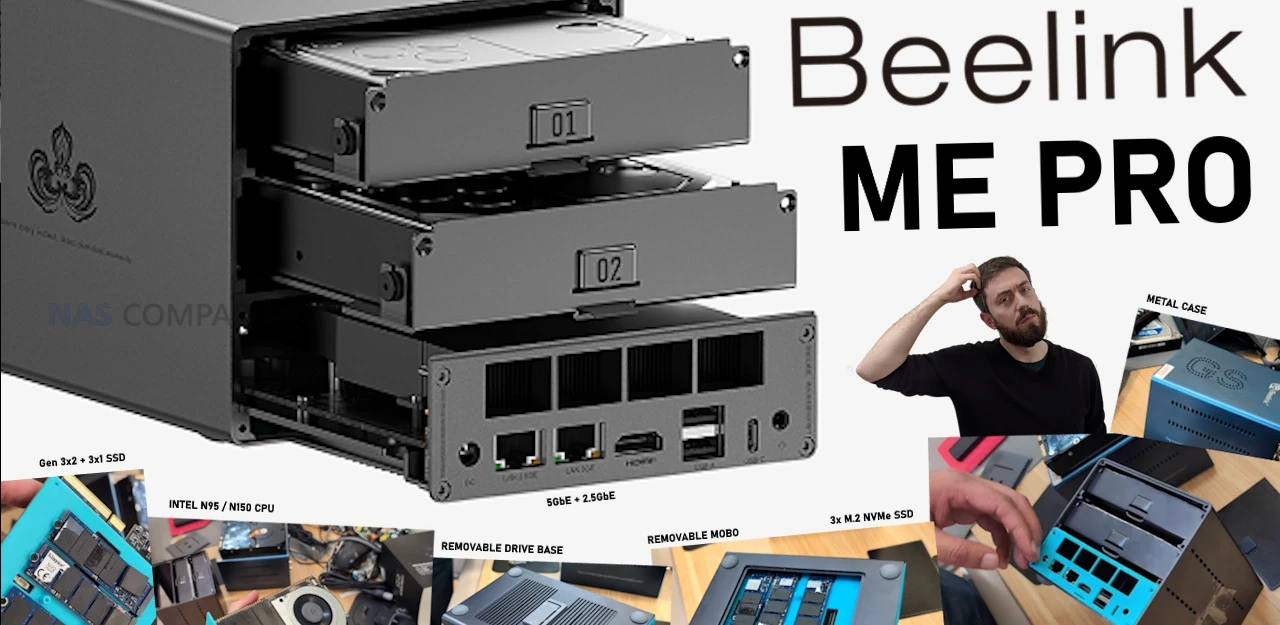
Beelink ME Pro NAS Coming Soon
The Beelink ME Pro NAS is a compact, OS agnostic network storage enclosure that follows the earlier ME Mini, which became one of the most popular small NAS releases of 2025 and marked the brand’s first move into this category. I first heard about the ME Pro during a visit to the company headquarters in Shenzhen in November 2025, where staff outlined a broader NAS roadmap for 2026, with the ME Pro positioned as the first hybrid 3.5/2.5 inch plus M.2 unit in that series. As with the ME Mini, the focus is on a small footprint chassis for users who want to install their own NAS operating system, with an emphasis on power efficiency, flexible storage options and network performance that sits above traditional entry level enclosures.
| Item | Detail |
|---|---|
| Model | Beelink ME Pro NAS |
| Form factor | Compact desktop NAS, 2x 3.5/2.5 inch SATA bays + 3x M.2 NVMe slots |
| CPU options | Intel N95 or Intel N150 quad core |
| Memory | 12 GB LPDDR5 (N95) or 16 GB LPDDR5 (N150) |
| OS drive | 512 GB SSD (N95) or 1 TB SSD (N150) |
| Dimensions | 165.905 x 121 x 115.95 mm |
| Ethernet | 1x 5 GbE (Realtek RTL8126), 1x 2.5 GbE (Intel i226 V) |
| USB | 1x USB 3.2 (10 Gbps), 2x USB 2.0, 1x USB Type C (10 Gbps, data/video) |
| Display output | 1x HDMI, up to 4K 60 Hz |
| M.2 layout | 1x PCIe 3.0 x2, 2x PCIe 3.0 x1 |
| Wireless | WiFi (MediaTek MT7920, M.2 2230), Bluetooth 5.4 |
| OS | No bundled NAS OS, user installs preferred platform |
| Planned availability | Aimed for December 2025 |
Beelink ME Pro Design and Storage
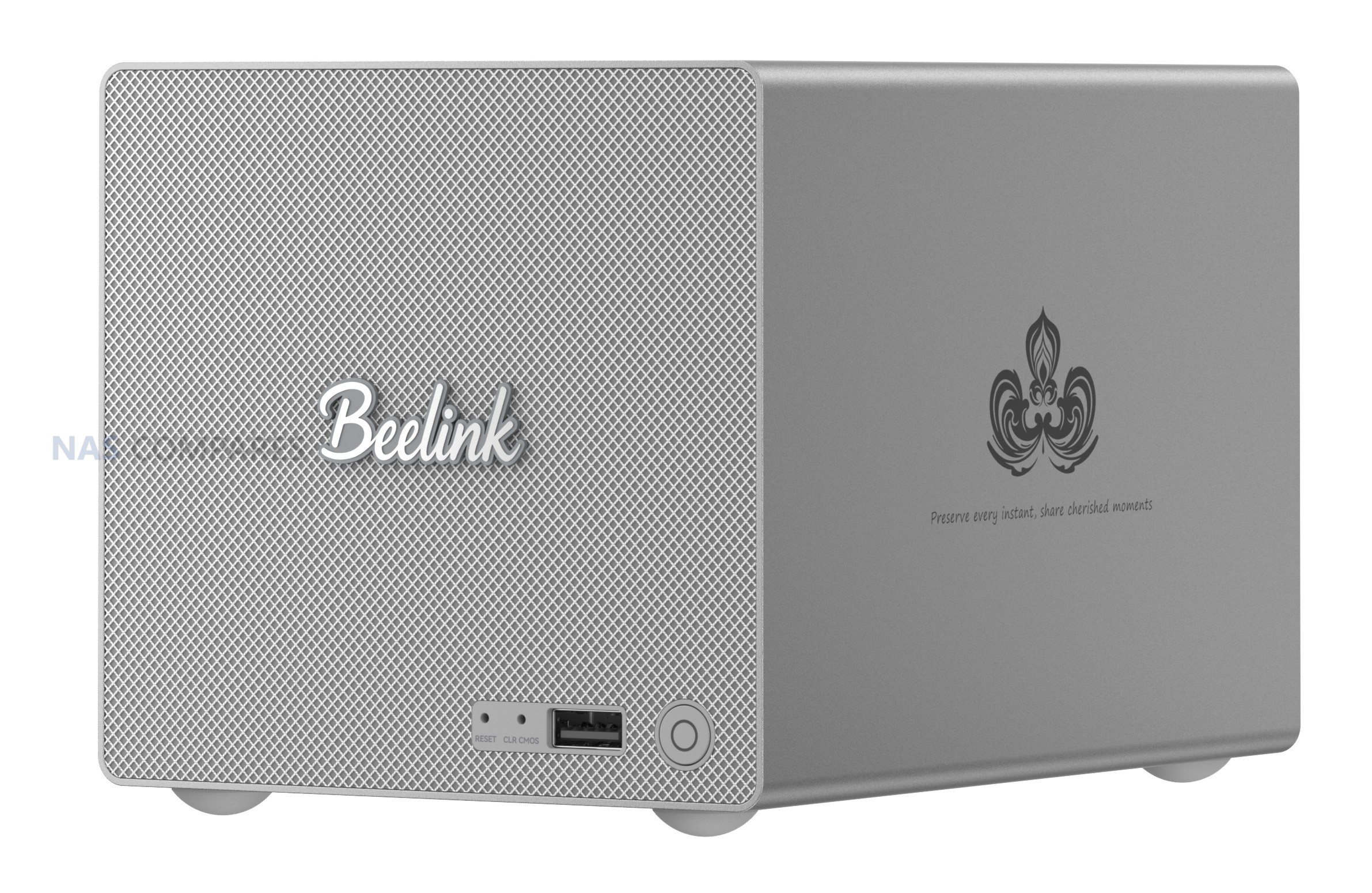
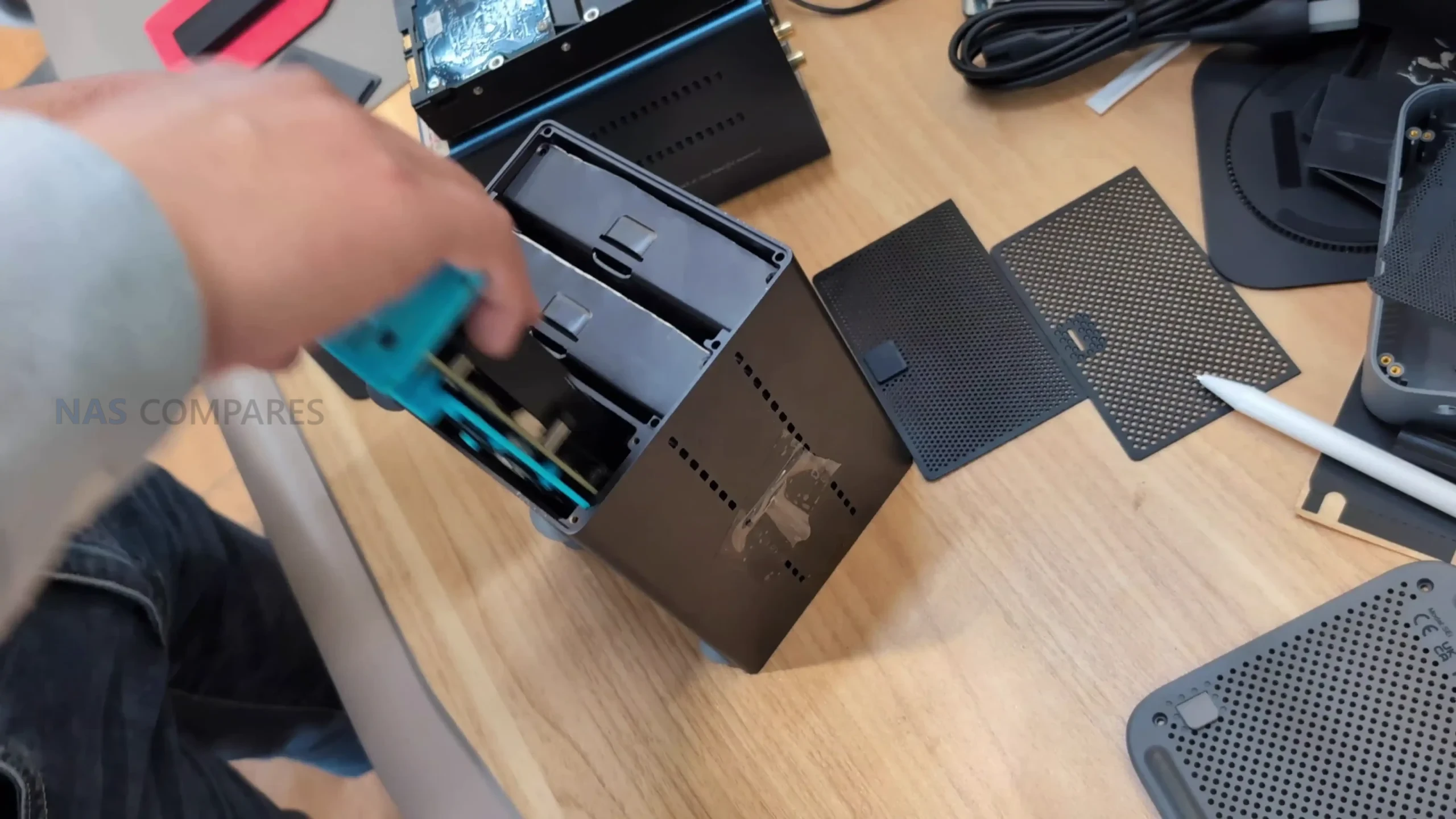
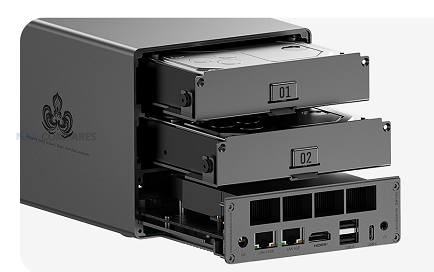
The ME Pro uses a small vertical chassis with a footprint closer to a mini PC than a traditional 2 or 4 bay NAS, measuring 165.905 x 121 x 115.95 mm. The enclosure is built around a compact internal frame with a slide out lower section that exposes the mainboard side of the system for upgrades and troubleshooting. A separate removable metal base plate covers the M.2 area and doubles as a heatsink, allowing heat from the NVMe drives to be drawn out through the underside of the chassis rather than relying entirely on airflow over the motherboard.
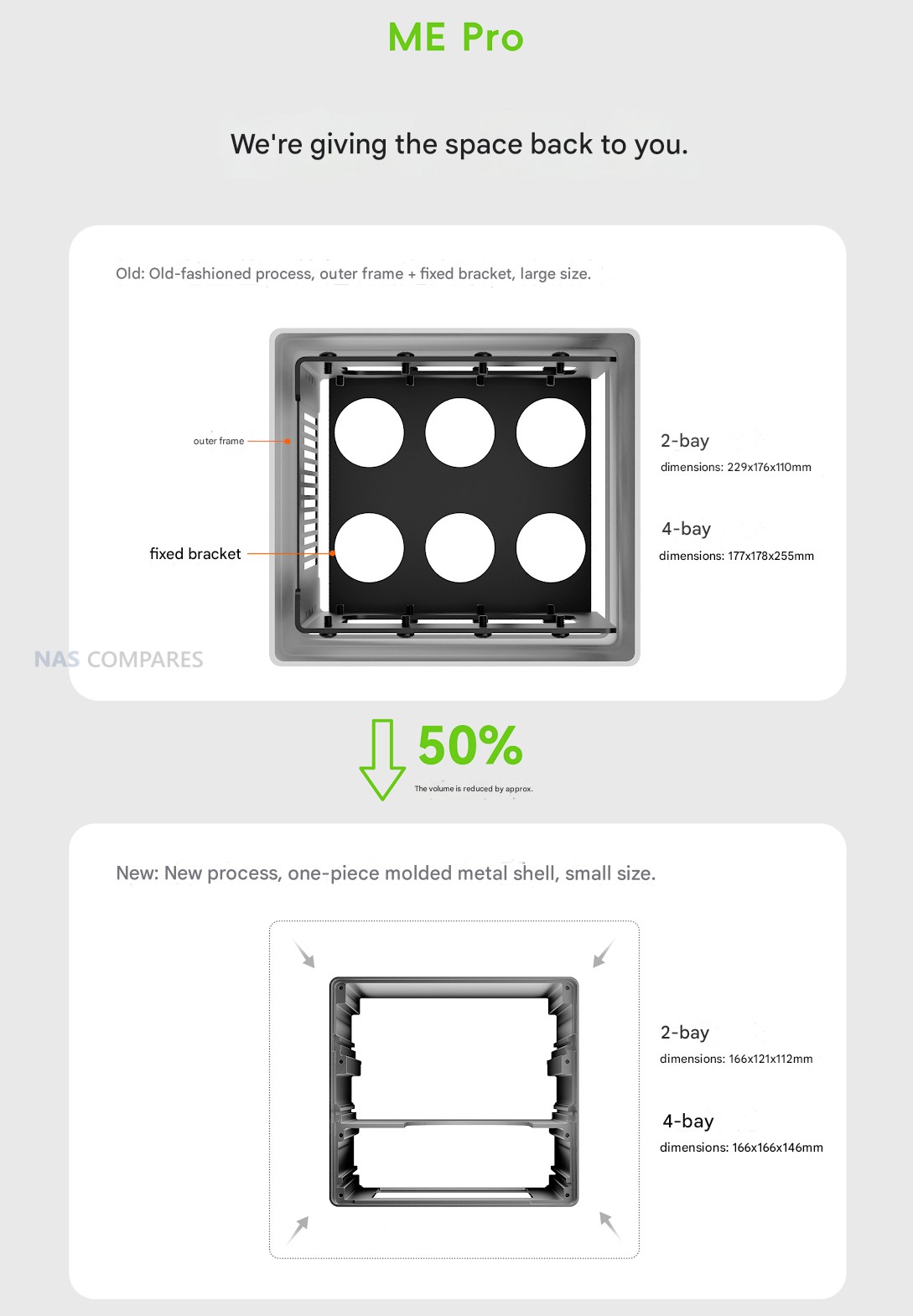
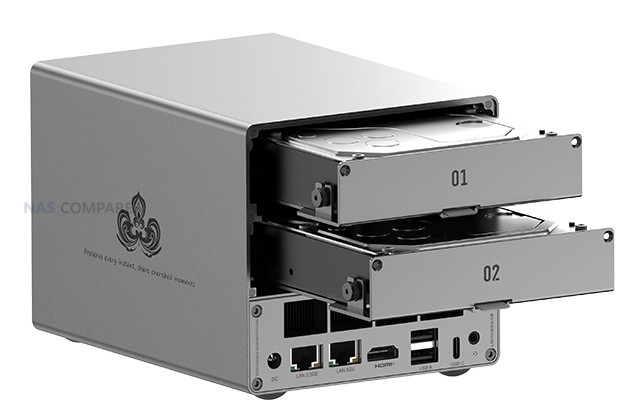
At the front, the system provides 2 SATA bays that accept either 3.5 inch or 2.5 inch drives on individual caddies. These are described as hot swappable, with trays secured by thumb screws on the sides rather than a completely tool free click in mechanism. The intention is clearly that these front bays act as the primary mass storage area for larger and more cost effective HDD or SSD media, while keeping them accessible for maintenance, drive replacement and RAID rebuilds without needing to dismantle the rest of the unit.
Internally, storage is expanded further by 3 M.2 NVMe slots arranged on the mainboard, giving the chassis an effective total of 5 populated drive positions once the front bays are included. One of the M.2 slots is wired as PCIe 3.0 x2 and is expected to carry the bundled OS SSD, with the remaining 2 slots at PCIe 3.0 x1 for additional fast storage, cache, VM volumes or higher performance pools, depending on the operating system chosen by the user. This layout reflects the limits of the available PCIe lanes on the chosen Intel processor platform while still separating bulk SATA capacity from higher speed solid state media.
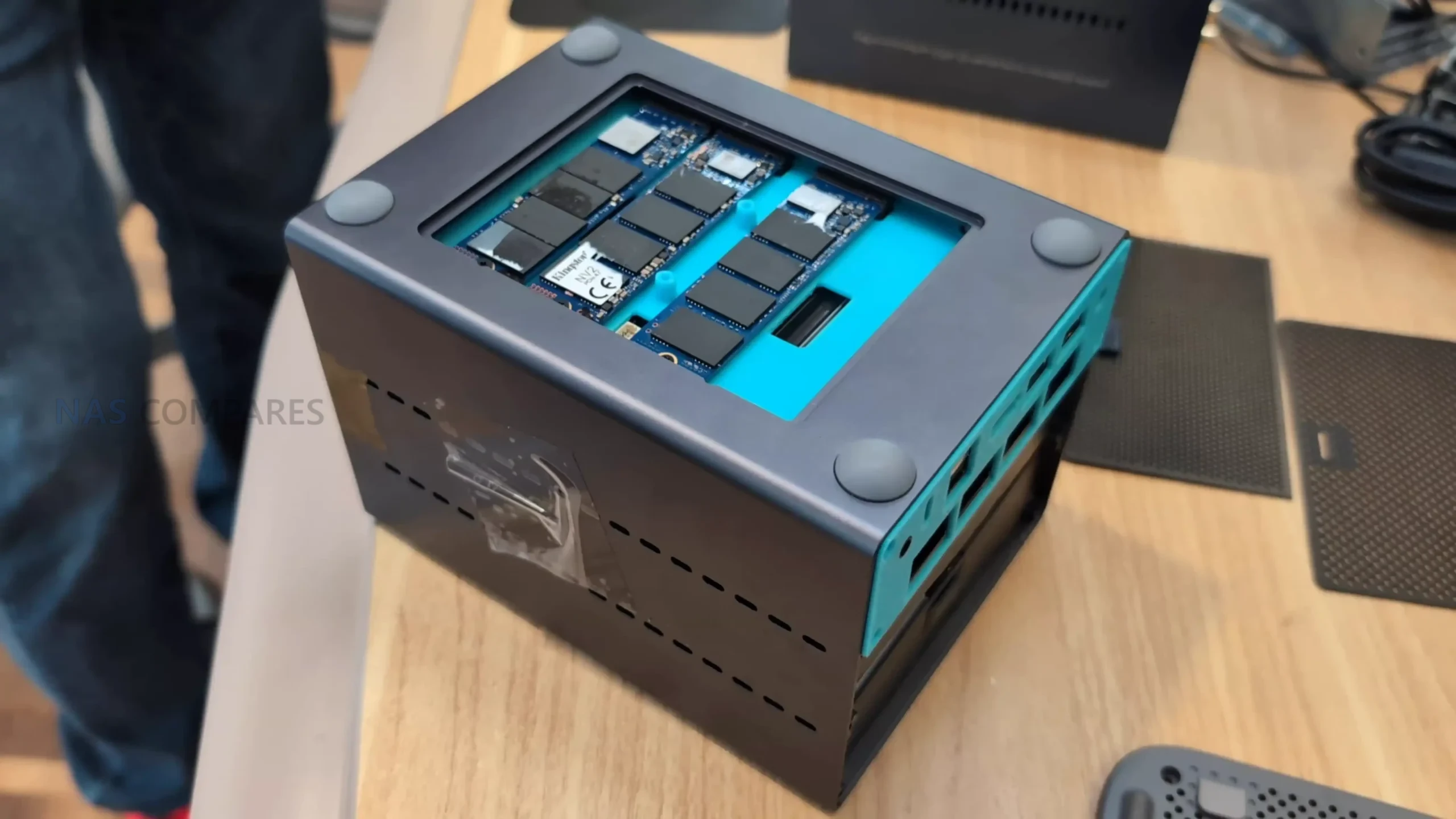
Beelink ME Pro – Internal Hardware
For processing, the Beelink ME Pro is built around Intel N series silicon, with configurations based on the N95 or N150. Both are 4 core, 4 thread CPUs aimed at low power desktop and embedded roles, and are already familiar from compact mini PCs and small DIY NAS builds in 2024 and 2025. The N150 sits slightly higher in the stack and is likely to be the more capable option for users planning heavier multi user file access, container workloads or light virtualisation, while the N95 variant is positioned as the more affordable entry tier. Integrated Intel graphics are used rather than a discrete GPU, which is typical in this class and sufficient for display output and hardware assisted media handling via the HDMI port.
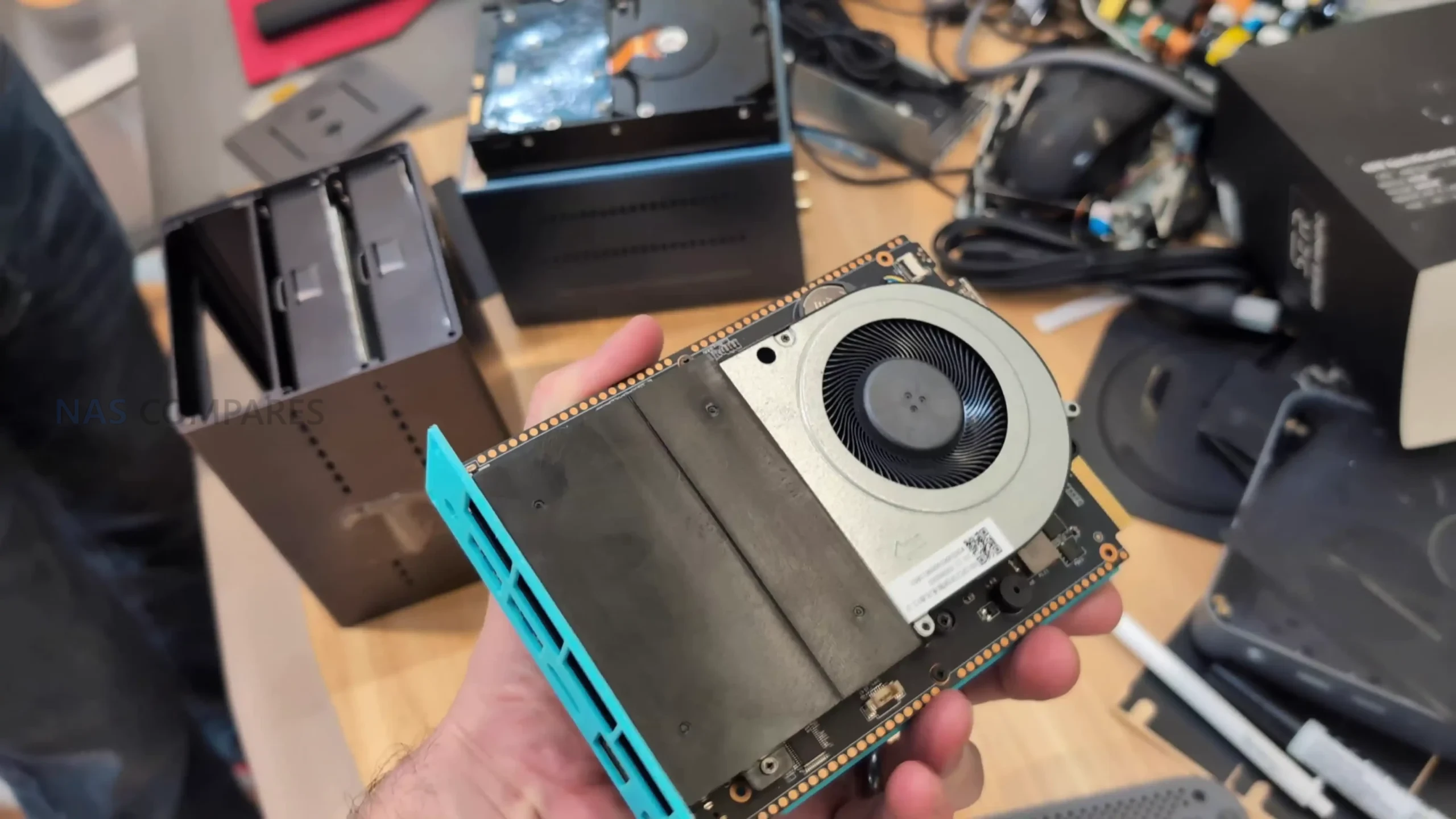
Memory is specified as LPDDR5 at 4800 MHz, with Beelink listing 12 GB and 16 GB options, and the N150 configuration earmarked for the higher capacity tier. This aligns with the broader positioning of the two SKUs, with the N150 build intended for users expecting to run more demanding NAS operating systems, services or virtual machines in parallel. At the time of writing, Beelink has not confirmed whether this memory is socketed or permanently attached, and therefore whether end users will be able to upgrade it beyond the factory configuration.
The underlying platform also integrates several system level features that are relevant to 24/7 network appliance use. A hardware TPM 2.0 implementation is supported for operating systems that can make use of secure boot and encryption features, and the BIOS exposes options for real time clock scheduling, automatic power on after power loss and Wake On LAN, all of which are useful in a NAS role. Wireless connectivity is handled by a MediaTek MT7920 module in M.2 2230 format, providing WiFi and Bluetooth 5.4, while dedicated front panel buttons offer CMOS reset and system recovery, reflecting the design intent of a user-managed, OS agnostic appliance rather than a locked down turnkey NAS.
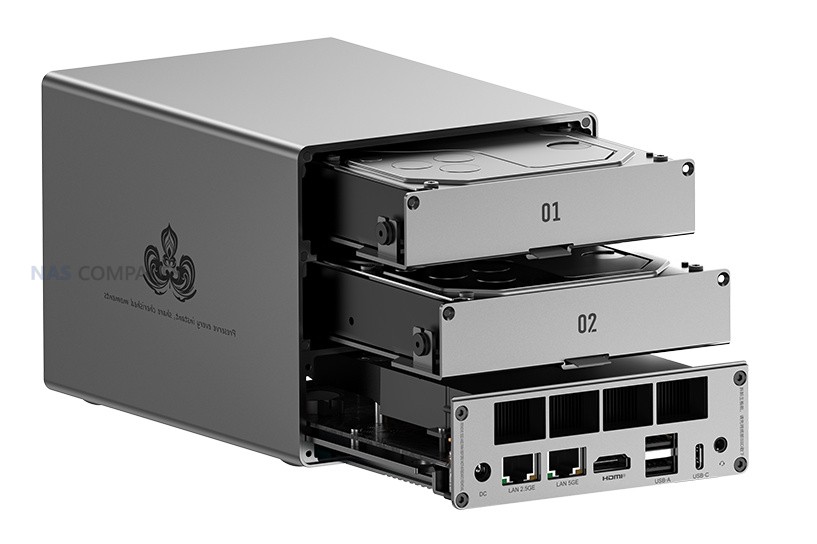
Beelink ME Pro – Ports and Connections
Physical connectivity on the Beelink ME Pro is split between data, display and management focused ports. For wired networking, the chassis provides 1x 5 GbE port based on the Realtek RTL8126 controller and 1x 2.5 GbE port using the Intel i226 V, giving users a choice between higher throughput on a single link or separate interfaces for LAN and dedicated services. HDMI output is available via a single port rated up to 4K at 60 Hz, covering roles such as local console access, lightweight media playback or direct system management without relying solely on network tools.
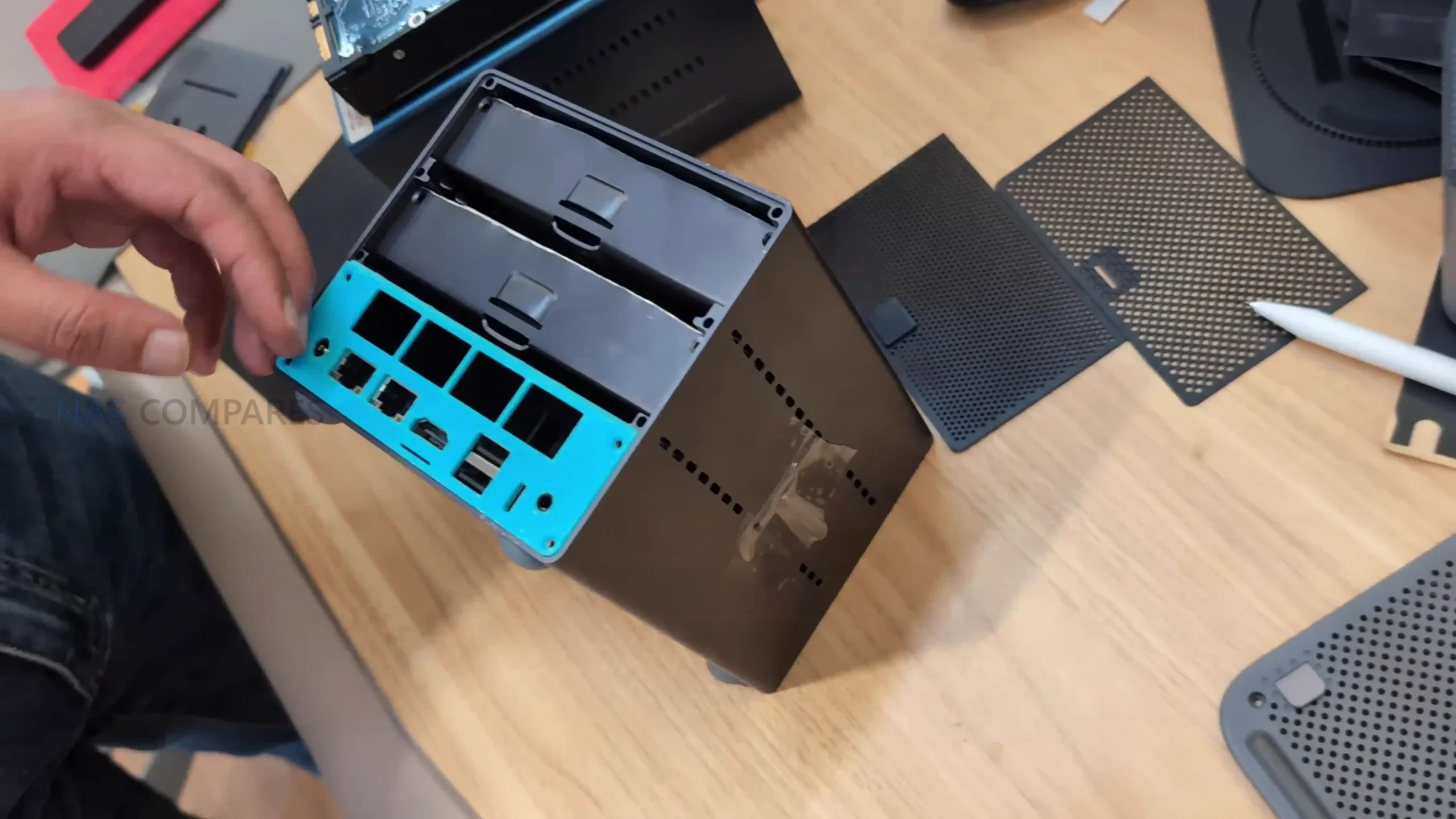
USB connectivity consists of 1x USB 3.2 port rated at 10 Gbps and 2x USB 2.0 ports at 480 Mbps on standard type A connectors, alongside 1x USB Type C port that is also specified for data and video at up to 10 Gbps. This mix allows for external backup media, peripheral input devices and additional adapters, with the faster ports suitable for high speed external drives or expansion units, and the slower USB 2.0 ports reserved for keyboard, mouse or low bandwidth accessories. The front facing power button is complemented by a white power LED that indicates system status during operation and startup.
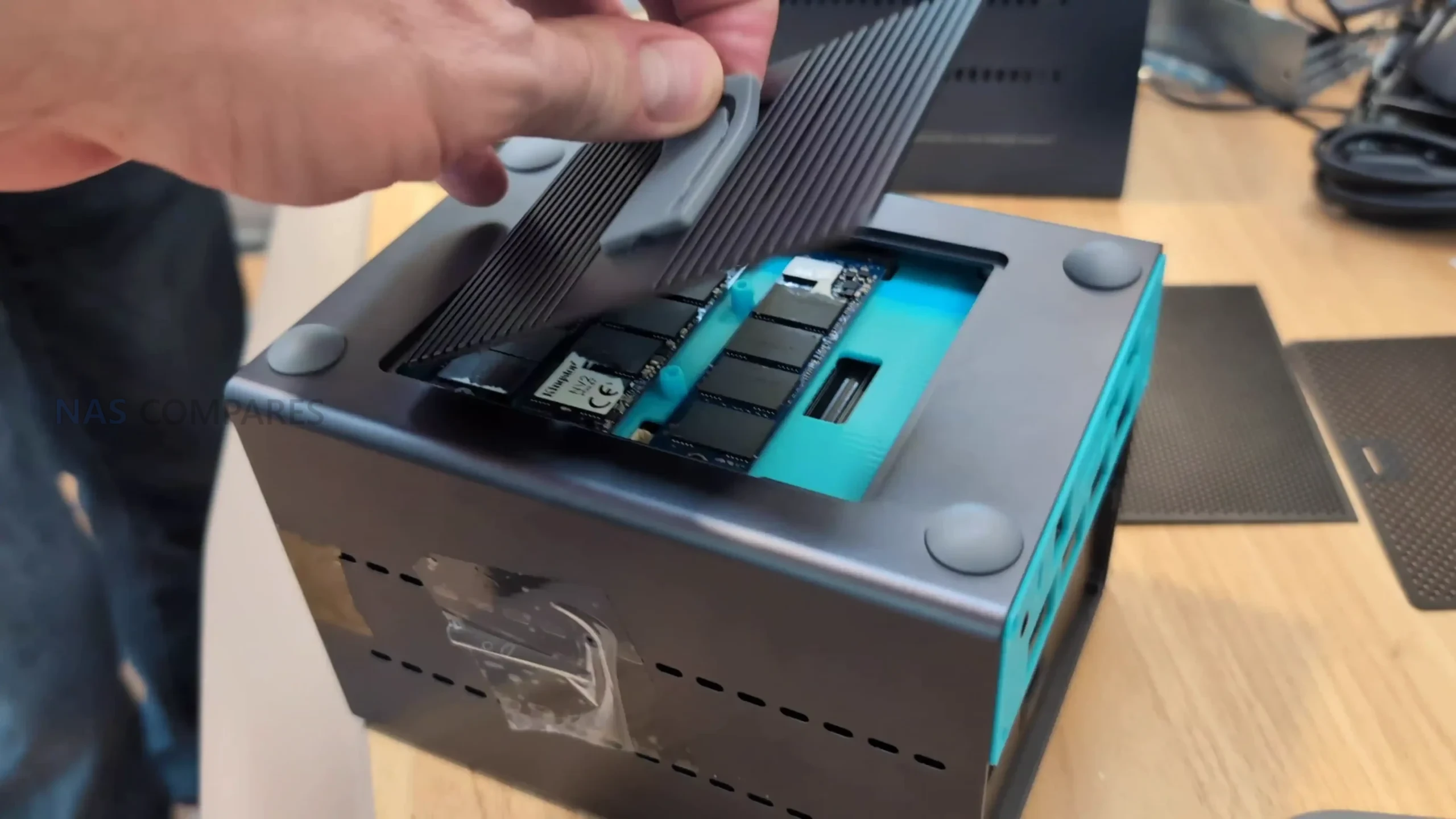
Wireless networking is enabled by a MediaTek MT7920 module in an internal M.2 2230 slot, and the chassis provides 2 antenna connections labeled MAIN and AUX via FPC plus coaxial leads to external antenna points. This arrangement allows the unit to operate in environments where wired LAN is not available or convenient, while still prioritising Ethernet as the primary interface for sustained NAS traffic.
Beelink ME Pro – Worth Waiting For?
The Beelink ME Pro positions itself as a compact, OS agnostic NAS platform aimed at users who want more flexibility than a typical turnkey 2 bay appliance without moving to a full custom build. Its combination of mixed 3.5/2.5 inch SATA bays, 3 internal M.2 slots, paired 5 GbE and 2.5 GbE networking and low power Intel N series CPUs gives it a distinct profile within the current wave of small DIY NAS enclosures that usually stop at 2.5 GbE and either all SATA or all M.2 storage. The chassis layout, serviceable base and inclusion of RTC, recovery and CMOS controls further underline that it is designed to be opened, adjusted and reconfigured by the end user rather than treated as a sealed consumer appliance.
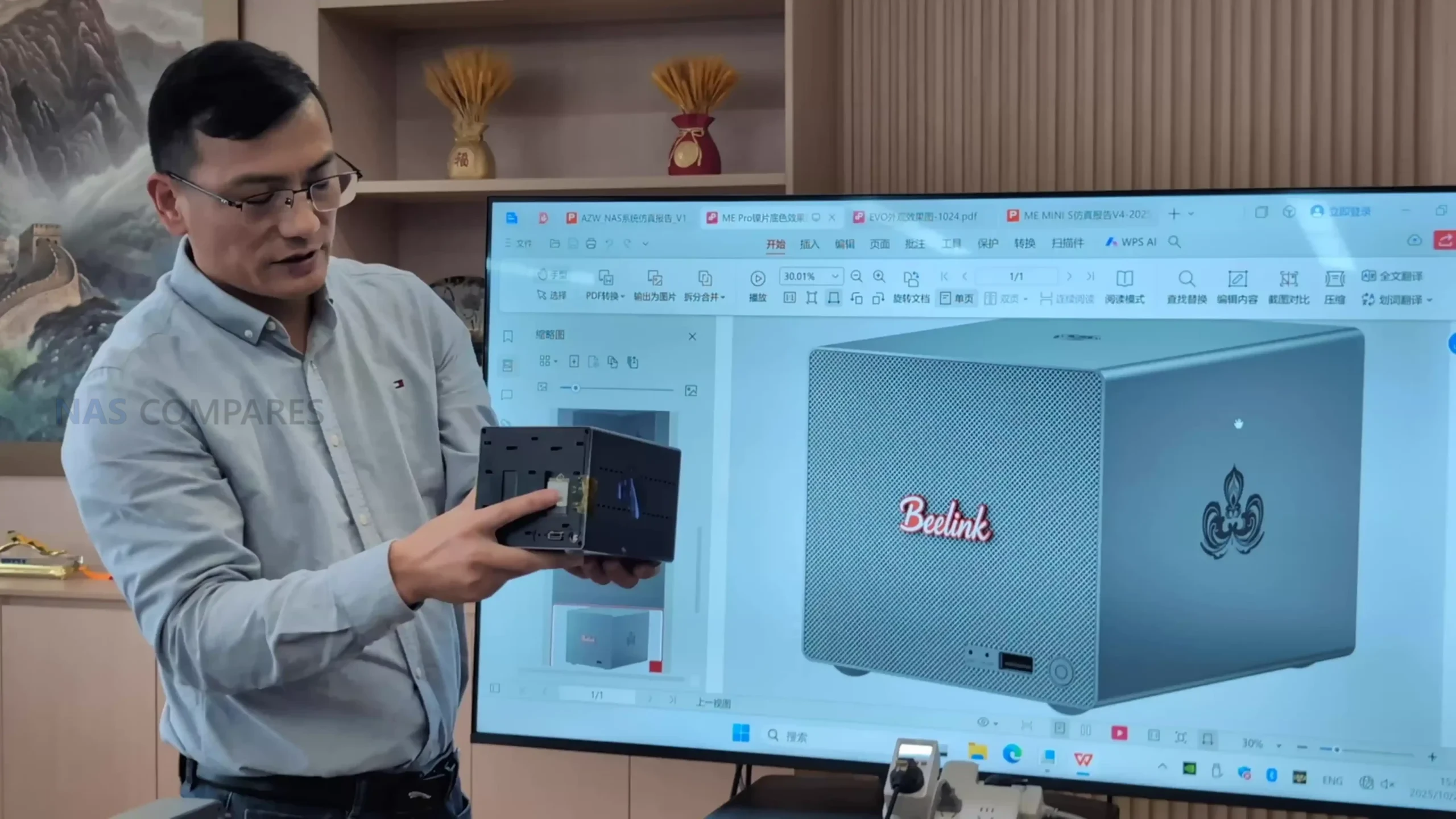
At the same time, there are still several unknowns that will decide how viable it is in practice. Final pricing, memory upgradability, PSU design, fan profile and sustained thermals will determine whether the ME Pro is a practical choice for 24/7 mixed workloads or better suited to lighter duties, and will influence how it compares against both the earlier ME Mini and established NAS brands once it reaches general availability. As part of a wider Beelink NAS roadmap for 2026, the ME Pro functions as an initial hybrid storage step in that series rather than a complete answer for every deployment scenario, and prospective buyers will need to weigh its compact footprint and flexible storage layout against the absence of a bundled NAS OS and the still evolving details of its final hardware implementation.
 |
||
|
Check Amazon in Your Region for the Beelink ME Pro NAS
|
Check AliExpress for the Beelink ME PRO NAS
|
Check the Official Beelink Site for the ME Pro NAS
|



7
📧 SUBSCRIBE TO OUR NEWSLETTER 🔔🔒 Join Inner Circle
Get an alert every time something gets added to this specific article!
This description contains links to Amazon. These links will take you to some of the products mentioned in today's content. As an Amazon Associate, I earn from qualifying purchases. Visit the NASCompares Deal Finder to find the best place to buy this device in your region, based on Service, Support and Reputation - Just Search for your NAS Drive in the Box Below
Need Advice on Data Storage from an Expert?
Finally, for free advice about your setup, just leave a message in the comments below here at NASCompares.com and we will get back to you. Need Help?
Where possible (and where appropriate) please provide as much information about your requirements, as then I can arrange the best answer and solution to your needs. Do not worry about your e-mail address being required, it will NOT be used in a mailing list and will NOT be used in any way other than to respond to your enquiry.
Need Help?
Where possible (and where appropriate) please provide as much information about your requirements, as then I can arrange the best answer and solution to your needs. Do not worry about your e-mail address being required, it will NOT be used in a mailing list and will NOT be used in any way other than to respond to your enquiry.
 TRY CHAT
Terms and Conditions
TRY CHAT
Terms and Conditions





|
 |
| Where to Buy a Product | |||
 |
    
|
  
|
VISIT RETAILER ➤ |
 |
|
|
VISIT RETAILER ➤ |
 |
|
|
VISIT RETAILER ➤ |
 |
|
|
VISIT RETAILER ➤ |
We use affiliate links on the blog allowing NAScompares information and advice service to be free of charge to you. Anything you purchase on the day you click on our links will generate a small commission which is used to run the website. Here is a link for Amazon and B&H. You can also get me a ☕ Ko-fi or old school Paypal. Thanks! To find out more about how to support this advice service check HERE


Beelink ME Pro NAS Revealed
Best SOLID STORAGE NAS of 2025
Should You Worry About the NanoKVM Hidden Microphone?
Best Cheap NAS of 2025
Minisforum MS-02 Ultra - WHO IS THIS FOR??? (The First 48HRs)
Why People Use TrueNAS, UnRAID and Proxmox to Turnkey NAS (Synology, QNAP, etc)
Access content via Patreon or KO-FI
Discover more from NAS Compares
Subscribe to get the latest posts sent to your email.
Looks like a forbiden router.
REPLY ON YOUTUBE
Quite a bunch of interesting things !
Depending on the price tag, this might become my first ready-made NAS… As long as I can choose what OS I want to run this compact (hence pretty !) hardware.
REPLY ON YOUTUBE
new camera
REPLY ON YOUTUBE
6 bay hard drive setup would be nice.
If 3.5 inch ones are too large, maybe a model that accepts 2.5 inch size drives?
REPLY ON YOUTUBE
That’s nice, but have they fixed their UEFI – the one that has AMI Test PK rolled out and MDM-managed EC?
If not – then Beelink still produces untrustworthy hardware.
REPLY ON YOUTUBE
Wish they would do a version with two 5gbit and no 3.5 disks;
REPLY ON YOUTUBE
Very interested in the final product and price. Almost went with the mini, but thought, Hmmm what will be the next thing they come up with, and seems we are almost there.
REPLY ON YOUTUBE
I’m waiting for Epyc 2005 based machines.
REPLY ON YOUTUBE
For your information the Me mini is not $209 at the moment it is $269. It might be good to update the video description with this information
REPLY ON YOUTUBE
What does soon mean? I just picked up a dxp2800 and would much rather have this if I can return it before I open it up lol
REPLY ON YOUTUBE
LOVE THAT SWEATER
REPLY ON YOUTUBE
Super compact, wifi and hopefully cheap, would make this a great secondary NAS to backup your primary NAS. Could put it anywhere. Would probably just backup the most important things with only a couple of drives, but that’s ok
REPLY ON YOUTUBE
272nd ????
REPLY ON YOUTUBE
I cant understand why you can choose between n95 and n150. price I dont care 😉 I won one. hmm what os would be a good choice.
REPLY ON YOUTUBE
I wonder if for the N150 they could drop the 3 NVME drives to using just PCIe3x1 ea, and create a 4 SATA subsystem that will power down Very low for a headless server of media AND services by ProxMox etc.
Yeah, the drives won’t be very fast, but serviceable. And ea nvme upto 1GB/s is fine for faster storage.
Just make sure your power (PSU AND MB) is all SOLID this time! Or give effective guidelines up front of there’s thermal issues.
REPLY ON YOUTUBE
Ok, this is way more interesting to me than the NVME ones. This would be an excellent stocking stuffer.
REPLY ON YOUTUBE
From what I’ve heard about how they handle warranty, I’m never even going to consider this brand. Ever.
REPLY ON YOUTUBE
Such a system looks very interesting. If the price is right, I might get one. My one concern is that Beelink and other brands like it are not known for the speed of releasing bios safety updates like the big motherboard brands. And one thing that you want for such a system is that security concerns in that area are addressed in a timely manner.
REPLY ON YOUTUBE
I won one of these and I’m so hyped to receive it.
REPLY ON YOUTUBE
I bought the Terramaster 425 Plus recently and love the mix of NVMe and HDD options. One item of note for those comparing that with the Beelink is that on the Terramaster, there is no room to put a heat sink on the NVMe’s .
REPLY ON YOUTUBE
I just want support for ECC ram
REPLY ON YOUTUBE
I look forward to your updates on this line of peoducts. Especially models that have more powerful CPU’s, Thx
REPLY ON YOUTUBE
I want one that has a U.2/U.3 backplane. So many used enterprise SSD’s are not SATA drives.
REPLY ON YOUTUBE
that stencil on the side is incredibly cringy, yikes
REPLY ON YOUTUBE
Thanks for the very interesting video – Its just weird why they stick to theese low ram solutions, n95 and n150 only have 9 pcie3 lanes, barely anything left when you use the cpu and a bit of networking. Would rather like to see an AMD chip version with modern pcie4/5 and more lanes.
REPLY ON YOUTUBE
all 3.5″ bays should be also be able to fit 8x nvme ssd’s 😀 change my mind that it wouldnt fit on a pcb and 3.5″ slot 😀
REPLY ON YOUTUBE
Curious which NAS OS would have drivers for wifi? Casa or Zima?
REPLY ON YOUTUBE
I’m very exited for this little box, now that the network interfaces seem to have a stable/final spec. I’m not so sure about the memory, though. We all see, what’s currently happening to DDR5 RAM prices. That N150 CAN speak DDR4, so please make it replaceable DDR4-3200 SO-DIMM – that’s plenty of memory bandwidth for an N150-2-bay, even in single-channel mode. The point is, that i want an upgrade path to 32 GB. Beelink should offer a barebones variant, without ram/nvme/bt/wifi, for DIY guys, who’ll be re-using existing hardware. (I’m from Germany, btw.)
REPLY ON YOUTUBE
I wonder if the crazy ram prices will affect the price of this.
REPLY ON YOUTUBE
Would be nice if psu is inside of the chassis.
REPLY ON YOUTUBE
The new environment is that SSD storage has gotten more expensive and the low end of SSDs is becoming less available with Micron shutting down its Crucial brand of both RAM and SSD. So the per terabyte cost ratio of SSD/HD is increasing meaning that the multiple you have to pay for SSD makes HD attractive again at least on a cost basis. But, the issue with hard drives is noise. One could toss a pair of 28 GB hard drives in a 2 bay but I would be concerned about the noise. Need either an acoustic enclosure or a separate closet or room. Lots of two bay NAS competition with brands that have their own flavor of Debian Linux. If I was in the market for a two bay after what I know I would be tempted by Asustor because their documentation is so much more thorough (“Asustor Univerity”). It’s the gaps in the documentation that kill you, “death of a thousand gaps”. It’s nice to have the freedom to set up the folder structure any way you want, but it is hard to figure out what folder structure you want three apps down the road for compatibility. No comprehensive NAS book out there for people used to step by step books. Then create users with permissions to match Docker containers. You have to setup SSH just to find out the userid number and group I’d number associated with a username…
REPLY ON YOUTUBE
5 GbE makes no sense, because there are no 5 GbE switches on the market, just 10 GbE “multiGig” (they can also 5Gbit). But they are much more expensive than most of the 8-port SFP+ switches, that are web-managed (Vlan is a MUST for homelabs).
And 2-bay is not enough for a “pro”-version (even the ME mini can have 6 SSDs). On a “pro” (which means “professional”, doesn’t it?) there is a need for at least 4 bays (to use raid5 or 6 or 10).
But if the m.2 ports are at the underside, I can add a m.2 Sata-controller and 3D-print an extension case as a socket for the “Pro”.
REPLY ON YOUTUBE
it’s a NAS, if you put SSD NVME, it’s at least 10Gbe, not 2.5, not 5…
REPLY ON YOUTUBE
I wish there were a small NAS that let you have a 5.25 bay in it so I can put one of those Icy Docks in there.
Imagine having a bay that can handle 8 SATA 2.5″ SSD’s in a small formfactor NAS
REPLY ON YOUTUBE
I wish they’d make it with either the N100 or i3-n305. These support In-Band ECC (IBECC), while the N150 and N355 do not. Never trust a NAS for anything important without some form of real ECC memory (not the on-die DDR5 kind).
REPLY ON YOUTUBE
All I want is a version with no RAM or NVME so I can install good stuff in there. And an external 19V PSU so I can continue using my mini-UPS, and who wants a custom prorietary PSU anyway?
REPLY ON YOUTUBE
Wonder if you removed the WiFi card could you put in a 4th ssd with a E key to M key adapter.
REPLY ON YOUTUBE
There is definitely a use case for the hybrid drive, although it depends on the price. Would like an affordable 4-bay hybrid NAS…
REPLY ON YOUTUBE
while we cant afford to put anything in it
REPLY ON YOUTUBE
Very nice! I’d be only interested in a 4bay though. The ugreen 2 bay with the soldered emmc left a sour taste.
REPLY ON YOUTUBE
So what would you choose between ugreen and beelink?
REPLY ON YOUTUBE
i just want 12/14/16/20/24 bay nas off shelf that i can just plug in, slap the plugins/apps i want and forget about it, nobody wants shitty small “nas” system
REPLY ON YOUTUBE
Building a Beelink Mini PC https://www.youtube.com/shorts/daUUIkN_Ki4
REPLY ON YOUTUBE
Beelink is a really impressive company. They seem to have a good pulse on what people actually want in a product. While the lead times when ordering products off their website can be quite slow, of the smaller mini-pc companies I think they have the best systems and prices (not too mention very nice looking designs).
REPLY ON YOUTUBE
How was it getting Visas etc? I am planning a trip to a production factory next year for some of the retro products on my website.
REPLY ON YOUTUBE
Beelink has been impressive to me as a brand. Their stuff feels solid and they keep getting better with every release. It’s nice to see a company actually trying instead of cutting corners. I’m pretty happy sticking with them.
REPLY ON YOUTUBE
Six-bay ME mini N150 is quite compact and relatively quiet. It offers great value for money. I use it to store photos and videos for my family, and occasionally connect it to the TV for home entertainment. I’ve always trusted Beelink. Their products are all of good quality.
REPLY ON YOUTUBE
Should of asked them if they are ever going to fix the GTR9 Pro crashes from faulty Intel NIC firmware.
REPLY ON YOUTUBE
My Beelink Ser7 pro is happily playing this video for me.
REPLY ON YOUTUBE
This is some great journaling and reporting. Nobody in this space is covering so much NAS real estate and in so much detail, truly a work of art what you’ve done here. Thank you very much. It was really great to get such an intricate insight into Beelink’s operations and they have really outdone themselves here.
REPLY ON YOUTUBE
Beelink not only takes after-sales service seriously, but also keeps investing in product innovation — which is really rare these days! Thanks for sharing such a great video. It honestly makes me trust Beelink even more. This is definitely a company worth investing in and supporting!
REPLY ON YOUTUBE
I’m really impressed by Beelink! The company appears very open and innovative, with strict quality control in their manufacturing process. It gives me even more confidence in using their products!
REPLY ON YOUTUBE
It all looks and sounds great. Wish my Me Mini would run longer than 2-4 days ( maybe 5) with out a total hang.
Even saying that, you did a very nice report, enjoyed it greatly.
REPLY ON YOUTUBE
Beelink show their factory tour in making one of their mini pc in SatisFactory Process channel.
REPLY ON YOUTUBE
Beelink is innovating. I already have 3 Mini’s running awesome. I cannot wait for them to release the 4-Bay NAS. Day one purchase for me.
REPLY ON YOUTUBE
Wonderful information on the all-flash NAS units. Now all we need is affordable M.2 SSD drives, the bulk of which are 50-100% more than they were 12-18 months ago
REPLY ON YOUTUBE
I like Beelink and feel they are a premiere miniPC maker. Having said that, my Me Mini was very unstable and would spontaneously reboot within 15-30 min of large file transfers using 4 Samsung 990 Pros under Proxmox. I worry that with so many models and an aggressive production schedule that their equipment isn’t fully tested and developed. They were very good and highly approachable when issuing a refund though I had to pay $25 for return shipping. They are a company in an early growth phase and I wish them the best.
REPLY ON YOUTUBE
Nice video, I enjoy these tours.
REPLY ON YOUTUBE
This is so cool
REPLY ON YOUTUBE
AZW the parent company also make Trigkey mini pc which are as good and bit cheaper than Beelink.
REPLY ON YOUTUBE
Well done. Cheers. Thanks for this in depth look. Best wishes.
REPLY ON YOUTUBE
Seeing how small manufacturing company Beelink is now I undertand why it took 30 days to deliver my Me Mini. Kudos nonetheless. Changed from HP Microserver and still being amazed. It is far from flawless, but I love it. Keep up the good work, Beelink.
REPLY ON YOUTUBE
As somebody with no relation to the brand, I can confirm that they honoured their returns policy, although I did have to specifically ask for a UK warehouse of wise, they expected me to send it directly back to China. But the refund happened in good time, and I would happily buy again
REPLY ON YOUTUBE
Have a Beelink mini PC. It’s getting “old” (August 2022) and was from before they got the branding quite right (GTR7 / GR9 😉 ) but I’m still amazed at what I got for the price. 2x 2.5Gbit/s Ethernet for a start. Nice kit.
REPLY ON YOUTUBE
2:54 props to the guy watching NAS compares. Dude knows what’s good
REPLY ON YOUTUBE
Pretty swanky HQ and nice workspaces.
REPLY ON YOUTUBE
This video backs up my actual experience with Beelink and I now have more respect for them over the other Chinese mini PC competitors based on how they conduct business when issues arise.
I bought a Me Mini 12GB original NAS from them back in the summer. I thought it was and is a wonderfully engineered machine. The thing that really impressed me was their proactive actions after my Me Mini displayed a design flaw.
I have a set of six, 2TB, PCIe Gen3 MVNE drives and a set of six, 4TB, PCIe Gen4 NVME drives. I installed Truenas using RAID-Z1, ZimaOS using Raid 5, and Windows 11 using Storage Spaces with one redundant drive. Under all 3 operating systems, the set of six 2TB drives worked flawlessly but when I set up the six, 4TB drives, each OS choked part way through the raid set up and only 3 of the 6 drives would then be seen by the OS and raid array.
I reported these results to Beelink customer service and they immediately replied and said there was a hardware issue design where the larger, Gen 4 NVMEs were not operating properly. They also immediately offered a refund or replacement and included a pre-paid return label. They received my Me Mini and reported they unfortunately did not have my color, the gray green, and would I prefer a white device or a refund. Rather than spend more time on the issue, I took the refund, which showed up within 2 days on my credit card.
Beelink’s customer service was prompt, professional, and did a remarkable job, especially considering the time and language barriers. They were transparent and up front on all issues. I would absolutely recommend Beelink products for the customer service as well as the excellent engineering and pricing. I am waiting patiently for that Beelink Me Mini Pro to be released and see myself probably buying one when available.
REPLY ON YOUTUBE
Thank you, it is very interesting for me to see how it is inside factory! And waiting for those new mini-NASes for sure.
REPLY ON YOUTUBE
I have 4 SATA SSDs and a 2.5″ Samsung 8TB drive.
Which compact NAS should we buy?
I haven’t found anything suitable yet, so I’ve decided I’ll have to build it myself.
REPLY ON YOUTUBE
Thoroughly great tour ????????
REPLY ON YOUTUBE
Thank you so much for this! Can’t wait for the updated version of the mini me to be released!
Question- any seagulls giving you hassle over there?
REPLY ON YOUTUBE
Great factory tour, thanks for sharing. I’m not surprised Beelink have a slick operation over there, having recently had a very good experience buying an SER8 mini PC from the order and delivery process, to customer support (for a shipping clarification), and experience with the device to date. The only thing that let the device down was the default Windows 11 install which, apart from a bit of bloatware, wouldn’t run windows update properly. Simply reinstalling Windows from USB fixed that and the volume license reactivated without any issues.
REPLY ON YOUTUBE
That’s what they wanted to let you see!
Where’s the step where they install Chineseium gov malware?
/s
REPLY ON YOUTUBE
Shoutout to Beelink Support Team, Ian, June, Rose and Yvette for my Beelink Me Mini case. I wish I had the option to get the 16GB + 64 eMMC as a replacement. But I already grabbed a 16GB version on Amazon.
REPLY ON YOUTUBE
They totally screwed up Beelink GTR9 Pro and still haven’t fixed it. Doesn’t give a strong impression of the company , it’s QC and values.
REPLY ON YOUTUBE
I have to admit while Chinese crap is still crap, as I suppose is crap from any other country, I think I may be seeing something new; good and decent Chinese hardware with quality, openness, and security in mind. As an American, the country of origin of Beelink, Zettlab, and others still gives me pause, but it is not a deal-breaker. The interesting part is how they are listening to the market, if not user commentary directly rather than the arrogance typical of many companies regardless of nationality (Synology?).
I have bought a ME mini and a EQR6 to test, and for what they are, I am completely satisfied, having tested them on Debian, Ubuntu, TrueNAS, and UnRAID with no major issues. We moved them to production as a small mobile IT stack with some other components, putting TrueNAS on the ME mini and Debian on the EQR6 used as a basic workstation. The primary design spec for us is a combo of capacity, mobility, and power efficiency, so this selection was a no-brainer.
Unless something changes, or I become aware of some other factor, I will be moving toward specifying Beelink in my lab. Given the quality I have observed in the manufacturing and parts selection, which was underscored by this video, I don’t think I can beat the bang for the buck. My only complaint, if you can call it that, is that they seem to love putting an AC power supply on board instead of an external DC box. I would have preferred this to allow field replacement of the most likely component to fail, as well as the ability to operate the equipment directly from DC sources.
Finally, while outside the scope of this video and channel, I would like to see their take on a laptop.
REPLY ON YOUTUBE
Great, thanks!
REPLY ON YOUTUBE
Probably heresy to say this on a NAScompares video, but the the Me Pro S is shouting “homelab server” at me – if they can do a barebones for £500 (or less) then I’m very, very interested. Could be ideal to replace my current trio of Beelinks… Otherwise Minisforum is getting my money.
REPLY ON YOUTUBE
Nota bene : Beelink ME Mini is now for $229 not $209 (+10%)
REPLY ON YOUTUBE
Beelink please hear me: 6 x 3.5 – 6 x NVMe M.2 – 6 Ram slots(ecc) – 16 core CPU – 2 x dual slot PCIe expansion – 2 x SFP+. In a rack or fat box configuration 😀
REPLY ON YOUTUBE
I’d love this stuff to go modular. Sell an nvme or 3.5 inch enclosure that has what you need then offer the mini pc boards to slide in the bottom separately. If i need a 4 bay n150 its the same box as the ryzen ai one with a different board at the bottom. If i decide the n150 isnt enough i can swap the board to the ryzen one instead of buying a full new system and migrating over. I’d be happy if that was lifting a nuc style board and using nvme to sata adapters or nvme extenders.
Ive actually wondered if the nuc style mini pcs could be stuffed in the bottom of an enclosure to run the hard drives above it but feels a bit janky when the wtr pro exists.
REPLY ON YOUTUBE
Love Beelink
REPLY ON YOUTUBE
Unfortunatly Beelink Me Mini is broken, it has a physical problem when using modern 4+ tb M2 ssds. They disconnect randomly. I demanded replacement 11/10/2025, not having positive response yet. My order : 22337.
REPLY ON YOUTUBE
I’m really happy that companies like Minisforum and BeeLink are pushing the state of the art. I’d rather see U.S. companies doing this, but development like this tends to take 2 forms. Revolutionary and Evolutionary. U.S. companies are demonstrably behind the curve and need to think outside the box, and be more revolutionary. The state of the art right now is evolutionary (meaning what’s out there will be improved and refined) and that will continue until the next revolutionary step takes place. I think the Me-Mini was revolutionary, but it has limitations, mostly driven by the form factor. As a home user that small form factor is very attractive, but I’m thinking users are willing to compromise on the size given the need for other more expansive capabilities. The next evolutionary steps should be improving and/or expanding the available storage. M.2 NVMe is pretty much limited to it’s form factor (4TB, or the much more expensive 8TB densities). I’d like to see SFF systems look into U.2 designs opening it up to really large storage spaces. (60TB and greater). At those densities one U.2 SSD would suffice for most users. I’d like to see faster access. PCIe 3.0×1 is OK for bulk storage needs but I/O is a limitation. 10Gb I/O (on the horizon). Faster CPUs. N150s are fine for that PCIe 3.0×1, but consider there’s a world of much more capable CPUs out there as demonstrated by DIY NAS builders. The density and efficiency gap between HDDs and SSDs needs to close and become more cost effective. (The whole paradigm of using a spinning disk to store data is evolutionary, going back to the late 1800’s) I think it’s run it’s course, it’s time to retire that and move on.
REPLY ON YOUTUBE
@5:45 great idea to reduce e-waste & encourage reusability! I really hope this becomes standardized to the point where you can plug in a motherboard from any manufacturer in this 3.5″ form factor. the DIY NAA market sure will be interesting the next few years!
REPLY ON YOUTUBE
Ugh. Another ad for undersized, junk NAS
REPLY ON YOUTUBE
I have been considering the beelink me mini, but I’ve heard it has issues with running six gen4 drives, depending on power consumption. I found a Reddit post where beelink states they fixed the issue, but aren’t clear on what the actual fix is. The uncertainty there is driving me towards considering other options like the lincstation n2.
REPLY ON YOUTUBE
Thank you for the info! I was planning on buying a Mini ME, but I’m waiting for one of the ones with the replaceable SODIMM memory. That was the one thing I really did not like about the current model.
REPLY ON YOUTUBE
6:15 – That’s the one I want. 4-Bay HDDs with 2NVMe bays? I am very happy with my 4 Beelinks running Kubernetes, and will add a 4-Bay NAS happily. If they can, give us an ECC option too.
REPLY ON YOUTUBE
if only the ME Mini refresh came with PoE it would be 10/10
REPLY ON YOUTUBE
I’m interested in the Mini Me gen2. My main 10bay HDD-NAS is not always on and such a small sized NVME Mini NAS would be perfect to run 24/7. But would be nice if it will support more than 16GB ram for Truenas Scale.
REPLY ON YOUTUBE
I’d be intrigued to see if the Max could be very cost competitive, or if it’ll just be another Strix Halo mini PC.
I kind of want a Strix cluster, but I am not quite ready to drop £+8k for that.
REPLY ON YOUTUBE
Great news, great video , thx. 4 it !!!
I am a big fan of the Me Mini; it works here so fine, silent and fast;
and when the new ones became as good, as the Me Mini is… i would be happy
And, Be Link (Disclaimer: I have no profit for recommand this firm)
i had a lot of conversation, and the was so cooperativ… i wish, other firms also would take care of their random/small customers… great !!!!
For the 2 Bay Nas; okay, great option, to place 3 NVMEs on the bottom (1 OS, 2 for storage, 2 HDs for cheap/long storaage); but depends on the price;
Cause i run nearly the same “system” from the Firm, who also offer the OS;
Extendercard (with NVMEs) on the pcie port; and the Nas Case is as big as the HDs are… and the open Sata wires… who cares, it´s inside a storage, and it´s tunning at 2.5, with a N150 unit
Conclusio: I duno, how BeLink would beat this; cause to be fair: Even when i am “in fight” with this firm; cause with the last OS update… it will become to a 29$ Solution (Licens);
But the hardwarerig work fine at all (only the fan could be better);
and i am absolut fine with the price, an there are no heating Problems with the HDs, cause they are not catched inside a Case (not really)
REPLY ON YOUTUBE
Awesome news!
REPLY ON YOUTUBE
Excuse the rookie question, but is there a reason that all brands design the nvme slots at the bottom of the rig? Wouldn’t it make more sense to put that motherboard tray at the top layer and blast a fan through it, venting like a chimney? I’m sure there’s a reason not to, since no one does it, but as a non-NAS builder it seems like low hanging fruit to me, considering how hot my various single nvme storage devices get when under sustained load.
REPLY ON YOUTUBE
Nice video! I noticed some Beelink team members and their workspace in the footage, which reminded me of a previous video showcasing their factory. It’s refreshing to see a company being so open. I must say, this brand is really growing on me.
REPLY ON YOUTUBE
I’ve always been a loyal Beelink fan. I trust the quality of their products, and I’m really looking forward to Beelink’s breakthrough in the DIY NAS field.
REPLY ON YOUTUBE
I was really excited when I first saw the launch of the Beelink ME mini — it’s honestly unbelievable that such a compact NAS device can hold up to six SSDs! I ordered one right away. At first, there were some stability issues, but Beelink improved the product later and even offered free replacements for affected units. That kind of after-sales support is truly rare — not many brands would go that far.
I’m also really glad to see Beelink continuing to innovate in the NAS field, developing new hybrid hard drive and M.2 NVMe solutions. The removable motherboard tray along the bottom mentioned in the video seems like a really convenient design — I wonder if there will be more surprises coming our way. Can’t wait to see the detailed reviews of new models!
REPLY ON YOUTUBE
Returned my ME mini after it was clear the PSU couldn’t handle the power requirements of more than 3 drives
REPLY ON YOUTUBE
Hopefully they actually do some math for the PSU sizing in the new 9 bay. The 6 bay is a joke, 45w psu for everything when 8w ssds are common and new models can be almost 10w each. You can see many reports of users having drives drop out under use.
REPLY ON YOUTUBE
Two things come to mind a) security concerns and reliance on CCP based hardware/software (e.g. our government pisses Xi off and he orders something nasty happen) and b) OpSys/Software quality for the English speaking market (we’ve already seen issues with ugreen’s environment).
REPLY ON YOUTUBE
I just want an me mini with more cores.
REPLY ON YOUTUBE
I was already looking at the Mate SE, to go with my SER8 machine. With just 2 M.2 SSDs, I was planning on a RAID1 setup.
But now – hybrid setups, with (cheaper) hard drives? Money is going back in my pocket – and I’ll wait.
REPLY ON YOUTUBE
What if you already have your own mini PC and want to get a hard drive enclosure? Any good recommendations out of China?
REPLY ON YOUTUBE
I´m interested in the new Terramaster F4-425 Plus, have to upgrade my linkstation N1 with a better cpu, and the N150 is an nice upgrade. Also manage to retire my N3150 dyi NAS with 4 3.5 inches 8TB disks. Keep it all in one
REPLY ON YOUTUBE
Just need the price of nvme drives to drop. I noticed the 990 pro 4TB had increased in price by almost £40 since April this year.
REPLY ON YOUTUBE
Beeline me mini was a disaster with its power issues when fully populated.
REPLY ON YOUTUBE
Couldnt wait anymore for Beelink to become concrete about the ME Pro of ME Max, so bought an F8 SSD Plus 3 weeks ago. So far, very happy 🙂
REPLY ON YOUTUBE
Fascinating how open manufacturers are getting with creators and their watchers. I bet its exciting to see inside. Great coverage
REPLY ON YOUTUBE
Very cool video I was waiting for. I really hope to see the Beelink ME Mini 9 Bay with something beefier than the Intel N150 and PCIe Gen 3×1.
Let’s hope they go with a modern 2025 AMD FP8-series CPU (like the recent Ryzen Z2 Go). Must be completly quiet of course 😀
REPLY ON YOUTUBE
Ok, I’m sold. I was just about to hit the buy on the ME Mini, but I might wait a little. My 2 x Synology NAS boxes are chugging away nicely, as is my TrueNAS PC built from cannibalised parts.
Technically, I don’t neeeed another NAS… ????
REPLY ON YOUTUBE
Given the issues I had with my beelink me mini randomly dropping access to nvme drives across multiple os installs and configurations, I would be very unlikely to purchase another beelink product.
REPLY ON YOUTUBE
If you show a kid his pudding before he has eaten his dinner guess what he does?
REPLY ON YOUTUBE
Good. Love Beelink.*
REPLY ON YOUTUBE
Are we not a bit worried that Chinese NAS manufactures are going absolutely ham on the DIY market in effort to capture market share? And by extension flood the market with cheap options? I’m not saying it is a bad thing but it could be an issue on a macro level. I guess in the meantime we benefit, but the sugar rush will finally come and there will be a proverbial crash. (Cue chicken little the sky is falling retorts)
REPLY ON YOUTUBE
I am shocked they let you release all of this internal mockups and lab stuff. Truly shocking and open.
REPLY ON YOUTUBE
All i would like is a 2 nvme / 6 hdd or more / 10Gbps and a cpu still supported and that don’t cost 2nd rent if it runs h24. ????
REPLY ON YOUTUBE
After my 3rd Synology NAS died (CPU, PSU, PSU) I’m done with proprietary hardware.
Generic parts from now on…
REPLY ON YOUTUBE
A 2 or 4 bay only nvme nas + system flash which size is similar to a mini pc at affordable price would be awesome.
REPLY ON YOUTUBE
Wow, ME Mini Gen 2 with dual 5GbE ????
REPLY ON YOUTUBE
I love my ME Mini. I would love the same type of solution but with 10gbe and the lanes to the m.2s to saturate it.
REPLY ON YOUTUBE
Great to see a new innovation in NAS.. I’ve got an ME Mini but I’m concerned by info regarding the PSU struggling to support 6 drive configurations… clever doesn’t beat stable though… ????
REPLY ON YOUTUBE
As someone who’s been waiting a few weeks for my 16Gb Me model to arrive, my first thought was, do I cancel and wait the next one?
Don’t think it would be worth cancelling for the updated version of the current model in reality, but that 9-bay version might prove interesting, though pretty expensive in terms of the NVMe drives themselves, in addition to the undoubted price rise for the hardware itself.
REPLY ON YOUTUBE
when you talk to Beelink, Minisforum, and any other mini pc builder. Plz make them add external antenna connector for whole house bluetooth coverage through walls. I bought a Minisforum um890 pro. Where I had to 3d print a new lid with housing for external antenna connector. For me quite useless without. no one can be unhappy with the fact that there are antennas sticking out, and the extra price is insignificant
REPLY ON YOUTUBE
Any word on Beelink software?
I am running ZimaOS on BeeLink Mini, but how long will ZimaCube tolerate that
when BeeLink line expands?
REPLY ON YOUTUBE
When’s the AMD version coming out?
REPLY ON YOUTUBE
The need to upgrade support. We can’t be sending off faulty units an waiting 2 to 4 weeks when we need an rma.
REPLY ON YOUTUBE
Can’t watch now but hoping one of these has core ultra for Plex transcoding.
REPLY ON YOUTUBE
Да, классные мини пк. Сам такие покупаю и использую для разных задач. Автор, спасибо за видео, вас приятно смотреть.
REPLY ON YOUTUBE
I’ll wait for M2 NAS with PCIe 5.0, ECC RAM, 25 Gbe SFP28 GBIC NIC, and 12 M.2 slots for RAIDZ3 9.3 efficiency. Even one 5.0 lane per M.2 slot should saturate 25 Gbe NIC.
REPLY ON YOUTUBE
I wonder If the new me Mini will have a Stringer Power supply to stable Support 4tb drives
REPLY ON YOUTUBE
Not that other’s negative experiences with Beelink are invalid, but my experience with them, ordering directly from them for both a ME Mini and an EQR6 has been positive. That said, with any luck, Beelink will abandon the OS on EMMC route as well as make a DC power supply that can be retrofitted at least. This would enable mobile and/or off grid operation without an inverter and associated losses.
REPLY ON YOUTUBE
I was expecting the ME Mini Gen2 to also upgrade the 5 NVMe Genx1 slots to Genx2. You haven’t reported it, does it mean they’re going to still be Genx1? If so, I don’t think the upgrade to 5Gbps Lan sockets is worth upgrading from the current ME Mini… hell, I don’t even think it will make any difference when the current bottleneck is the NVMe slots throughput. If confirmed, I’m happy I bought the current ME Mini, wouldn’t have been nice to have an upgraded version just after a few months. ????
REPLY ON YOUTUBE
I still want a cheap ish 6×3.5 nas ._.
REPLY ON YOUTUBE
DDR prices might have something to say about this.
REPLY ON YOUTUBE
My goodness they just dont get it! We need a STRONG INTEL CPU. Intel is the only option for decent transcoding at the moment. N150 just DOESNT CUT IT for the PCIE lanes! Why are they insisting on it? And when they say they are considering an alternative they are looking at AMD!
A strong Intel CPU is something necessary!!
Imagine a Beelink Mini with 13-1220p or i5 and 32GB AM? It would be a monster NAS!
REPLY ON YOUTUBE
This is a game changer! I was contemplating picking up the current gen Me Mini, but knowing what is in the pipeline I think I’ll hold out until the 5GB networking model arrives. Kudos on the great information.
REPLY ON YOUTUBE
I’ve had 3 Beelink NUC’s and all 3 had ssd failures within 6 months????????
REPLY ON YOUTUBE
Wallet : I am ready
REPLY ON YOUTUBE
it’s nice to see a company treating nvme as a compact and quiet option, rather than racing to see who can use the most electricity in an always-on device. That 9-bay version might be my next NAS. I’m less enthusiastic about the AI PRO MAX +++ version, almost certainly better to have one of their GTR machines sleeping next to a more efficient NAS
REPLY ON YOUTUBE
I love my beelinks, seriously can’t wait to check out their new releases!!
REPLY ON YOUTUBE
If Beelink is reading this, please advertize IBECC support on those Twin Lake NAS boxes. If they can’t do that, then they’re not worth the risk.
REPLY ON YOUTUBE
I’m very interested in that little 2-bay. I hope, they integrate 2x 2.5G NICs as well as replaceable RAM. I didn’t buy the UGreen 2-bay, because it only has 1 NIC. I don’t exactly “need” 2, but i want 2, so i can bond them together (RR mode).
REPLY ON YOUTUBE
Needing two people to translate. I thought you went to China, not to the English countryside.
REPLY ON YOUTUBE
Please no n150 for the 9 bay mini. That would be a shame. It needs something stronger, a n305 (n355) at least.
REPLY ON YOUTUBE
I won’t be buying anymore Beelink products, my ME Mini has been a disaster, and their returns policy is pretty naff [they require you have a paypal account].
REPLY ON YOUTUBE
I think the GL iNet is missing the boat for some of us by not putting an NVME slot in their travel routers. They have DLNA capabilities so an internal drive slot would seem to be a natural. As for the new batch of NAS’s, I just bought the Terramaster 425+ because I got tired waiting for Synology ( ok, actually I was bored and wanted something new to tinker with). I really liked the 3 NVME slots and 4 HDD bays; it’s the perfect mix for some of us. And, the ability to run Unraid on it if we choose. TOS 6 looked pretty although I haven’t explored it much yet. But TOS 7 previews make me think that Synology needs to be looking over their shoulders.
REPLY ON YOUTUBE
Sounds promising, I really like the original Mini. Until the hardware is out for review, I’ll hold my breath.
REPLY ON YOUTUBE
No mention of full ECC compliance?
With the amount of storage devices pluggable into these proposed machines and the PCIE/NVME throughput I would expect them to come out of the box with full ECC, but I heard no mention of that which seems to be a trend with these mini-pc-come-NAS boxes – they cram in as much storage devices as possible but neglect any data integrity checks by skipping ECC entirely – I do not count DDR5 on-die ECC as ECC as it is only internal to the memory sticks themselves and not the full data chain you get with full ECC.
REPLY ON YOUTUBE
Ordered the 425 plus over 7 days ago and am being told they got too many orders. If it was back ordered they should have listed this on the website. I paid and now have to wait? They have my money and are not shipping. This is bad business.
REPLY ON YOUTUBE
Beeware
REPLY ON YOUTUBE