

So, I’ve installed the QM2-2S card and Crucial SSD’s and I am wondering what I have to do next?
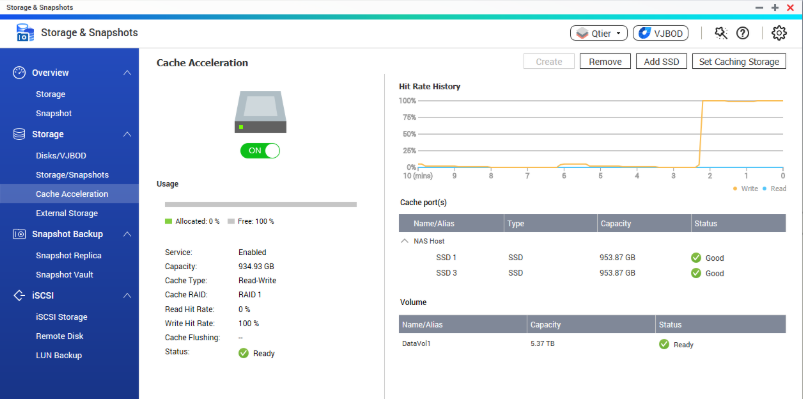
Find cache settings under Storage & Snapshots. Then click on Cache Acceleration.
It is a very simple process. Just follow the Qnap wizard and it can be set up in seconds.
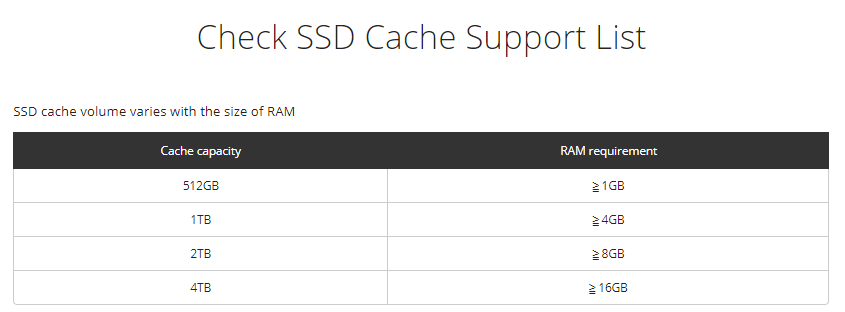
Also, keep in mind that bigger cache will also require more capacity on RAM. Here is a recommendation of the RAM size:
Further Reading at Qnap
Creating SSD Volumes
Follow the steps below to create a SSD volume:
1. Click “Create”.
2. Select the SSD drive(s) and cache algorithm to create a SSD cache volume.
3. Select the cache type: Read-Only or Read/Write.
4. Click “Create”.
5. Please note that all data on the selected hard drive(s) will be erased. Click “OK” if you are certain about this.
6. An SSD cache volume will be created.
| Where to Buy a Product | |||
 |
    
|
  
|
VISIT RETAILER ➤ |
 |
|
|
VISIT RETAILER ➤ |
We use affiliate links on the blog allowing NAScompares information and advice service to be free of charge to you. Anything you purchase on the day you click on our links will generate a small commission which is used to run the website. Here is a link for Amazon and B&H. You can also get me a ☕ Ko-fi or old school Paypal. Thanks! To find out more about how to support this advice service check HERE





Do You NEED 5GbE NAS? (Or Should You Skip Ahead to 10GbE)
UGREEN DXP4800 PRO NAS Review
Minisforum G7 Pro Review
CAN YOU TRUST UNIFI REVIEWS? Let's Discuss Reviewing UniFi...
WHERE IS SYNOLOGY DSM 8? and DO YOU CARE? (RAID Room)
UniFi Routers vs OpenWRT DIY Routers - Which Should You Choose?
Access content via Patreon or KO-FI
Discover more from NAS Compares
Subscribe to get the latest posts sent to your email.

DISCUSS with others your opinion about this subject.
ASK questions to NAS community
SHARE more details what you have found on this subject
IMPROVE this niche ecosystem, let us know what to change/fix on this site